 PH
PH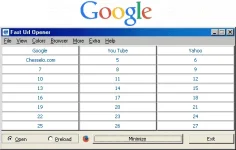
Fast Url Opener opens 75 daily websites in various browsers easy and fast. It opens websites one by one, in a click, in the default browser — changing as default Firefox, Chrome, Internet Explorer, Opera, and Safari. Fast Url Opener saves time in opening the same websites, many of them, on a daily basis. To use Fast Url Opener:
1. Connect to the Internet and start the program.
2. Preload buttons with the titles and Urls of your websites under Preload.
3. Open your websites in a click by clicking the preloaded buttons under Open.
4. Change the default browser via the Browser or context menu in the Main window.
Fast Url Opener has 75 opening buttons located in the Main window, More Buttons window, and Extra Buttons window. You can switch between two features: Open and Preload. You can open your websites in a click, change the default browser, change the looks of the application by selecting from different preset color schemes, show or hide tooltips, close all browsers in a click, activate the main commands using the context menus, and more... Fast Url Opener saves your time in opening your frequently used websites on a daily basis.
OS : Windows NT/98/Me/2000/XP/2003/Vista/Server 2008/8/7 32-bit/64-bit
Language : English
Home Page - You do not have permission to view the full content of this post. Log in or register now.