 PH
PHPHC-CoronaV19
Forum Veteran
So ito mga lods actually matagal nato, peru share ko nalang din dito para sa mga d pa nakakaalam.
ENABLE/DISABLE Developer Options
The first step toward developer options heaven is to actually enable them. To do this, go to Settings > About phone or Settings > About > Software information > More. Scroll to Build number and tap it seven times in a row.
By doing so, you will be notified that you have become a developer. You can then return to the settings menu and scroll to the bottom. You should be able to find the Developer options somewhere above About or About phone in the system settings.
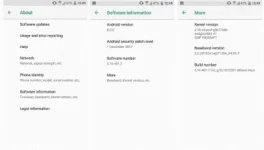
If you change your mind and want to disable the developer options, just open them in the settings and you'll see a simple on/off toggle in the upper right corner.
-Done ☺