PH
PHShare ko lang...
Spotify no ads PC* [mobile] unlimited skip
Yung sa mobile dapat rooted phone nyo
Para lang to sa malilikot yung kamay and geeks..
Follow instructions ha kung ayaw kumana basahin ulit yung instructions baka may mali kayo or na laktawan
Goodluck guys
Hello Everything! How are you to find out?! HaHaHa!
LOL
Everyone deserves this
#Esp_Hot_Tea_Pie
#NoAds #GoodAsPremiumShit
hosts add-ons: You do not have permission to view the full content of this post. Log in or register now.
Setup-Spotify: You do not have permission to view the full content of this post. Log in or register now.
DK: yTw7rAbjxREEFmTHZdufO0ZrSsAN82fDq3Ry8ZzJRjw
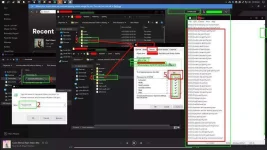
Instructions (see image below) *** :
1: install spotify-setup | after install - close application
2: open app-data [ Windows-key + r ] type/paste: %appdata%
* In my case, Explorer will be opened on >%Username%>appdata>roaming.
* Follow step 3&4 . Do same procedure.
3-4: (***) Open "Spotify" folder and create "Update" folder.
* Open app-data again by following step 2, notice your path is >%Username%>appdata>roaming .. change/move directory backwards once . Then open/goto "Local" folder and look for Spotify folder and do the same. Create "Update" folder.
5: Set and edit "Update" folder Properties/Security x Permission to "DENY" on all Users. Make sure to CHECK(deny) ->ALL
* Once done, Save and apply.
6: Copy hosts add-on from given pastebin link above.
* Open new folder[ Windows-key + e ]
* Goto: C:\Windows\System32\drivers\etc
* Edit "hosts" file on any text-editor (Run-as-Admin)
* Paste the list of host-blockers you copied earlier below [ INSIDE HOSTS FILE ].
* Make sure to SAVE it nibba xD.
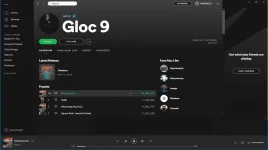
FINALE: Open Spotify -> Login -> Play any song [ Unli Skips ] NO-ADS!
Thots-it!
Bella Ciao!
#ANBU #PURE #LETSMAKEITTHISWAY
Working din yan sa CP(rooted)ONLY*
Add mo lang yung host files sa Blockers
Hi everything.
CTTO
Spotify no ads PC* [mobile] unlimited skip
Yung sa mobile dapat rooted phone nyo
Para lang to sa malilikot yung kamay and geeks..
Follow instructions ha kung ayaw kumana basahin ulit yung instructions baka may mali kayo or na laktawan
Goodluck guys
Hello Everything! How are you to find out?! HaHaHa!
LOL
Everyone deserves this
#Esp_Hot_Tea_Pie
#NoAds #GoodAsPremiumShit
hosts add-ons: You do not have permission to view the full content of this post. Log in or register now.
Setup-Spotify: You do not have permission to view the full content of this post. Log in or register now.
DK: yTw7rAbjxREEFmTHZdufO0ZrSsAN82fDq3Ry8ZzJRjw
Instructions (see image below) *** :
1: install spotify-setup | after install - close application
2: open app-data [ Windows-key + r ] type/paste: %appdata%
* In my case, Explorer will be opened on >%Username%>appdata>roaming.
* Follow step 3&4 . Do same procedure.
3-4: (***) Open "Spotify" folder and create "Update" folder.
* Open app-data again by following step 2, notice your path is >%Username%>appdata>roaming .. change/move directory backwards once . Then open/goto "Local" folder and look for Spotify folder and do the same. Create "Update" folder.
5: Set and edit "Update" folder Properties/Security x Permission to "DENY" on all Users. Make sure to CHECK(deny) ->ALL
* Once done, Save and apply.
6: Copy hosts add-on from given pastebin link above.
* Open new folder[ Windows-key + e ]
* Goto: C:\Windows\System32\drivers\etc
* Edit "hosts" file on any text-editor (Run-as-Admin)
* Paste the list of host-blockers you copied earlier below [ INSIDE HOSTS FILE ].
* Make sure to SAVE it nibba xD.
FINALE: Open Spotify -> Login -> Play any song [ Unli Skips ] NO-ADS!
Thots-it!
Bella Ciao!
#ANBU #PURE #LETSMAKEITTHISWAY
Working din yan sa CP(rooted)ONLY*
Add mo lang yung host files sa Blockers
Hi everything.
CTTO