 PH
PHBirdman Elvo Ashik
Fanatic
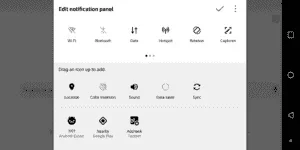
If in case you’re bored with your current status bar or plan of adding and removing certain options then you no longer need to rely on third party apps.
You just have to enable the hidden settings menu called as “System UI Tuner” which can be done by holding the settings gear present in the Notification toggle menu. On doing the same, the gear icon will start rotating followed by a toast message confirming that System UI tuner has been enabled.
Now, you will be able to see the System UI tuner menu in the settings app where you can specify what sort of icons you want to appear in the status bar like indication for orientation, networks, headphones (this ain’t enabled by default on some phones), etc. You can further tweak extra settings for Do Not Disturb mode, notifications and Always On Display (if supported).
However, this hidden setting may not be present on phones with custom UI like EMUI/MIUI and older android versions.