 PH
PHThe good old time:
When you installed a video game from a CD or a DVD, you installed some redistributable packages too: DirectX, Games For Windows Live Redist, VC Redist, Rapture3D, NVidia PhysX Redist, etc. They were installed from the CD/DVD, and those installers didn't stay on your hard drive.
Now, Steam, the problem:
The Steam application allows you to download games from the Internet and install them, but what about these redistributable packages ? You probably saw they are installed the first time you launch your game, OK, but what happens to these files when they go wasted ? The answer is very simple: Steam doesn't delete them. An example: install the first complete season of Sam & Max (6 episodes): every episode is about ~300MB. For each of them, you can count 100MB for the DirectX redistributable package. Yes, it is about a third of the game files size, and they are not removed by Steam. For 6 episodes, you could save 600MB. Imagine what you could save for 10 or 20 games.
The solution:
A little tool that is able to list every redistributable package stored on your Steam directories, and allows you to remove them. This is the goal of TikiOne-Steam-Cleaner. This is a very simple program: set the Steam SteamApps folder (this is a sub-folder of the Steam application), click "Search", you choose what file or folder you want to remove.
Instruction:
As TikiOne-Steam-Cleaner is a Java-based program, ensure you have already installed Java (version 7 or better).
You can download the latest version of Java at You do not have permission to view the full content of this post. Log in or register now.. Install Java 7 or better.
*The program is packaged in a ZIP file. Unzip it and double-click to the "tikione-steam-cleaner.bat" file. The program starts.
ScreenShots:
Screenshot 1: the main frame
1. You can auto-detect the Steam directory, or use the "..." button to locate it manually.
2. Start search.
3. The program may find many redistributable packages on your Steam sub-directories. Check the files and folders you want do delete.
4. NB: if you uncheck an item, it will be automatically unchecked the next times; so, you can easily set a list of files and folders you'll never delete.
5. Ask the program to delete selected items.

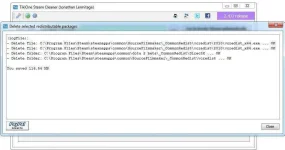
Screenshot 2: you saved space!
That's all, you can now close the program

Eto ung ss ko patunay sa working talaga sya. 116.54MB nafree up na space nya.
  sa inyo ba??
When you installed a video game from a CD or a DVD, you installed some redistributable packages too: DirectX, Games For Windows Live Redist, VC Redist, Rapture3D, NVidia PhysX Redist, etc. They were installed from the CD/DVD, and those installers didn't stay on your hard drive.
Now, Steam, the problem:
The Steam application allows you to download games from the Internet and install them, but what about these redistributable packages ? You probably saw they are installed the first time you launch your game, OK, but what happens to these files when they go wasted ? The answer is very simple: Steam doesn't delete them. An example: install the first complete season of Sam & Max (6 episodes): every episode is about ~300MB. For each of them, you can count 100MB for the DirectX redistributable package. Yes, it is about a third of the game files size, and they are not removed by Steam. For 6 episodes, you could save 600MB. Imagine what you could save for 10 or 20 games.
The solution:
A little tool that is able to list every redistributable package stored on your Steam directories, and allows you to remove them. This is the goal of TikiOne-Steam-Cleaner. This is a very simple program: set the Steam SteamApps folder (this is a sub-folder of the Steam application), click "Search", you choose what file or folder you want to remove.
Instruction:
As TikiOne-Steam-Cleaner is a Java-based program, ensure you have already installed Java (version 7 or better).
You can download the latest version of Java at You do not have permission to view the full content of this post. Log in or register now.. Install Java 7 or better.
*The program is packaged in a ZIP file. Unzip it and double-click to the "tikione-steam-cleaner.bat" file. The program starts.
ScreenShots:
Screenshot 1: the main frame
1. You can auto-detect the Steam directory, or use the "..." button to locate it manually.
2. Start search.
3. The program may find many redistributable packages on your Steam sub-directories. Check the files and folders you want do delete.
4. NB: if you uncheck an item, it will be automatically unchecked the next times; so, you can easily set a list of files and folders you'll never delete.
5. Ask the program to delete selected items.
Screenshot 2: you saved space!
That's all, you can now close the program
Eto ung ss ko patunay sa working talaga sya.
116.54MB nafree up na space nya. sa inyo ba??Enjoy Guys!
DIRECT DOWNLOAD LINK:
You do not have permission to view the full content of this post. Log in or register now.
PASSWORD:
googledotcom
Thread Added on "Gaming" Section (TikiOne Steam Cleaner) of You do not have permission to view the full content of this post. Log in or register now.
DIRECT DOWNLOAD LINK:
You do not have permission to view the full content of this post. Log in or register now.
PASSWORD:
googledotcom
Thread Added on "Gaming" Section (TikiOne Steam Cleaner) of You do not have permission to view the full content of this post. Log in or register now.