PH
PHPHC-BlackQuantum
Forum Expert
SHARE ME (Formerly Mi Drop from Xiaomi)

ShareMe The Best File Sharing App
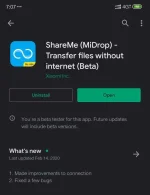
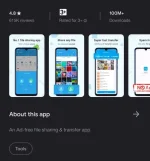
Like other Xiaomi apps, ShareMe is also available on Play Store. Which means, any Android device running Android 4.4 or above can use it, and it’s free. It has been around as one of the best MIUI features since MIUI 7 (2015) known as Mi Drop. Now, It became a stand-alone app that almost any Android user can use it. It has beautiful and clean UI, more lightweight then SHAREit (ShareMe Competitor). The faster data transfer rate and easy to connect. ShareMe – An ad-free P2P document transfer tool that functions without connecting to the web. A lot more than 200 million users are using it.
-Supports all Android devices
-Share files without cellular or internet data utilization
-Send and receive all sorts of data
-200 times faster than Bluetooth, the best speed rises to 50M/s
-Share files in 1 tap, without complicated step
-Intuitive and User-friendly UI.
User Interface
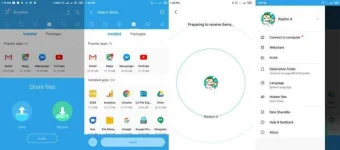
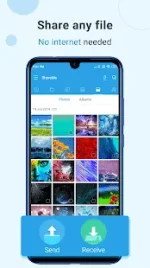
ShareMe has a nice and clean user interface. When you first open the app, you will see two buttons. First, one is Send, and the second one is Receive.
Main Features
Let’s see some of the main features of ShareMe that make it best.
1. Transfer And Share All Sorts Of Files
It is capable of transferring almost all sorts of files. You can quickly share music, videos, images, apps, and files between any Android devices anytime and anywhere. It is effortless to share your media files without any hassle.
2. Share Files Without The Internet
It doesn’t require an internet connection to share files. You can share your files with your friends without any mobile data charges.
3. Lightning Fast Speed
ShareMe is a modern file sharing tool. It transfers documents at a lightning-fast speed. It is 200 times faster than Bluetooth. You can transfer files with speed up to 50 MB/s.
4. Transfer Documents Between All Android Devices
It supports all Android devices running Android 4.4 (KitKat). If you are a Xiaomi smartphone user, then ShareMe comes preinstalled with your phone, or you can download the app from Google Play. With ShareMe, transfer documents between all Android devices become easy.
5. Intuitive And User-Friendly Interface
It has a clean, Intuitive, and user-friendly interface. It has categories (e.g., Music, Apps, and Images, etc.), which makes it easy to find and share files.
6. Resume Interrupted Transfers
Things can go wrong during file sharing. But don’t worry. ShareMe can resume interrupted transfer with a simple tap without starting it over again.
7. Ad-Free File Transfer Tool
It is entirely ad-free file transfer tool. Which makes it more clean and polished. Giving you a much better user experience.
8. Send Large Files Without Limitation
It has no file size limitation. You can share large video files, photos, music, apps, documents, and any other file types of unlimited file size. Sending large files without limitation is a significant advantage.
9. Multiple Languages Supported
If you are not native to English, don’t worry. ShareMe supports numerous languages. The following languages are supported –
Bahasa Indonesia, Bengali, Chinese, English, Español, Português, ру́сский язы́к, українська мова, Tiếng Việt.
Pros
1. Nice and Clean User Interface
2. Organized File Management for original file selection.
3. One tap file receives.
4. Free of any internet connection. So no data charges.
5. Faster data transfer rate up to 50 MB/s.
6. Share files with computers.
7. No annoying ads.
Cons
1. Sometimes it fails to start the hotspot on some devices.
2. No iPhone support so far.
Personal Verdict
In my opinion, ShareMe is the right choice. It is an excellent and clean Android application. It can transfer files faster than any other apps found on Google Play. Though it has some bugs, most of the times it feels more stable than any other apps similar to this. And most importantly, it has no annoying ads, which mean I can save up my mobile data from freaking video ads. Cool! Right? I have no reason to drop this app.
Conclusion
From my point of view, I will recommend this app with no doubt. Just give it a try. So, what you think? Will you try ShareMe? Or do you have something better than that? Let us know in the comment section below.
If I have missed something or said something wrong, then please let me know. It will help a lot of making good quality content. Thank You
Have you tried the new ShareMe? What do you think? Share your thoughts in the comment section below. We would love to hear it from you.
source: androneed.com
PLAYSTORE LINK: You do not have permission to view the full content of this post. Log in or register now.
ShareMe The Best File Sharing App
Like other Xiaomi apps, ShareMe is also available on Play Store. Which means, any Android device running Android 4.4 or above can use it, and it’s free. It has been around as one of the best MIUI features since MIUI 7 (2015) known as Mi Drop. Now, It became a stand-alone app that almost any Android user can use it. It has beautiful and clean UI, more lightweight then SHAREit (ShareMe Competitor). The faster data transfer rate and easy to connect. ShareMe – An ad-free P2P document transfer tool that functions without connecting to the web. A lot more than 200 million users are using it.
-Supports all Android devices
-Share files without cellular or internet data utilization
-Send and receive all sorts of data
-200 times faster than Bluetooth, the best speed rises to 50M/s
-Share files in 1 tap, without complicated step
-Intuitive and User-friendly UI.
User Interface
ShareMe has a nice and clean user interface. When you first open the app, you will see two buttons. First, one is Send, and the second one is Receive.
Main Features
Let’s see some of the main features of ShareMe that make it best.
1. Transfer And Share All Sorts Of Files
It is capable of transferring almost all sorts of files. You can quickly share music, videos, images, apps, and files between any Android devices anytime and anywhere. It is effortless to share your media files without any hassle.
2. Share Files Without The Internet
It doesn’t require an internet connection to share files. You can share your files with your friends without any mobile data charges.
3. Lightning Fast Speed
ShareMe is a modern file sharing tool. It transfers documents at a lightning-fast speed. It is 200 times faster than Bluetooth. You can transfer files with speed up to 50 MB/s.
4. Transfer Documents Between All Android Devices
It supports all Android devices running Android 4.4 (KitKat). If you are a Xiaomi smartphone user, then ShareMe comes preinstalled with your phone, or you can download the app from Google Play. With ShareMe, transfer documents between all Android devices become easy.
5. Intuitive And User-Friendly Interface
It has a clean, Intuitive, and user-friendly interface. It has categories (e.g., Music, Apps, and Images, etc.), which makes it easy to find and share files.
6. Resume Interrupted Transfers
Things can go wrong during file sharing. But don’t worry. ShareMe can resume interrupted transfer with a simple tap without starting it over again.
7. Ad-Free File Transfer Tool
It is entirely ad-free file transfer tool. Which makes it more clean and polished. Giving you a much better user experience.
8. Send Large Files Without Limitation
It has no file size limitation. You can share large video files, photos, music, apps, documents, and any other file types of unlimited file size. Sending large files without limitation is a significant advantage.
9. Multiple Languages Supported
If you are not native to English, don’t worry. ShareMe supports numerous languages. The following languages are supported –
Bahasa Indonesia, Bengali, Chinese, English, Español, Português, ру́сский язы́к, українська мова, Tiếng Việt.
Pros
1. Nice and Clean User Interface
2. Organized File Management for original file selection.
3. One tap file receives.
4. Free of any internet connection. So no data charges.
5. Faster data transfer rate up to 50 MB/s.
6. Share files with computers.
7. No annoying ads.
Cons
1. Sometimes it fails to start the hotspot on some devices.
2. No iPhone support so far.
Personal Verdict
In my opinion, ShareMe is the right choice. It is an excellent and clean Android application. It can transfer files faster than any other apps found on Google Play. Though it has some bugs, most of the times it feels more stable than any other apps similar to this. And most importantly, it has no annoying ads, which mean I can save up my mobile data from freaking video ads. Cool! Right? I have no reason to drop this app.
Conclusion
From my point of view, I will recommend this app with no doubt. Just give it a try. So, what you think? Will you try ShareMe? Or do you have something better than that? Let us know in the comment section below.
If I have missed something or said something wrong, then please let me know. It will help a lot of making good quality content. Thank You
Have you tried the new ShareMe? What do you think? Share your thoughts in the comment section below. We would love to hear it from you.
source: androneed.com
PLAYSTORE LINK: You do not have permission to view the full content of this post. Log in or register now.