 PH
PH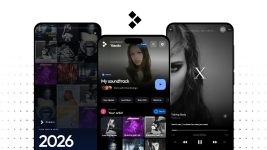
Derbis — Android Music Player
Lightweight, Ad-Free Music Streaming & Local Audio Player
Developed by Yasuda (jusnie) — Independent Filipino Developer | 100% Free & Open Source
You do not have permission to view the full content of this post. Log in or register now. • You do not have permission to view the full content of this post. Log in or register now. • You do not have permission to view the full content of this post. Log in or register now.
Hi PHCorner,
I'm an independent Filipino Android developer, and I built an open-source music streaming app called Derbis.
The goal behind the project was straightforward: create a clean, lightweight player that streams music from YouTube's catalog without commercial interruptions, audio ads, or paywalled background playback, while also functioning as a capable offline player for files stored directly on your phone.
The interface is built with Jetpack Compose using a pure black (#000000) AMOLED palette to cut battery draw on OLED screens, taking design cues from both YouTube Music and Apple Music without the heavy background services or tracking analytics.
Technical Specifications
| App Name | Derbis |
| Version | v1.1.1 (Build 3000204) |
| Package Name | com.derbis.app |
| Target Android Version | Android 8.0 (Oreo) up to Android 15 / 16 (API 26+) |
| Architecture | Universal (arm64-v8a, armeabi-v7a, x86_64) |
| APK File Size | ~71 MB (Universal build with native audio runtimes) |
| License | GPL-3.0 (Full source code available on GitHub) |
Key Features
- Ad-Free Playback — Streams music tracks without audio ads, video interruptions, or promotional overlays. Unlimited track skipping is supported out of the box.
- Background & Screen-Off Play — Continues playing when switching apps or locking your device. Full MediaSession integration handles lock screen controls, notification widgets, and Bluetooth headset events.
- YouTube Music 4-Track Column Carousel — Modeled directly after YouTube Music's Quick Picks shelves. Displays 4 tracks per column with horizontal snap scrolling, animated active equalizer bars, and a one-tap "Play all" option.
- 16 Curated Explore Genres — Instant category browsing for Pop, Rock, Jam & Live, Hip-Hop, R&B, OPM (BINI, Maki, SB19), Indie, Electronic, Chill, K-Pop, Country, Metal, Jazz, Acoustic, Party, and Workout with real artist artwork and quick-start playback.
- Time-Synchronized Lyrics — Parses line-by-line synchronized lyrics that scroll in real time with the vocal track.
- Local Audio Player — Plays offline audio files stored on device storage (FLAC, MP3, AAC, M4A, OPUS, WAV) with gapless playback support.
- Pure AMOLED (#000000) Theme — True pitch-black UI designed to minimize OLED power consumption during long listening sessions.
- Privacy-Focused — No accounts required, no Google login dependencies for standard playback, and zero third-party telemetry or ad SDKs.
In-App Screenshots
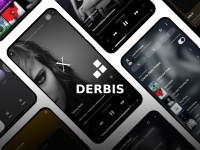
Overview: Home shelves, player dock, and genre browsing
Home Carousel & Explore Categories
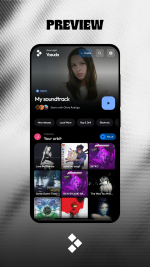
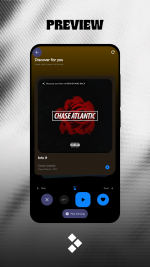
Left: Quick Picks 4-track column shelf with live visualizers. Right: Explore categories with artist avatar stacks and filter chips.
Player Interface & Synced Lyrics
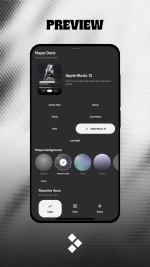
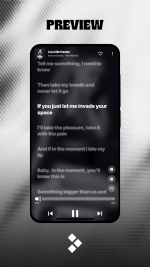
Left: Minimalist player deck with reactive aura lighting. Right: Real-time autoscrolling synced lyrics view.
Downloads
- Direct v1.1.1 APK Download:
You do not have permission to view the full content of this post. Log in or register now.
Direct download from GitHub Releases. No ad links or redirects.
- Direct Latest APK Link (Always points to latest):
You do not have permission to view the full content of this post. Log in or register now.
- GitHub Releases Archive:
You do not have permission to view the full content of this post. Log in or register now.
- Source Code Repository:
You do not have permission to view the full content of this post. Log in or register now.
Installation Steps
- Download Derbis.apk using the direct download link above.
- Open the APK file once downloaded. If prompted, allow installations from your browser or file manager under Settings > Install unknown apps.
- Select Install.
- Open Derbis to start playing.
Feedback and Bug Reports:
As an independent dev, testing across different Android skins (MIUI, One UI, ColorOS, stock AOSP) is always a work in progress. If you run into playback drops, audio service kills on aggressive battery managers, or UI bugs on your device, drop a comment with your phone model and Android version, or open an issue on GitHub.
If the app works well for you, a like on this thread and a star on the repo are always appreciated.