You need a PC to connect your mobile through USB (ADB driver installed). Then refer to the following steps:
MOBILE SIDE:
Step 1: Access the Developer authority
To access the files that Android uses to run passwords, you must first become a developer. This is very simple.
Get your Android phone and go to settings. Scroll down and find "About phone." Tap on it and scroll down again to find Build number.
Tap on this "build number" 5 to 6 times until a message pops up saying, "You are now a developer".
Step 2: Enable the debugging
Go back to Settings. Scroll down for developer options. Turn on the button for "Android/USB debugging".
PC SIDE:
Step 3: Install ADB drivers (google for ADB download links)
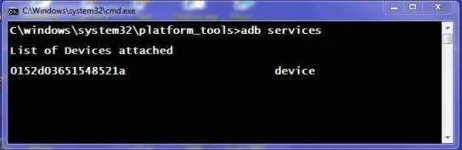
Step 4: Test the ADB
To do this, connect your phone to the PC using a USB. In the command prompt, type
adb services and then press enter. If it's working properly, you should see a device in this list.
Step 5: Find Android wifi password
Now, it is time to type the given command in the command prompt and type:
adb pull /data/misc/wifi/wpa_supplicant.conf c:/wpa_supplicant.conf. This will fetch the file from your phone to the local disc C drive of the PC.
Step 6: Get the wifi passwords
Lastly, open the file with a notepad and there you go.
All credit to JD...
 PH
PH