 PH
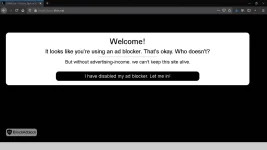
PHGanito palagi ang makikita mo kapag naka enable yung adblocker mo sa PC:
This is what you'll always see when you enable your adblocker in your PC:
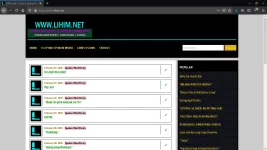
Ganito kapag merong Anti-Adblock Killer:
This is what happens when you have Anti-Adblock Killer:
So, paano ito gawin? Simple lang. Install ka lang ng uBlock Origin. Yes, uBlock Origin. Remove mo lahat ng previous adblockers mo!
So, how to do it? It's simple. Simply install uBlock Origin. Yes, uBlock Origin. You must remove all previous adblockers you have!
uBlock Origin for Mozilla Firefox: You do not have permission to view the full content of this post. Log in or register now.
uBlock Origin for Google Chrome: You do not have permission to view the full content of this post. Log in or register now.
Wait! Hindi pa tapos yung steps! Kailangan mo pang mag install ng anti-adblock killer! To do this, follow my steps:
1. Go to You do not have permission to view the full content of this post. Log in or register now.
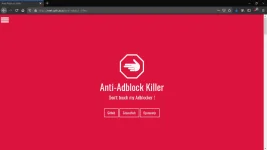
2. Scroll down to Filter List.
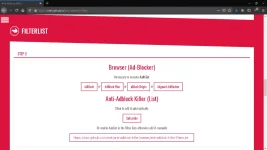
3. Click Subscribe!
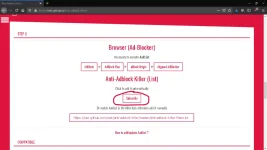
4. YOU ARE DONE!
Final steps to verify you succesfully subscribed to Anti-Adblock Killer
1. Click this icon of uBlock Origin
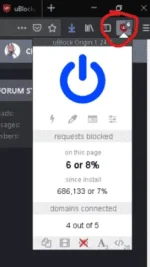
2. Then click the settings icon
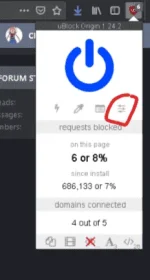
3. Click Filter lists
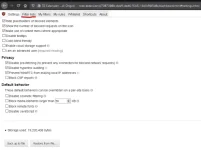
4. Scroll down until you see AakList (Anti Adblock Killer)
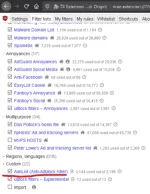
5. You are done! Now, test it on the website with ANTI ADBLOCK ENABLED
P.S.
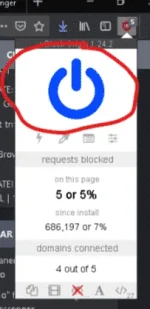
PLEASE SUPPORT PHCORNER BY WHITELISTING IT ON YOUR ADBLOCKER: https://phcorner.org/help/whitelist/
To do this: simply click this button:
This is what you'll always see when you enable your adblocker in your PC:
Ganito kapag merong Anti-Adblock Killer:
This is what happens when you have Anti-Adblock Killer:
So, paano ito gawin? Simple lang. Install ka lang ng uBlock Origin. Yes, uBlock Origin. Remove mo lahat ng previous adblockers mo!
So, how to do it? It's simple. Simply install uBlock Origin. Yes, uBlock Origin. You must remove all previous adblockers you have!
uBlock Origin for Mozilla Firefox: You do not have permission to view the full content of this post. Log in or register now.
uBlock Origin for Google Chrome: You do not have permission to view the full content of this post. Log in or register now.
Wait! Hindi pa tapos yung steps! Kailangan mo pang mag install ng anti-adblock killer! To do this, follow my steps:
1. Go to You do not have permission to view the full content of this post. Log in or register now.
2. Scroll down to Filter List.
3. Click Subscribe!
4. YOU ARE DONE!
Final steps to verify you succesfully subscribed to Anti-Adblock Killer
1. Click this icon of uBlock Origin
2. Then click the settings icon
3. Click Filter lists
4. Scroll down until you see AakList (Anti Adblock Killer)
5. You are done! Now, test it on the website with ANTI ADBLOCK ENABLED
P.S.
PLEASE SUPPORT PHCORNER BY WHITELISTING IT ON YOUR ADBLOCKER: https://phcorner.org/help/whitelist/
To do this: simply click this button:
