🔒 Closed Help! How to unlock SM-A705MN locked in Smart?

Status
Not open for further replies.

Hgxy

Leecher
Good day.

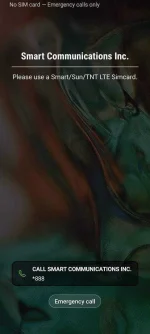
I have a Samsung A70. Globe ang primary sim ko. Before mag sign-in sa Play Store, nagagamit ko pa ung data ng globe. After ko mag sign-in, eto ung lumalabas sa screeneen:
1766319_Screenshot_20200116-221821_One_UI_Home.jpg


Di ko ma gamit ung phone unless Smart ung sim na nakalagay. Kapag nakalagay parehas ang Globe at Smart sim ko, Smart data lang nagagamit ko. Ung Globe na data, di pwede magamit.

Nagtry na ako ng SAMTool pero ga yan parin lumalabas kapag walang sim or Globe lang nakalagay. SamKey naman ginamit ng phone technician sa mall pero nag fail lang.

Baka po meron dito nakaka alam ng pwedeng gawin paraw mawala yan at magamit ko na Globe sim ko. Salamat po sa tutulong.
 

Attachments

  • Screenshot_20200116-221821_One UI Home.webp
    Screenshot_20200116-221821_One UI Home.webp
    68.5 KB · Views: 22
I-format mo muna then i-unlock.

Hindi kasi madedebug iyan kung ganyan ng nasa screen, so kailangan mo muna ifactory reset, and i-unlock.

PM Mo ako sa FB : /aramiljesus2461 nagreremote service ako ng Samsung.
 
Sir na format ko na po ung phone ilang beses na. nagdown grade ako ng firmware na u3 before. tapos kanina inupdate ko sa latest u3 version. Nag factory reset at wipe cache partition din ako sa recovery mode bago ako nag try ulit sa SAMTool, kaso ganyan parin lumalabas sa screen ko kapag nag sign-in ako sa Play Store na Globe sim gamit ko.
 
Sir na format ko na po ung phone ilang beses na. nagdown grade ako ng firmware na u3 before. tapos kanina inupdate ko sa latest u3 version. Nag factory reset at wipe cache partition din ako sa recovery mode bago ako nag try ulit sa SAMTool, kaso ganyan parin lumalabas sa screen ko kapag nag sign-in ako sa Play Store na Globe sim gamit ko.
I see, nagtry ka ba magchange ng Combination Firmware? Gawin mo ng unlock, Then upgrade to XTC or Debrand sa Ibang region. Wag lang GLB or SMR.
 
I see, nagtry ka ba magchange ng Combination Firmware? Gawin mo ng unlock, Then upgrade to XTC or Debrand sa Ibang region. Wag lang GLB or SMR.
Official firmware lang po nagamit ko sa Odin. Ung combination firmware, di ko ma install. Di ko pa po natry sa ibang region. Actually, XTC na po ung phone kaso lumalabas parin ung 'Smart Communications Inc.' sa screen everytime na tanggalin ko ung sim or Globe lang gamitin ko.
 
Official firmware lang po nagamit ko sa Odin. Ung combination firmware, di ko ma install. Di ko pa po natry sa ibang region. Actually, XTC na po ung phone kaso lumalabas parin ung 'Smart Communications Inc.' sa screen everytime na tanggalin ko ung sim or Globe lang gamitin ko.
Hmm, seems strange. Kasi i never encountered na maghard-locked ng Smart for the first time. Brb.
 
Try mo muna i-lagay ng Smart Sim mo, and enable mo yung OEM Unlock sa Developer Settings. After nun, maghanap ka ng 4 or 5 file part firmware na meron HOME_CSC & CSC.
 
Try mo muna i-lagay ng Smart Sim mo, and enable mo yung OEM Unlock sa Developer Settings. After nun, maghanap ka ng 4 or 5 file part firmware na meron HOME_CSC & CSC.
Un lang problema sir. Naka hide ung OEM Unlock ko. Di ko alam pano palabasin eh. Pag pumupunta ako sa download mode, nakalagay sa screen 'OEM LOCK : ON (L)'
 
Un lang problema sir. Naka hide ung OEM Unlock ko. Di ko alam pano palabasin eh. Pag pumupunta ako sa download mode, nakalagay sa screen 'OEM LOCK : ON (L)'
Oh okay, try mo lang ng nakita ko sa XDA baka makatulong.

  • - Disabled USB debugging, OEM unlocking and then disabled Developer Options.
  • - Disabled Wi-Fi.
  • - Flashed the latest version of stock firmware.
  • - Powered down the phone and removed the SIM tray.
  • - Disconnected the charger/PC cable.
  • - Rebooted to stock android recovery, factory reset/wipe cache.
  • - Started phone again, skipped most steps, including Wi-Fi setup (still no sim card installed).
  • - Enabled developer options, confirmed, NO OEM Unlocking available.
  • - Connected to Wi-Fi.
  • - Went to Developer options, OEM Unlocking now available.
or dito din.

You do not have permission to view the full content of this post. Log in or register now.
 
Try mo muna i-lagay ng Smart Sim mo, and enable mo yung OEM Unlock sa Developer Settings. After nun, maghanap ka ng 4 or 5 file part firmware na meron HOME_CSC & CSC.
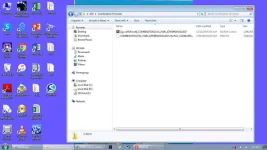
Eto sir ung combination firmware na di ko mainstall:
Picture1.webp


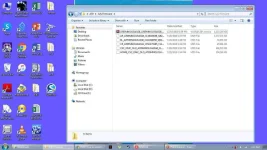
Eto naman po ung firmware na i-ni-nstall ko para ma downgrade:
Picture3.webp


pero nung nag downgrade ako, di po unlocked ung OEM kasi naka-hide.

tapos kanina, nag update lang ako ng sa software update ng android para sa latest U3 firmware before ako nag reformat sa recovery mode and nag try ulit sa SAMTool. pero ganun parin po ung nangyayari.

ung sa Combination Firmware po pala, naghahanap ng pit file. nag try ako mag search sa google, kaso wala ako nakita. nag try ako gumawa ng pit file gamit 7z kaso di gumana.
 
Oh okay, try mo lang ng nakita ko sa XDA baka makatulong.

  • - Disabled USB debugging, OEM unlocking and then disabled Developer Options.
  • - Disabled Wi-Fi.
  • - Flashed the latest version of stock firmware.
  • - Powered down the phone and removed the SIM tray.
  • - Disconnected the charger/PC cable.
  • - Rebooted to stock android recovery, factory reset/wipe cache.
  • - Started phone again, skipped most steps, including Wi-Fi setup (still no sim card installed).
  • - Enabled developer options, confirmed, NO OEM Unlocking available.
  • - Connected to Wi-Fi.
  • - Went to Developer options, OEM Unlocking now available.
or dito din.

You do not have permission to view the full content of this post. Log in or register now.
Sige sir, try ko. Mabagal lang tong laptop so medyo matagal to. hehe. salamat. brb.

Ung sa change date and time, na try ko na dati. di gumana.
 
Oh okay, try mo lang ng nakita ko sa XDA baka makatulong.

  • - Disabled USB debugging, OEM unlocking and then disabled Developer Options.
  • - Disabled Wi-Fi.
  • - Flashed the latest version of stock firmware.
  • - Powered down the phone and removed the SIM tray.
  • - Disconnected the charger/PC cable.
  • - Rebooted to stock android recovery, factory reset/wipe cache.
  • - Started phone again, skipped most steps, including Wi-Fi setup (still no sim card installed).
  • - Enabled developer options, confirmed, NO OEM Unlocking available.
  • - Connected to Wi-Fi.
  • - Went to Developer options, OEM Unlocking now available.
or dito din.

You do not have permission to view the full content of this post. Log in or register now.
Sir, nagawa ko na step-by-step kaso wala parin ung OEM Unlock. Tapos after a few seconds mag connect sa wifi na wala ung sim tray, lumabas agad ung 'Smart Communications Inc.'
 
Sir, nagawa ko na step-by-step kaso wala parin ung OEM Unlock. Tapos after a few seconds mag connect sa wifi na wala ung sim tray, lumabas agad ung 'Smart Communications Inc.'
Try mo magchange ng csc using *227*#IMEIMO#, baka hindi pa rin nagchange sa XTC at SMA pa rin siya nakainstalled.
 
Try mo magchange ng csc using *227*#IMEIMO#, baka hindi pa rin nagchange sa XTC at SMA pa rin siya nakainstalled.
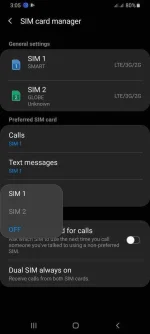
XTC na sya. Kahit dati pa nung nag downgrade ako. Xtc din kasi ung firmware na kinuha ko. Kaso ganun parin ung nangyayari. Lumalabas parin ung 'Smart Communicstions Inc.' Kapag wlang sim or Globe sim lang nakalagay. Pag Smart sim, nagagamit ko. Pag Smart and Globe magkasabay na nakalagay, nagagamit ko ung phone pero di ko ma on ung data ng Globe. Data lang ng smart pwede.
Screenshot_20200118-030622_SIM card manager.webp

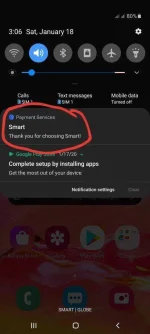
Tsaka lagi tong lumalabas kapag magkasabay ung Smart and Globe na nakalagay.
20200118_030751.webp
 
Hindi pwede maopenline ng Smart Locked na unit dahil may Samsung Knox nakaenroll sa unit. Fun fact factory unlocked ng unit pero inilock lang sa smart by using mdm.
 
Status
Not open for further replies.

About this Thread

  • 20
    Replies
  • 3K
    Views
  • 4
    Participants
Last reply from:
Shinsuke Nishizono

Trending Topics

Online now

Members online
1,022
Guests online
724
Total visitors
1,746

Forum statistics

Threads
2,276,972
Posts
28,973,435
Members
1,229,673
Latest member
saikonkhan134153
Back
Top