 PH
PHSUPPORTED in B310AS-938 (optional) and B315s-936
1. Make sure connected ang modem nyo via WIFI or via LAN cable.
2. I-open ang putty.exe.
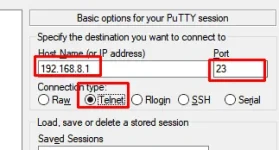
Host Name (or IP address): 192.168.8.1
Port: 23
Connection type: Telnet
Then click Open. (see pics)
3. Kapag may lumabas na root@711:/ #, itype lang ito sa putty
(see pics)
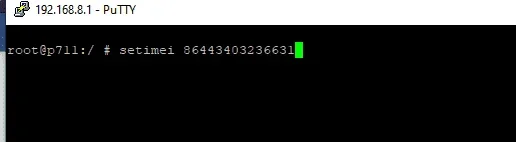
then press enter
**
Kung gusto nyo ng ibang imei, open nyo lang to
You do not have permission to view the full content of this post. Log in or register now. [credits to JeromeLaliag]
4. Kapag may lumabas na
Success na yun.. yun lang
1. Make sure connected ang modem nyo via WIFI or via LAN cable.
2. I-open ang putty.exe.
Host Name (or IP address): 192.168.8.1
Port: 23
Connection type: Telnet
Then click Open. (see pics)
3. Kapag may lumabas na root@711:/ #, itype lang ito sa putty
(see pics)
Code:
setimei 864434032366318**
Kung gusto nyo ng ibang imei, open nyo lang to
You do not have permission to view the full content of this post. Log in or register now. [credits to JeromeLaliag]
4. Kapag may lumabas na
Code:
Changing IMEI to 864434032366318
Success!
Rebooting...
Success na yun.. yun lang
