PH
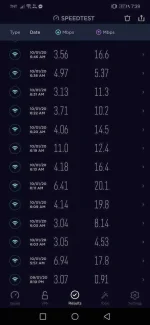
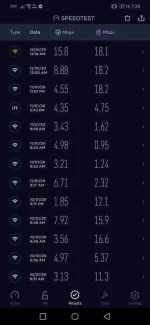
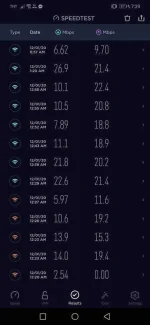
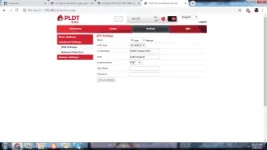
PHApn tried on PLDT Home Prepaid Wifi (See attached Files)
Note! : These are based on my experience. It is not applicable to all said modem. Results can vary depending on your area/location.
1. pldthomewifi (Default apn)
- The default apn for the modem is good. I run multiple of speedtest and they meet at Download speed of 5-15mbps, and Download speed of 10-28mbps. However the connection is unstable specially when the traffic is getting bigger. The best time to use this apn is during midnight and early morning. Download and Upload speed decreases during mid day.
2. SmartLTE
- This apn is commonly used in smartphones, I tried it in the modem and it shows an interesting result. Download Speed 5-10mbps, Upload Speed 5-10mbps. This apn is unstable but it is better than the default apn but one thing i noticed that it is limited for up to 10mbps during my tests. Please read Note above)
3. smartbro
- This apn is used in pocket wifi's as their default apn. Tested it on speedtest and they are almost the same with SmartLTE apn.
4. pldthomelte & pldthome1& ultera
-These apn might be existing but i only tried these to see if it works. From the default apn (pldthomewifi) i changed the latter with anything. The results are good Download Speed 4-15mbps, Upload Speed 8-18mbps. I tried watching videos on YouTube and connection is stable at 144p to 480p, but when I tried 720p and 1080p videos it loads but it has difficulty loading continously.
5. pldthomedsl
-I'm not sure of this is the default apn for Home Dsl bjt I've tried it and it show very good result, might be the best. Download speed is 3-9mbps, Upload Speed is 8-20mbps. It is stable and although it only gets 4 mbps most of the time in the speedtest watching videos in youtube at 1080p is flawlessly continous. I havent tried on downloading large files but it shows a very good results.
6. pldthomefibr
-Because pldthomedsl was able to connect i thought that dsl might too, so yes, it connected but I haven't done any test for this apn. Maybe someone might want to try it and share his/her result.
Thays all, mates. Again these apn's are according to my experience it might vary from different area/location. It would be nice if you try it also and share your results.
Feedbacks are greatly appreciated!
Note! : These are based on my experience. It is not applicable to all said modem. Results can vary depending on your area/location.
1. pldthomewifi (Default apn)
- The default apn for the modem is good. I run multiple of speedtest and they meet at Download speed of 5-15mbps, and Download speed of 10-28mbps. However the connection is unstable specially when the traffic is getting bigger. The best time to use this apn is during midnight and early morning. Download and Upload speed decreases during mid day.
2. SmartLTE
- This apn is commonly used in smartphones, I tried it in the modem and it shows an interesting result. Download Speed 5-10mbps, Upload Speed 5-10mbps. This apn is unstable but it is better than the default apn but one thing i noticed that it is limited for up to 10mbps during my tests. Please read Note above)
3. smartbro
- This apn is used in pocket wifi's as their default apn. Tested it on speedtest and they are almost the same with SmartLTE apn.
4. pldthomelte & pldthome1& ultera
-These apn might be existing but i only tried these to see if it works. From the default apn (pldthomewifi) i changed the latter with anything. The results are good Download Speed 4-15mbps, Upload Speed 8-18mbps. I tried watching videos on YouTube and connection is stable at 144p to 480p, but when I tried 720p and 1080p videos it loads but it has difficulty loading continously.
5. pldthomedsl
-I'm not sure of this is the default apn for Home Dsl bjt I've tried it and it show very good result, might be the best. Download speed is 3-9mbps, Upload Speed is 8-20mbps. It is stable and although it only gets 4 mbps most of the time in the speedtest watching videos in youtube at 1080p is flawlessly continous. I havent tried on downloading large files but it shows a very good results.
6. pldthomefibr
-Because pldthomedsl was able to connect i thought that dsl might too, so yes, it connected but I haven't done any test for this apn. Maybe someone might want to try it and share his/her result.
Thays all, mates. Again these apn's are according to my experience it might vary from different area/location. It would be nice if you try it also and share your results.
Feedbacks are greatly appreciated!