 PH
PHHow to force your monitor to run kali linux.
Stucked in Black screen .
Kung nag install ka ng kali pero out of range resolution dahil unsupported ng monitor..
Solusyon.
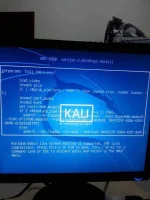
During GRUB BOOT (bootloader)press 'E' key to enter grub parameter.. sa bandang ibaba hanapin ang "quiet" at palitan mo lang ng "nomodeset quiet splash" then control x to exit
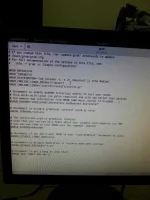
tas pag nakapag boot na pumunta naman sa /etc/default/grub at i edit ang file ,, palitan ang quiet ng nomodeset quiet splash with double quotation yan.. click save after open ka ng terminal at i type ang update-grub
ang tricks ay para sa permanenteng resolution support kahit pa hindi available sa monitor mo ang 1600 pixels resolution..
Stucked in Black screen .
Kung nag install ka ng kali pero out of range resolution dahil unsupported ng monitor..
Solusyon.
During GRUB BOOT (bootloader)press 'E' key to enter grub parameter.. sa bandang ibaba hanapin ang "quiet" at palitan mo lang ng "nomodeset quiet splash" then control x to exit
tas pag nakapag boot na pumunta naman sa /etc/default/grub at i edit ang file ,, palitan ang quiet ng nomodeset quiet splash with double quotation yan.. click save after open ka ng terminal at i type ang update-grub
ang tricks ay para sa permanenteng resolution support kahit pa hindi available sa monitor mo ang 1600 pixels resolution..