 PH
PHWindows 7 Logon screen editor [Freeware]

Description
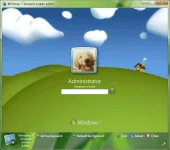
Account screen editor provides an easy way to customize the logon background for Windows 7.
Account screen editor provides an easy way to customize the logon background for Windows 7.
Instructions
Click on "set background" and choose a picture for your logon screen. Or drag & drop an image inside the program
Click on: "Default background" to change the logon screen background to the default background.
If a picture is to large, ASE will automatically make the picture smaller.
Click on + for shadow types.
This is the simplest logon screen editor that I've used.
Credits all go to the creator.
Creator: bcubing form deviantart.com
If a picture is to large, ASE will automatically make the picture smaller.
Click on + for shadow types.
This is the simplest logon screen editor that I've used.
Credits all go to the creator.
Creator: bcubing form deviantart.com
Homepage:
You do not have permission to view the full content of this post. Log in or register now.
You do not have permission to view the full content of this post. Log in or register now.
You do not have permission to view the full content of this post. Log in or register now.
You do not have permission to view the full content of this post. Log in or register now.

