 PH
PH-
Welcome to PHCorner Forums! Sign up for free to unlock full access and exclusive privileges, including:
- Asking questions about computer and mobile issues
- Discovering internet tips for your mobile network and computer
You are using an out of date browser. It may not display this or other websites correctly.
You should upgrade or use an alternative browser.
You should upgrade or use an alternative browser.
❓ Help PLDT HOME FIBR
- Thread starter Japsz
- Start date
- Status
- Not open for further replies.
may mga website po akong di ma access pero na aacess ko naman with mobile data? is there any way to fix it? yung pong ma aaccess ko po lahat ng site para po kasing may naka blocked eChange pass mo na tas tandaan mo mga password nyan
Use vpn or change your DNSmay mga website po akong di ma access pero na aacess ko naman with mobile data? is there any to fix it? yung pong ma aaccess ko po lahat ng site para po kasing may naka blocked e
- Navigate to Settings -> Wi-Fi.
- Press and hold on the Wi-Fi network you want to change.
- Choose Modify network. ...
- Scroll down and click on Advanced options. ...
- Scroll down and click on DHCP. ...
- Click on Static. ...
- Scroll down and change the DNS server IP for primary DNS to 8.8.8.8 and secondary DNS to 8.8.4.4
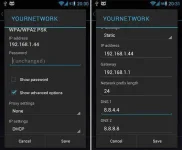
wala naman pong magagalaw sa internet ko nyan ? walang pong mababago sa speed ng net ko?Use vpn or change your DNS
View attachment 742963
- Navigate to Settings -> Wi-Fi.
- Press and hold on the Wi-Fi network you want to change.
- Choose Modify network. ...
- Scroll down and click on Advanced options. ...
- Scroll down and click on DHCP. ...
- Click on Static. ...
- Scroll down and change the DNS server IP for primary DNS to 8.8.8.8 and secondary DNS to 8.8.4.4
SUPER DUPER THANK U PO TALAGA NAPAKALAKING TULONGUse vpn or change your DNS
View attachment 742963
- Navigate to Settings -> Wi-Fi.
- Press and hold on the Wi-Fi network you want to change.
- Choose Modify network. ...
- Scroll down and click on Advanced options. ...
- Scroll down and click on DHCP. ...
- Click on Static. ...
- Scroll down and change the DNS server IP for primary DNS to 8.8.8.8 and secondary DNS to 8.8.4.4
 sana ol gaya mo nag shashare ng knowledge
DNS lang po iyan. same ip same speedwala naman pong magagalaw sa internet ko nyan ? walang pong mababago sa speed ng net ko?
 and if you feel na mahina ang speed then remove mo lang si dns at gumamit ka ng vpn madami sa playstore nyan
Explore ka lang at madami ka talagang matutonanSUPER DUPER THANK U PO TALAGA NAPAKALAKING TULONG ❣ sana ol gaya mo nag shashare ng knowledge
Thank u very much poExplore ka lang at madami ka talagang matutonan

Midnight Owl
Eternal Poster
dapat eh manual mong i type yang https//:chalaladiko po ma access yang 192.168.1.1 nayan, pano po yon?
- Status
- Not open for further replies.
Similar threads
-
❓ Help Pldt home fibr disconnected may pang bypass ba kayo?
- Started by boytorpe
- Replies: 1
-
-
-
PLDT HOME SIM TO GLOBE AT HOME ZLT s10g 2.00
- Started by Icebrisket02
- Replies: 0
-
About this Thread
-
32Replies
-
3KViews
-
12Participants
Last reply from:
tonton05
tonton05
New Topics
-
CASHG pa help po
- Started by Secret Weapon
- Replies: 0
- ❓ Internet Questions
-
PISOFI DROP SPEED
- Started by Exclamatory
- Replies: 0
- ❓ Internet Questions
-
Surf 2 Sawa walang internet kahit may load pa
- Started by Rovac
- Replies: 0
- ❓ Internet Questions
-
Error code 83 on disney plus
- Started by Casio991es11
- Replies: 1
- ❓ Internet Questions
-
Pldt home fibr disconnected may pang bypass ba kayo?
- Started by boytorpe
- Replies: 1
- ❓ Internet Questions
-
Any tips or way po para mapalakas signal ng sim ko?
- Started by Meowshi
- Replies: 0
- ❓ Internet Questions
-
Sts noload/ iwanttfc
- Started by nikola budoy
- Replies: 0
- ❓ Internet Questions
-
Pa help po, internet access is blocked
- Started by sl4yer1000
- Replies: 0
- ❓ Internet Questions
-
LF Netflix own email
- Started by Jrjn
- Replies: 0
- ❓ Internet Questions
Trending Topics
Online now
- Members online
- 343
- Guests online
- 8,040
- Total visitors
- 8,383