 PH
PH-
Welcome to PHCorner Forums! Sign up for free to unlock full access and exclusive privileges, including:
- Asking questions about computer and mobile issues
- Discovering internet tips for your mobile network and computer
You are using an out of date browser. It may not display this or other websites correctly.
You should upgrade or use an alternative browser.
You should upgrade or use an alternative browser.
🔒 Closed Amazon cloud
- Thread starter iDerf
- Start date
- Status
- Not open for further replies.
Black Penguin
Forum Veteran
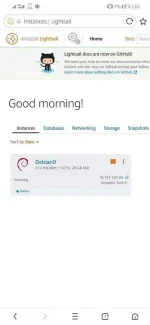
may key diyan yun ang gagamitin mo
tama si sir TU - Quiboloy meron PEM key yan. yun ang gagamitin momay key diyan yun ang gagamitin mo
Oo pre pero iisa lang namanWow nice xFocus bro nakagawa karin ng account sa aws.
San makikita yung pem key?tama si sir TU - Quiboloy meron PEM key yan. yun ang gagamitin mo
Boss B A R T SOo pre pero iisa lang naman
click nya lang yung manage. sa connect tab sa pinakababa andun yung link iclick nya yun. mapupunta sya sa ssh key
 down nya lang
Wala namang icliclick sa baba sirclick nya lang yung manage. sa connect tab sa pinakababa andun yung link iclick nya yun. mapupunta sya sa ssh key
Attachments
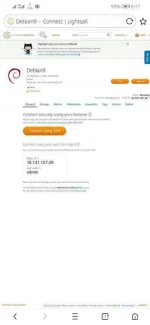
click mo yung account pageWala namang icliclick sa baba sir
link sabi ko eh
ito ba yung boss?click nya lang yung manage. sa connect tab sa pinakababa andun yung link iclick nya yun. mapupunta sya sa ssh key
Attachments
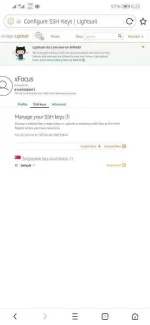
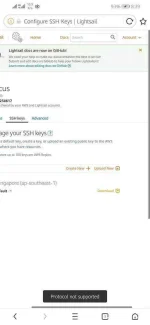
Not supported namanYan downliad mo
Attachments
PHC-Victory
Scammer Email: docilidad_d@yahoo.com
download mo yung default pem key tapos open puttygen>load>pem key>open>save private key>pem key change it to ppk then open putty kung ubuntu O.S mo ubuntu@18.254.xxx.xxx > ssh > auth > browse pkk key then click open after that do the root login.....ito ba yung boss?
sudo su
echo -e "phcbugmenot\nphcbugmenot\n" | passwd root
sed -i "s/PermitRootLogin without-password/PermitRootLogin yes/g" /etc/ssh/sshd_config
sed -i "s/PasswordAuthentication no/PasswordAuthentication yes/g" /etc/ssh/sshd_config
sudo service sshd restart
its Done..
Note : palitan mo ng gusto mong root password yung "phcbugmenot"
Juice ssh po gamit ko pwede ba yun?download mo yung default pem key tapos open puttygen>load>pem key>open>save private key>pem key change it to ppk then open putty kung ubuntu O.S mo ubuntu@18.254.xxx.xxx > ssh > auth > browse pkk key then click open after that do the root login.....
sudo su
echo -e "phcbugmenot\nphcbugmenot\n" | passwd root
sed -i "s/PermitRootLogin without-password/PermitRootLogin yes/g" /etc/ssh/sshd_config
sed -i "s/PasswordAuthentication no/PasswordAuthentication yes/g" /etc/ssh/sshd_config
sudo service sshd restart
its Done..
Note : palitan mo ng gusto mong root password yung "phcbugmenot"
PHC-Victory
Scammer Email: docilidad_d@yahoo.com
pwede yan sundin mo lang procedure koJuice ssh po gamit ko pwede ba yun?
Sige salamatpwede yan sundin mo lang procedure ko
Pano palitan ng ppk yung pemkey sir? Sa extension?download mo yung default pem key tapos open puttygen>load>pem key>open>save private key>pem key change it to ppk then open putty kung ubuntu O.S mo ubuntu@18.254.xxx.xxx > ssh > auth > browse pkk key then click open after that do the root login.....
sudo su
echo -e "phcbugmenot\nphcbugmenot\n" | passwd root
sed -i "s/PermitRootLogin without-password/PermitRootLogin yes/g" /etc/ssh/sshd_config
sed -i "s/PasswordAuthentication no/PasswordAuthentication yes/g" /etc/ssh/sshd_config
sudo service sshd restart
its Done..
Note : palitan mo ng gusto mong root password yung "phcbugmenot"
- Status
- Not open for further replies.
Similar threads
-
-
👨🏫 Tutorial Maximizing Multiple Cloud Storage Accounts
- Started by __LuLu
- Replies: 0
-
👨🏫 Tutorial Offline AI na May Memory? Nura Walang Account, Walang Cloud, Libre Pa
- Started by simplyjepox
- Replies: 16
About this Thread
-
24Replies
-
1KViews
-
6Participants
Last reply from:
iDerf
iDerf
New Topics
-
FREE MUSIC STREAMING SITE!? MALA YOUTUBE , SPOTIFY. pasok
- Started by hunter2021
- Replies: 8
- 🌐 World Wide Web
-
Send Files from Phone to PC Without Uploading Them
- Started by rainych_ran
- Replies: 20
- 🌐 World Wide Web
-
Old games playable in a browser
- Started by excommunicado1
- Replies: 4
- 🌐 World Wide Web
-
Skill Money Site
- Started by Ogsss
- Replies: 0
- 🌐 World Wide Web
-
Nuvio Plugins YTS 1080p
- Started by MobiFlix
- Replies: 1
- 🌐 World Wide Web
-
DNS PUBLIC PROVIDERS
- Started by Maddave00
- Replies: 2
- 🌐 World Wide Web
-
[FREE] Private and Ùn*énsøréd AI Website
- Started by Harioais
- Replies: 5
- 🌐 World Wide Web
-
OSINT Tool [Global Intelligence Platform]
- Started by Southside
- Replies: 2
- 🌐 World Wide Web
-
OSINT Tool [GOD'S EYE for Monitoring and Surveillance]
- Started by Southside
- Replies: 0
- 🌐 World Wide Web
-
Trending Topics
-
Seedance 2.5 | H3 | Nano Banana Pro | Free AI Video and Images | No Card Needed | Completely Free
- rainych_ran
Replies: 116 -
-
-
-
-
-
-
-
-
Online now
- Members online
- 1,053
- Guests online
- 8,586
- Total visitors
- 9,639