PH
PHWhen you use Windows 7, you may have issues with changing the desktop background, you may have a scenario similar to the following:
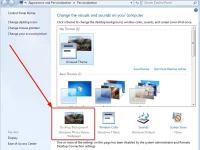
Scenario 1:
In Windows 7, when you try to change your desktop background by clicking Control Panel, Appearance and Personalization and then Change desktop Background, the check boxes are not selected when clicked and the Select all and Clear all buttons do not work as expected. Therefore, you cannot change desktop background.
Scenario 2:
In Windows 7, when you try to right-click a picture and then select Set as desktop background, you receive the following error message:
This image can''t be set as wallpaper. An internal error occurred.
Scenario 3:
In Windows 7, the slideshow feature for desktop background does not work from a certain time although it works well before.
Please check the link for solutions : You do not have permission to view the full content of this post. Log in or register now.
Thank you(",)
Scenario 1:
In Windows 7, when you try to change your desktop background by clicking Control Panel, Appearance and Personalization and then Change desktop Background, the check boxes are not selected when clicked and the Select all and Clear all buttons do not work as expected. Therefore, you cannot change desktop background.
Scenario 2:
In Windows 7, when you try to right-click a picture and then select Set as desktop background, you receive the following error message:
This image can''t be set as wallpaper. An internal error occurred.
Scenario 3:
In Windows 7, the slideshow feature for desktop background does not work from a certain time although it works well before.
Please check the link for solutions : You do not have permission to view the full content of this post. Log in or register now.
Thank you(",)