🔒 Closed Openline/unlock your zte mf190 smartbro modem!

Status
Not open for further replies.

xSilent

Forum Expert
Good day to all! I just want to share this tutorial to those who have SmartBro ZTE MF190 Broadband modem and they want to use other networks like Globe and Sun.

So, how to openline/unlock this kind of modem?

1st, we need these requirements:
  • QPST - You do not have permission to view the full content of this post. Log in or register now.
  • MF190 1st Updater - You do not have permission to view the full content of this post. Log in or register now.
  • MF190 2nd Updater - You do not have permission to view the full content of this post. Log in or register now.
  • You need to use LAPTOP! You must plug also the charger to avoid interruption
  • You may put or not to put sim anyway
The Procedure:

1st Part
  1. Install QPST
  2. Plug in your modem (after that, close the dashboard)
  3. Open QPST Configuration
  4. Go to PORTS and click ADD NEW PORTS
  5. Select the port of your modem (ex: Port: COM6 Label: COM6) and Click OK
  6. You should see there SURFXXXX under the phone column
  7. Click Start Client > EFS Explorer > You'll see there SURFXXXX Label then click OK
  8. You'll see the files and folders in the modem. You MUST not touch (or attempt to click :D ) the folders.
  9. Save a copy of these files (backup in case you want to restore your old dashboard)
    • config
    • reset_cntr.bin
    -pbm_phone_uid.dat
    • pbm_master_v_20.dat
    • ZTEMODEM.ISO
    • UimEfsAPDULog.Txt
    • NODOWNLOAD.FLG
    • SWITCH.TMP
    • AUTORUN.FLG
  10. Then after backing up those files, delete those files (all 9 files but remember NOT to include the FOLDERS)
  11. After deleting, you'll be prompted to reset the device, just choose NO then close the QPST Configuration
2nd Part
  1. Update the firmware using the MF190 1st Updater (ET_EG_EUV1.00.00)
  2. It takes 10 -15 mins to update. Just be patient.
  3. After the update, the dashboard of the 1st updater will install and you will install it
  4. After the installation, the 2 dashboard will show up (SmartBro and Etisalat). Just close those dashboard then Unplug your modem
  5. Replug your modem. Close the dashboards
  6. Do the steps on the 1st part
  7. Open QPST Configuration
  8. Select the port of your modem
  9. Open EFS Explorer
  10. Again, don't dare to click the folders!
  11. Delete those 9 files above (you can keep a backup of them if you want)
    • config
    • reset_cntr.bin
    • pbm_phone_uid.dat
    • pbm_master_v_20.dat
    • ZTEMODEM.ISO
    • UimEfsAPDULog.Txt
    • NODOWNLOAD.FLG
    • SWITCH.TMP
    • AUTORUN.FLG
  12. After deleting, you'll be prompted to reset the device, just choose NO then close the QPST Configuration
  13. Open the MF190 2nd Updater, wait until the port is detected, then update (dtac aircard).It takes 15 - 25mins so be patient.
  14. After the update, the dtac aircard will install and you should install it. Then, the 3 dashboard will show up ( SmartBro, Etisalat, and dtac Aircard). Just simply close them.
  15. After that, uninstall the 3 dashboards
  16. Restart if you want or just do a scan by CCleaner.
  17. After the restart/clean, replug the modem with a sim card :D
  18. Viola! your modem now is unlocked! :)
Don't forget to configure your settings :)

For Globe:
Name: Any name
APN: http.globe.com.ph
Dial Number: *99***1#

For Smart:
Name: Any name
APN: SMARTBRO or internet
Dial Number: *991#

For Sun:
Name: Any name
APN: minternet
Dial Number: *99***1#

Source:
You do not have permission to view the full content of this post. Log in or register now.
 
Good day to all! I just want to share this tutorial to those who have SmartBro ZTE MF190 Broadband modem and they want to use other networks like Globe and Sun.

So, how to openline/unlock this kind of modem?

1st, we need these requirements:
  • QPST - You do not have permission to view the full content of this post. Log in or register now.
  • MF190 1st Updater - You do not have permission to view the full content of this post. Log in or register now.
  • MF190 2nd Updater - You do not have permission to view the full content of this post. Log in or register now.
  • You need to use LAPTOP! You must plug also the charger to avoid interruption
  • You may put or not to put sim anyway
The Procedure:

1st Part
  1. Install QPST
  2. Plug in your modem (after that, close the dashboard)
  3. Open QPST Configuration
  4. Go to PORTS and click ADD NEW PORTS
  5. Select the port of your modem (ex: Port: COM6 Label: COM6) and Click OK
  6. You should see there SURFXXXX under the phone column
  7. Click Start Client > EFS Explorer > You'll see there SURFXXXX Label then click OK
  8. You'll see the files and folders in the modem. You MUST not touch (or attempt to click :D ) the folders.
  9. Save a copy of these files (backup in case you want to restore your old dashboard)
    • config
    • reset_cntr.bin
    -pbm_phone_uid.dat
    • pbm_master_v_20.dat
    • ZTEMODEM.ISO
    • UimEfsAPDULog.Txt
    • NOdôwnlôad.FLG
    • SWITCH.TMP
    • AUTORUN.FLG
  10. Then after backing up those files, delete those files (all 9 files but remember NOT to include the FOLDERS)
  11. After deleting, you'll be prompted to reset the device, just choose NO then close the QPST Configuration
2nd Part
  1. Update the firmware using the MF190 1st Updater (ET_EG_EUV1.00.00)
  2. It takes 10 -15 mins to update. Just be patient.
  3. After the update, the dashboard of the 1st updater will install and you will install it
  4. After the installation, the 2 dashboard will show up (SmartBro and Etisalat). Just close those dashboard then Unplug your modem
  5. Replug your modem. Close the dashboards
  6. Do the steps on the 1st part
  7. Open QPST Configuration
  8. Select the port of your modem
  9. Open EFS Explorer
  10. Again, don't dare to click the folders!
  11. Delete those 9 files above (you can keep a backup of them if you want)
    • config
    • reset_cntr.bin
    • pbm_phone_uid.dat
    • pbm_master_v_20.dat
    • ZTEMODEM.ISO
    • UimEfsAPDULog.Txt
    • NOdôwnlôad.FLG
    • SWITCH.TMP
    • AUTORUN.FLG
  12. After deleting, you'll be prompted to reset the device, just choose NO then close the QPST Configuration
  13. Open the MF190 2nd Updater, wait until the port is detected, then update (dtac aircard).It takes 15 - 25mins so be patient.
  14. After the update, the dtac aircard will install and you should install it. Then, the 3 dashboard will show up ( SmartBro, Etisalat, and dtac Aircard). Just simply close them.
  15. After that, uninstall the 3 dashboards
  16. Restart if you want or just do a scan by CCleaner.
  17. After the restart/clean, replug the modem with a sim card :D
  18. Viola! your modem now is unlocked! :)
Don't forget to configure your settings :)

For Globe:
Name: Any name
APN: http.globe.com.ph
Dial Number: *99***1#

For Smart:
Name: Any name
APN: SMARTBRO or internet
Dial Number: *991#

For Sun:
Name: Any name
APN: minternet
Dial Number: *99***1#

Source:
You do not have permission to view the full content of this post. Log in or register now.
Bro kailangan b ng internet connection pag isasagawa ung mga steps pagkadownload nung requirements?
 
Bro kailangan b ng internet connection pag isasagawa ung mga steps pagkadôwnlôad nung requirements?
wala na.. once you downloaded it, lahat na ay pwede gawin offline (y)
make sure to make a backup ha? :) and dapat iwasang ma delete ang folders :D
 
Good day to all! I just want to share this tutorial to those who have SmartBro ZTE MF190 Broadband modem and they want to use other networks like Globe and Sun.

So, how to openline/unlock this kind of modem?

1st, we need these requirements:
  • QPST - You do not have permission to view the full content of this post. Log in or register now.
  • MF190 1st Updater - You do not have permission to view the full content of this post. Log in or register now.
  • MF190 2nd Updater - You do not have permission to view the full content of this post. Log in or register now.
  • You need to use LAPTOP! You must plug also the charger to avoid interruption
  • You may put or not to put sim anyway
The Procedure:

1st Part
  1. Install QPST
  2. Plug in your modem (after that, close the dashboard)
  3. Open QPST Configuration
  4. Go to PORTS and click ADD NEW PORTS
  5. Select the port of your modem (ex: Port: COM6 Label: COM6) and Click OK
  6. You should see there SURFXXXX under the phone column
  7. Click Start Client > EFS Explorer > You'll see there SURFXXXX Label then click OK
  8. You'll see the files and folders in the modem. You MUST not touch (or attempt to click :D ) the folders.
  9. Save a copy of these files (backup in case you want to restore your old dashboard)
    • config
    • reset_cntr.bin
    -pbm_phone_uid.dat
    • pbm_master_v_20.dat
    • ZTEMODEM.ISO
    • UimEfsAPDULog.Txt
    • NOdôwnlôad.FLG
    • SWITCH.TMP
    • AUTORUN.FLG
  10. Then after backing up those files, delete those files (all 9 files but remember NOT to include the FOLDERS)
  11. After deleting, you'll be prompted to reset the device, just choose NO then close the QPST Configuration
2nd Part
  1. Update the firmware using the MF190 1st Updater (ET_EG_EUV1.00.00)
  2. It takes 10 -15 mins to update. Just be patient.
  3. After the update, the dashboard of the 1st updater will install and you will install it
  4. After the installation, the 2 dashboard will show up (SmartBro and Etisalat). Just close those dashboard then Unplug your modem
  5. Replug your modem. Close the dashboards
  6. Do the steps on the 1st part
  7. Open QPST Configuration
  8. Select the port of your modem
  9. Open EFS Explorer
  10. Again, don't dare to click the folders!
  11. Delete those 9 files above (you can keep a backup of them if you want)
    • config
    • reset_cntr.bin
    • pbm_phone_uid.dat
    • pbm_master_v_20.dat
    • ZTEMODEM.ISO
    • UimEfsAPDULog.Txt
    • NOdôwnlôad.FLG
    • SWITCH.TMP
    • AUTORUN.FLG
  12. After deleting, you'll be prompted to reset the device, just choose NO then close the QPST Configuration
  13. Open the MF190 2nd Updater, wait until the port is detected, then update (dtac aircard).It takes 15 - 25mins so be patient.
  14. After the update, the dtac aircard will install and you should install it. Then, the 3 dashboard will show up ( SmartBro, Etisalat, and dtac Aircard). Just simply close them.
  15. After that, uninstall the 3 dashboards
  16. Restart if you want or just do a scan by CCleaner.
  17. After the restart/clean, replug the modem with a sim card :D
  18. Viola! your modem now is unlocked! :)
Don't forget to configure your settings :)

For Globe:
Name: Any name
APN: http.globe.com.ph
Dial Number: *99***1#

For Smart:
Name: Any name
APN: SMARTBRO or internet
Dial Number: *991#

For Sun:
Name: Any name
APN: minternet
Dial Number: *99***1#

Source:
You do not have permission to view the full content of this post. Log in or register now.
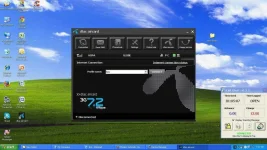
Pati bro pano un tatlo ung dashboard?
wala na.. once you dôwnlôaded it, lahat na ay pwede gawin offline (y)
make sure to make a backup ha? :) and dapat iwasang ma delete ang folders :D
Ok bro
 
Salamat Dito Sir. eto hinihintay ko.
may nakita akong tutorial dati pero baka masira broadband ko.
pero ngayon try ko na trusted ang nagpost eh :)
 
xSilent
Sir. sa 2nd part di na po nag tuloy tuloy sa akin, tapos may nag prompt eh remove ko daw tapos replug ulit. 35 mins akong nag intay wala parin. tiningnan ko sa cpu usage 0% so hindi siya nag process.
binalik ko nlng muna sa default(Smartbro).

Pwede mag request sir?
Pwede pa upload ng 9 files ng MF190 2nd Updater(dtac aircard) yung ganito niya:
  • config
  • reset_cntr.bin
-pbm_phone_uid.dat
  • pbm_master_v_20.dat
  • ZTEMODEM.ISO
  • UimEfsAPDULog.Txt
  • NOdôwnlôad.FLG
  • SWITCH.TMP
  • AUTORUN.FLG

eh copy ko nalang directly sa modem ko yong files baka pwede. haha
di po kita sisisihin if masira man broadband ko ;)
Salamat sir.
 
Thank you boss.. napagana ko na rin sa wakas.. not compatible lang pala ang windows 7 OS ko sa mga updater kaya nag try ako sa cafe, and it works perfectly.. sana ayos pa rin to sa laptop pag uwi ko.. (y)(y)(y)(y)
untitled.webp
 
arbel
congrats sir. buti kapa. hehe sakin kasi di mag tuloy2 yung updater. not compatible din siguro.

sir pwede pa copy ng 9 files ng new firmware(dtac aircard) mo. salamat. kung pwede.hehe
di kasi ma install yung sakin.
 
arbel
congrats sir. buti kapa. hehe sakin kasi di mag tuloy2 yung updater. not compatible din siguro.

sir pwede pa copy ng 9 files ng new firmware(dtac aircard) mo. salamat. kung pwede.hehe
di kasi ma install yung sakin.
di compatible yung updater ko sayo? baka ibang version yung MF190 mo hmm
 
Status
Not open for further replies.

About this Thread

  • 26
    Replies
  • 8K
    Views
  • 16
    Participants
Last reply from:
eikia123

Online now

Members online
439
Guests online
913
Total visitors
1,352

Forum statistics

Threads
2,271,667
Posts
28,937,169
Members
1,238,768
Latest member
Nen22
Back
Top