 PH
PHsquall080684
Enthusiast
Share ko lang po ito pa move nalang or delete kung may same po ng tutorial na ito salamat mga boss.
Itong tutorial po na ito ay ikaw mismo ang mg eedit dun po s ayaw ng mg edit punta po kayo sa thread ni boss tsok111 ...
Lets start
First kailngan nyo ng Bluestacks offline installer madami po dito hanap hanap lang...
Second download nyo ang apps na yan..
You do not have permission to view the full content of this post. Log in or register now.
NOTE: This trick only works on Offline installer not on Split installer
Install first the orca apps after na matapos ang pag install
punta kayo sa bluestacks na nadownload nyo ... right click nyo then find the edit with orca
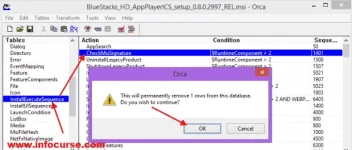
after that punta kyo dito > InstallExecuteSequence > CheckMsiSignature then delete this option (click nyo yung may scissor sa taas para madelete) or see the attached file. Sundan nyo na lang po yung pagkakasunod sunod ng attached file
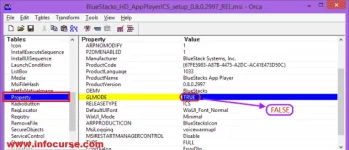
Punta kayo ng "PROPERTY" double click nyo yung "TRUE" value ng GLMODE. At palitan ng "FALSE" then hit enter.
Then Punta save po natin see the attached files...
Then install na natin si bluestacks ..
Tips: Kung ayaw or mabagal ma download ang mga games sa apps na yan try nyong magdownload sa ibang sites...
Hope na nakatulong feedback nalang po....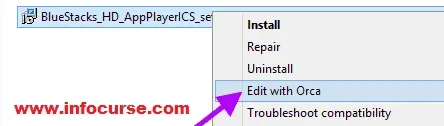

Itong tutorial po na ito ay ikaw mismo ang mg eedit dun po s ayaw ng mg edit punta po kayo sa thread ni boss tsok111 ...
Lets start
First kailngan nyo ng Bluestacks offline installer madami po dito hanap hanap lang...
Second download nyo ang apps na yan..
You do not have permission to view the full content of this post. Log in or register now.
NOTE: This trick only works on Offline installer not on Split installer
Install first the orca apps after na matapos ang pag install
punta kayo sa bluestacks na nadownload nyo ... right click nyo then find the edit with orca
after that punta kyo dito > InstallExecuteSequence > CheckMsiSignature then delete this option (click nyo yung may scissor sa taas para madelete) or see the attached file. Sundan nyo na lang po yung pagkakasunod sunod ng attached file
Punta kayo ng "PROPERTY" double click nyo yung "TRUE" value ng GLMODE. At palitan ng "FALSE" then hit enter.
Then Punta save po natin see the attached files...
Then install na natin si bluestacks ..
Tips: Kung ayaw or mabagal ma download ang mga games sa apps na yan try nyong magdownload sa ibang sites...
Hope na nakatulong feedback nalang po....