 PH
PHkung marunong na kayo gumamit ng warp para sa inyo to.
walang ng mahabang intro intro diretso na. download nyo tong 4 files na to.
1. You do not have permission to view the full content of this post. Log in or register now.
2. You do not have permission to view the full content of this post. Log in or register now. (or Directly nyo na idownload sa playstore)
3. You do not have permission to view the full content of this post. Log in or register now.
4. You do not have permission to view the full content of this post. Log in or register now. (optional na to. if gusto nyo lang maunlock full version ng PdaNet+)
simulan natin sa CP nyo.
-install nyo muna si WARP at PdaNet sa cp nyo.
-open WARP then connect. ok na basta connected
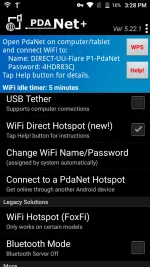
-open PdaNet+ then select nyo yung "Wifi Direct Hotspot", pag ok at running na lipat naman tayo sa PC.
sa PC naman install nyo lang yung PdaNet for PC.
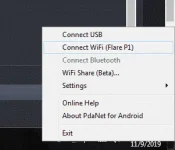
-Open nyo si PdaNet Desktop. Lalabas yung icon nun sa lower left side ng monitor, dun sa may notification area.
-right click nyo icon sa notification area the choose "Connect Wifi"
-Dapat madetect ang CP nyo. Kung ok at nadetect na CP nyo, Input nyo lang yung password, makikita ang password sa PdaNet sa CP nyo.
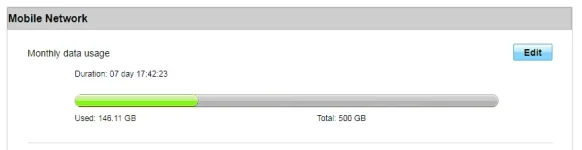
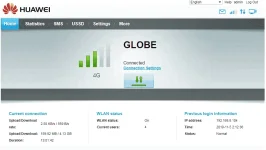
ayos na. pwede nyo na laspagin ang warp hanggang sa makatay. sagarin nyo na habang working pa. wala namang permanente.
dont hate.
walang ng mahabang intro intro diretso na. download nyo tong 4 files na to.
1. You do not have permission to view the full content of this post. Log in or register now.
2. You do not have permission to view the full content of this post. Log in or register now. (or Directly nyo na idownload sa playstore)
3. You do not have permission to view the full content of this post. Log in or register now.
4. You do not have permission to view the full content of this post. Log in or register now. (optional na to. if gusto nyo lang maunlock full version ng PdaNet+)
simulan natin sa CP nyo.
-install nyo muna si WARP at PdaNet sa cp nyo.
-open WARP then connect. ok na basta connected
-open PdaNet+ then select nyo yung "Wifi Direct Hotspot", pag ok at running na lipat naman tayo sa PC.
sa PC naman install nyo lang yung PdaNet for PC.
-Open nyo si PdaNet Desktop. Lalabas yung icon nun sa lower left side ng monitor, dun sa may notification area.
-right click nyo icon sa notification area the choose "Connect Wifi"
-Dapat madetect ang CP nyo. Kung ok at nadetect na CP nyo, Input nyo lang yung password, makikita ang password sa PdaNet sa CP nyo.
ayos na. pwede nyo na laspagin ang warp hanggang sa makatay. sagarin nyo na habang working pa. wala namang permanente.
dont hate.

