
🔒 Closed My|phone agua rio fun stock rom

Status
Not open for further replies.

Lawliet_1

Leecher
10617241_791318900889098_139711874_n_zps6573d575.webp

1. Extract your downloaded Stock ROM to Desktop.

2. Extract to your Desktop and Open SP Flash Tool.

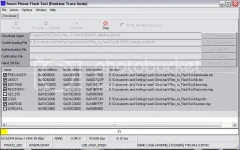
3. On SP Flash Tool click “Scatter-loading” button.a. Locate your downloaded stock rom.b. Select “MT6572_Android_scatter_emmc.txt”. Wait files to be added in to SP Flash Tool.

4. Turn off your phone and remove battery.

5. Click “Download” button or press F9 button.

6. Connect your phone to your computer using a USB Cable.

7. The process will start, wait until a green circle will pop up. And you’re finished!You can now safely disconnect your phone and turn it on.
Screenshot_1_zpsd40660b5.webp

NOTE: uncheck secro and userdata para po hindi nawawala ang imei o nag e invalid imei
DONE
10622016_791318957555759_1401261391_n_zpsf6829eed.webp

credits to Xian

see the attachment for the download link
 

Attachments

I mean kapag nagstart na po ako ng process sa sp flash tool.. matagal po ba talaga magstart magloading yun?
I mean kapag nagstart ka po ng process sa flashtool matagal po ba talaga magprocess?
Thanks po.
 
ahh kasi may dinownload po ako na flashtool last night. Then yun dinownload ko din po itong stock rom na to. I'm using windows 8 na os. Tas yun nung inistart ko na po F9 or download eh ang tagal po magstart paano po kaya yun?
 
ahh kasi may dinownload po ako na flashtool last night. Then yun dinownload ko din po itong stock rom na to. I'm using windows 8 na os. Tas yun nung inistart ko na po F9 or dôwnlôad eh ang tagal po magstart paano po kaya yun?
same instructions ba yung kagabi? so alam mo na toh? hehe
 
Status
Not open for further replies.

About this Thread

  • 125
    Replies
  • 59K
    Views
  • 82
    Participants
Last reply from:
jemuell99

Trending Topics

Online now

Members online
321
Guests online
1,687
Total visitors
2,008

Forum statistics

Threads
2,270,679
Posts
28,935,820
Members
1,240,971
Latest member
bsbsbss
Back
Top