PH
PHEnable Telnet through Command Prompt or Control Panel in Windows 7 | 8
Enable Telnet using CMD
To enable Telnet through Command Prompt:
Enable Telnet via Control Panel
Enable Telnet using CMD
To enable Telnet through Command Prompt:
- Click on Start and under search type in CMD
- Right click on CMD and click on Run as administrator
- Enter the Administrator password if it prompt
- Then type in pkgmgr /iu:”TelnetClient” to enable the Client
- And pkgmgr /iu:”TelnetServer” to enable the Server
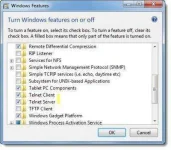
Enable Telnet via Control Panel
- Click on Start and under search type in appwiz.cpl
- Then click Turn Windows feature on or off from the right side panel
- There look for Telnet Server and Telnet Client and click on that box
- Click OK and reboot the system if prompted.