 PH
PHNew Android Warning: These 15 Malicious Apps May Be Hiding On Your Phone—Uninstall Now
As the stories keep coming about malicious apps finding their way onto Google’s Play Store, one serious concern is the increasingly sophisticated efforts made by those apps to hide their intent from users. Well, the latest You do not have permission to view the full content of this post. Log in or register now. from the team at Sophos has found 15 harmful apps that have gone a stage further—literally “hiding their app icons in the launcher... or disguising themselves in the phone’s App settings page.”
Put simply, apps have been found that trick users into installing them to perform a trivial service. The app disappears from view, but it is actually running, disguised under a system name, making it impossible to detect and stop without effort. Users are urged to specifically root these apps out, stop them, then delete them completely.
If the apps aren’t seen, then they won’t trigger user concerns and they become much more difficult to casually delete without making the effort to find them. That’s the theory. But now those apps have been exposed. Users have been warned.
Yet again, these latest apps join the countless others delivering adware—generating fraudulent revenue for their operators. Let’s be clear, free apps that deliver ads in their unpaid versions might be irritating, but they’re not necessarily fraudulent. But here we are talking about apps designed to deliver ads—it’s their sole purpose. It is the direct opposite of free apps, the ads are the focus, the app itself a wraparound.
The 15 apps discovered and disclosed by Sophos have been installed on more than 1.3 million devices—that’s a lot of ads, a lot of fraudulent revenue. And this is likely the tip of the iceberg for this new “icon hiding” threat category. “If history is any indication,” Sophos warns, “there are likely many more waiting to be found.”
The “dirty tricks” pulled off by these apps include various ruses to hide away—either on install or shortly afterward, and installing two apps at once—a benign app that is visible as per normal, and a malicious app that remains hidden. Most phones these days have a wide range of legacy and unused apps—we don’t notice what’s there and how many of us ever purge our devices? That’s the social engineering taking place here—if the app can hide initially, it will likely hang around for some time.
“Nine of the 15 apps used deceptive application icons and names, most of which appeared to have been chosen because they might plausibly resemble an innocuous system app,” Sophos explained. But they cannot hide completely if you know what you’re looking for—and Android users are urged to check their phones for these apps—and if you find them, delete them. “The app icon is still visible in the phone’s ‘gear’ Settings menu, under Apps.”
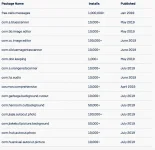
Here are the 15 apps exposed by Sophos—you’ll notice the poor reviews, often a sign that an app of this kind is best avoided.

As so often with adware apps, most are designed around trivial utilities—QR readers and image editors, for example. “Most ironically,” Sophos reports, one of the malicious apps is designed “to scrub your phone of private data.” You couldn’t make this up. The mindset to download an app of unknown provenance for such a delicate purpose we won’t get into—the warnings here basically go without saying.
Once installed, the apps use innocuous names to ensure they don’t trigger suspicions. And, arguably, the most worrying finding is that all 15 apps appeared this year—that means there are still gaping holes in Play Store security and there are adware factories churning out such apps and pushing them into the public domain. Sophos believes that similarities in coding structure and user interfaces suggests this batch of apps might all be related, despite appearing to come from different publishers.
Sophos says that Google was notified about the apps and they seem to have been removed—the underlying threat and coding techniques will remain in other as yet unidentified apps in the store and the myriad apps likely still to come.
The package names of the 15 apps are here:
Andrew Brandt, a principal researcher at Sophos, warns that “while these apps have been removed from the Google Play Store, there may be others we haven’t yet discovered that do the same thing.”
Brandt also explains that if uses suspect an app might be hiding, or to check against the published list, “tap Settings, then Apps & Notifications. The most recently opened apps appear in a list at the top of this page. If any of those apps use the generic Android icon (which looks like a little greenish-blue Android silhouette) and have generic-sounding names (‘Back Up,’ ‘Update,’ ‘Time Zone Service’) tap the generic icon and then tap ‘Force Stop’ followed by ‘Uninstall’.” Real system apps won’t offer an ‘uninstall’ option but will have a ‘disable’ option instead.
Ultimately, the usual advice applies here. Don’t download trivial utility apps because they seem nifty and free—they’re free for a reason. Even if the downside is simply unwanted ads, the fact is that malicious apps can often be hiding more dangers than that. Given how much private information we carry on our devices, don’t casually leave the backdoor open to anyone with a shiny app and a free install.
You do not have permission to view the full content of this post. Log in or register now.
As the stories keep coming about malicious apps finding their way onto Google’s Play Store, one serious concern is the increasingly sophisticated efforts made by those apps to hide their intent from users. Well, the latest You do not have permission to view the full content of this post. Log in or register now. from the team at Sophos has found 15 harmful apps that have gone a stage further—literally “hiding their app icons in the launcher... or disguising themselves in the phone’s App settings page.”
Put simply, apps have been found that trick users into installing them to perform a trivial service. The app disappears from view, but it is actually running, disguised under a system name, making it impossible to detect and stop without effort. Users are urged to specifically root these apps out, stop them, then delete them completely.
If the apps aren’t seen, then they won’t trigger user concerns and they become much more difficult to casually delete without making the effort to find them. That’s the theory. But now those apps have been exposed. Users have been warned.
Yet again, these latest apps join the countless others delivering adware—generating fraudulent revenue for their operators. Let’s be clear, free apps that deliver ads in their unpaid versions might be irritating, but they’re not necessarily fraudulent. But here we are talking about apps designed to deliver ads—it’s their sole purpose. It is the direct opposite of free apps, the ads are the focus, the app itself a wraparound.
The 15 apps discovered and disclosed by Sophos have been installed on more than 1.3 million devices—that’s a lot of ads, a lot of fraudulent revenue. And this is likely the tip of the iceberg for this new “icon hiding” threat category. “If history is any indication,” Sophos warns, “there are likely many more waiting to be found.”
The “dirty tricks” pulled off by these apps include various ruses to hide away—either on install or shortly afterward, and installing two apps at once—a benign app that is visible as per normal, and a malicious app that remains hidden. Most phones these days have a wide range of legacy and unused apps—we don’t notice what’s there and how many of us ever purge our devices? That’s the social engineering taking place here—if the app can hide initially, it will likely hang around for some time.
“Nine of the 15 apps used deceptive application icons and names, most of which appeared to have been chosen because they might plausibly resemble an innocuous system app,” Sophos explained. But they cannot hide completely if you know what you’re looking for—and Android users are urged to check their phones for these apps—and if you find them, delete them. “The app icon is still visible in the phone’s ‘gear’ Settings menu, under Apps.”
Here are the 15 apps exposed by Sophos—you’ll notice the poor reviews, often a sign that an app of this kind is best avoided.
As so often with adware apps, most are designed around trivial utilities—QR readers and image editors, for example. “Most ironically,” Sophos reports, one of the malicious apps is designed “to scrub your phone of private data.” You couldn’t make this up. The mindset to download an app of unknown provenance for such a delicate purpose we won’t get into—the warnings here basically go without saying.
Once installed, the apps use innocuous names to ensure they don’t trigger suspicions. And, arguably, the most worrying finding is that all 15 apps appeared this year—that means there are still gaping holes in Play Store security and there are adware factories churning out such apps and pushing them into the public domain. Sophos believes that similarities in coding structure and user interfaces suggests this batch of apps might all be related, despite appearing to come from different publishers.
Sophos says that Google was notified about the apps and they seem to have been removed—the underlying threat and coding techniques will remain in other as yet unidentified apps in the store and the myriad apps likely still to come.
The package names of the 15 apps are here:
Andrew Brandt, a principal researcher at Sophos, warns that “while these apps have been removed from the Google Play Store, there may be others we haven’t yet discovered that do the same thing.”
Brandt also explains that if uses suspect an app might be hiding, or to check against the published list, “tap Settings, then Apps & Notifications. The most recently opened apps appear in a list at the top of this page. If any of those apps use the generic Android icon (which looks like a little greenish-blue Android silhouette) and have generic-sounding names (‘Back Up,’ ‘Update,’ ‘Time Zone Service’) tap the generic icon and then tap ‘Force Stop’ followed by ‘Uninstall’.” Real system apps won’t offer an ‘uninstall’ option but will have a ‘disable’ option instead.
Ultimately, the usual advice applies here. Don’t download trivial utility apps because they seem nifty and free—they’re free for a reason. Even if the downside is simply unwanted ads, the fact is that malicious apps can often be hiding more dangers than that. Given how much private information we carry on our devices, don’t casually leave the backdoor open to anyone with a shiny app and a free install.
You do not have permission to view the full content of this post. Log in or register now.
