For openvpn GUI:
1. Download OpenVPN
The first thing you need to do to connect to OVPN is to
You do not have permission to view the full content of this post.
Log in or register now..
You do not have permission to view the full content of this post.
Log in or register now.
2. Install OVPN
To begin the installation, double-click the file you downloaded in the previous step. Go through the installation process.
3. Download the configuration you want
Create an account with tcpvpn.com or 1 month account at vpnsplit.com or other websites
Then you need to edit the config according to your ISP
4. Import configuration file
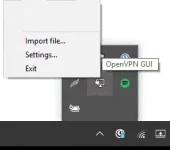
OpenVPN's icon should be in the activity tray in the right corner of your screen. You might need to click on the arrow in order to display the icon with the padlock. When you've found the icon, right click on it and choose
Import file.
 5. Connect to OVPN
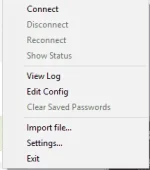
Go ahead and right click on the OpenVPN icon again. This time, choose to
Connect. When prompted, enter the username and password you used when creating your OVPN account.
 6. Finished
You should now be connected to OVPN and be able to browse the internet safely. To make sure everything was set up correctly, please check
You do not have permission to view the full content of this post.
Log in or register now. to verify that you are connected.
 PH
PH