 PH
PHGood Day mga ka PHC, sa mga Windows 10 users dyan na di pa alam yung mga Tweaks ng PC or Laptop nila.
Follow nyo nlng instructions. Sana magamit nyo to.
To see hidden content you must react:
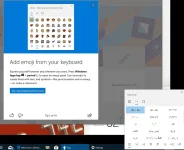
Enable Kaimoji/Emoji
1. Press Windows + Period(.)
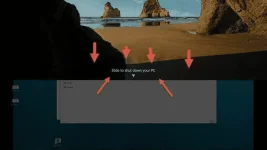
Enable Slide Shutdown
1. right click on desktop> New> Shortcut
2. then Insert this code to the pop up window: "%windir%\System32\SlideToShutDown.exe"
note: without qoute ("")
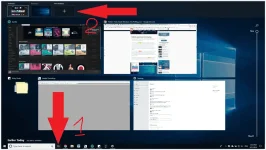
Enable Multi Desktop
1. click task view then new desktop or press Windows + Tab then new desktop
how to switch with your multiple desktop
press windows tab then click the desktop you want to select or
press Windows + Control + Right/Left Arrows
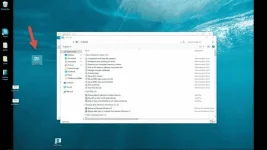
Enable GOD Mode
1. right click desktop> New Folder then rename the folder with this:
GodMode.{ED7BA470-8E54-465E-825C-99712043E01C}
then to open god mode double click the folder
Dont Hit n Run
Feedback nmn kung gumana rin sa inyo.
Para Happy
Working Screenshots:
Follow nyo nlng instructions. Sana magamit nyo to.
To see hidden content you must react:
Enable Kaimoji/Emoji
1. Press Windows + Period(.)
Enable Slide Shutdown
1. right click on desktop> New> Shortcut
2. then Insert this code to the pop up window: "%windir%\System32\SlideToShutDown.exe"
note: without qoute ("")
Enable Multi Desktop
1. click task view then new desktop or press Windows + Tab then new desktop
how to switch with your multiple desktop
press windows tab then click the desktop you want to select or
press Windows + Control + Right/Left Arrows
Enable GOD Mode
1. right click desktop> New Folder then rename the folder with this:
GodMode.{ED7BA470-8E54-465E-825C-99712043E01C}
then to open god mode double click the folder
Dont Hit n Run
Feedback nmn kung gumana rin sa inyo.
Para Happy
Working Screenshots:
