 PH
PHHuawei WEBUI Modify Tools
Created by Jerome Laliag
Download Link:
You do not have permission to view the full content of this post. Log in or register now.
Password: jeromelaliag
NOTE :
1. Nasa res folder yung mga ieedit nyong picture na nasa web interface.
2. Kung anong size ng picture dapat ganon din ang size ng pag edit nyo para hindi mastretch yung image.
3. Make sure ganon din ang file type.
4. Recommend ko na pang edit nyo ay photoshop, bakit? Para yung transparent hindi maging plain.
5. Make sure na nakaextract tong zip file para sure na maimport ng ayos sa modem yung image.
6. Kapag naedit nyo na, iopen lang ang install.cmd then hintayin matapos.
Kapag hindi nag apply ang changes, iclear browsing data nyo nalang po. Salamat!
(c) Jerome Laliag
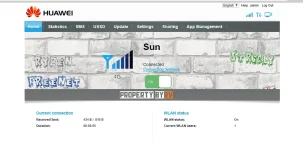
Sample ito yung akin
Created by Jerome Laliag
Download Link:
You do not have permission to view the full content of this post. Log in or register now.
Password: jeromelaliag
NOTE :
RECOMMEND KO NA CONNECTION NA GAMITIN NYO IS WIFI!
PERO KUNG WALANG WIFI, OK LANG NA LAN CABLE. TIISIN NYO NALANG ANG TAGAL NG PAG IIMPORT.
1. Nasa res folder yung mga ieedit nyong picture na nasa web interface.
2. Kung anong size ng picture dapat ganon din ang size ng pag edit nyo para hindi mastretch yung image.
3. Make sure ganon din ang file type.
4. Recommend ko na pang edit nyo ay photoshop, bakit? Para yung transparent hindi maging plain.
5. Make sure na nakaextract tong zip file para sure na maimport ng ayos sa modem yung image.
6. Kapag naedit nyo na, iopen lang ang install.cmd then hintayin matapos.
Kapag hindi nag apply ang changes, iclear browsing data nyo nalang po. Salamat!
(c) Jerome Laliag
Sample ito yung akin

