PH
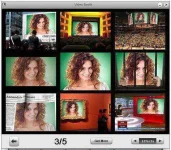
PHVideo Booth makes it easy to take snapshots with your built-in or computer-connected cameras. Just launch this application, locate images, and click. Take a single picture or take four pictures in succession using the “Continuous Shooting” mode which makes your pictures more special. Before photo is snapped, Video Booth flashes your screen to let you know that it is taking the last display showing in the main window.
With Video Booth, recording video clips by your webcam is fairly easy, just clicks away. What more important is that the video clips captured by Video Booth are very smooth and stable. Effects can be added to your video and make it more fun to upload to YouTube and to share with your family and friends.
Furthermore, it enables you to use the effects to transform your look, make your smiles fantastic or freaky. Snap a picture of yourself in outer space, or take a walk in a beautiful fall woods. Start your journey of fun with all these effects offered by Video Booth which works perfectly for snap shooting and video recording.
Installer:
You do not have permission to view the full content of this post. Log in or register now.
Pach:
You do not have permission to view the full content of this post. Log in or register now.
Instruction:
after installation, do not open first. copy paste the ρá†ch to the video booth folder.
enjoy full version.
paki hit naman ng LIKE button para masaya tayong lahat.
With Video Booth, recording video clips by your webcam is fairly easy, just clicks away. What more important is that the video clips captured by Video Booth are very smooth and stable. Effects can be added to your video and make it more fun to upload to YouTube and to share with your family and friends.
Furthermore, it enables you to use the effects to transform your look, make your smiles fantastic or freaky. Snap a picture of yourself in outer space, or take a walk in a beautiful fall woods. Start your journey of fun with all these effects offered by Video Booth which works perfectly for snap shooting and video recording.
Installer:
You do not have permission to view the full content of this post. Log in or register now.
Pach:
You do not have permission to view the full content of this post. Log in or register now.
Instruction:
after installation, do not open first. copy paste the ρá†ch to the video booth folder.
enjoy full version.
paki hit naman ng LIKE button para masaya tayong lahat.