PH
PHPhc_draneam
Forum Veteran
Tips for Xiaomi Users on how to Update your Mobile Legends app into Version 2.0. (EXCLUSIVE FOR XIAOMI PHONES ONLY)
Steps:
1. Go to settings > Additional Settings
2. Set your Region into Russia
3. Go back to your main screen and find Mi App that will pop-up after setting the Region into Russia
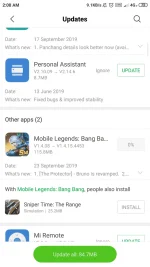
4.Open Mi App and search Mobile Legends
5. Click Update
100% no ban
100% not third party app nor website
100% official
Update size is only 115MB
Thank me later.
Steps:
1. Go to settings > Additional Settings
2. Set your Region into Russia
3. Go back to your main screen and find Mi App that will pop-up after setting the Region into Russia
4.Open Mi App and search Mobile Legends
5. Click Update
100% no ban
100% not third party app nor website
100% official
Update size is only 115MB
Thank me later.