PH
PHZTE Modem Unlock Code Calculator/ Writer
Unlock ZTE Free – There are so many unlocking tools available for Huawei modems. But for ZTE there are a few unlocking tools are available. Today we have got a software for ZTE which will help to send the unlock code / NCK in your ZTE Modem Dongle
Step by step guide to unlock ZTE Modem Dongle Free :
Download the compatible unlocking software from the download link which is provided at the end of the article.
Now plug the ZTE Modem Dongle to PC and let it install all the drivers and software.
Now disconnect from the internet and close the software of ZTE Modem Dongle.
Now run the downloaded software.
Now it will ask you unlock code.
Put the NCK/SPCK/SP digit unlock code in “Unlock Code :” box.
Now click on “Unlock” Button.
Now your ZTE Modem Dongle is unlocked forever to use with any another network sim.
Now create the profile as per the new sim and enjoy.
Note : Don’t use any wrong codes into your ZTE Modem Dongle. ZTE modems gives chances to put only 5 times unlock code. After that your ZTE Modem Dongle will be locked permanently.
Get the ZTE Unlock Code from here : You do not have permission to view the full content of this post. Log in or register now.
Note: u will get 2 code try both of them NCK AND SPCK
Download ZTE Modem Dongle Unlocker Software: You do not have permission to view the full content of this post. Log in or register now.
Unlocking Procedure for ZTE Modem for Windows Users
Before you get started, please make sure you have the following:
1. Your current ZTE modem working correctly in your PC
2. The necessary Unlocking code is available (as provided for your specific modem IMEI number).
3. The executable unlocking tool.
There are 3 steps necessary to unlock the modem:
Step1: Run the executable unlocking tool.
Step2: Plug in the ZTE modem in to the PC with the other network Sim card inserted in to the modem.
Step3: Input the unlocking code.
Please see the following guide:
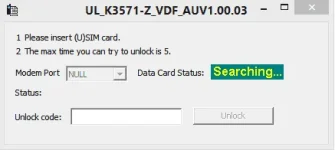
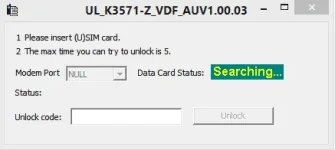
Step 1: Run the executable unlocking tool. See pic 1
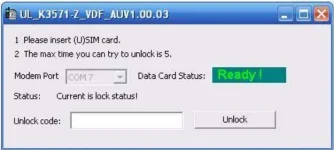
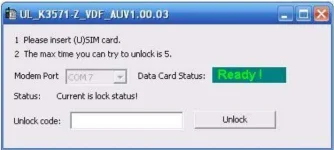
Step 2: Insert the ZTE modem in to the PC and then the unlocking tool will detect the modem automatically (See Pic 2). In this Step, make sure you have inserted a other network Sim card in the modem
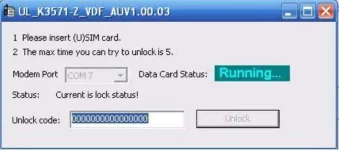
Step 3: Input the correct unlocking code. (See Pic 3)
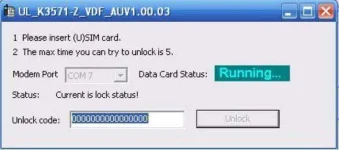
Please note that you only have 5 chances to input the unlocking code correctly and if you input the code incorrectly more than 5 times, the modem will be locked permanently.
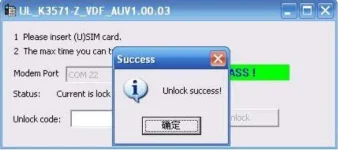
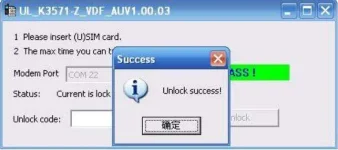
Once you have successfully unlocked the modem, a Success message will be displayed as below :
LIKE AND FEEDBACK GUYS KUNG NA UNLOCK NYO MODEM NYO! THANKS !
Unlock ZTE Free – There are so many unlocking tools available for Huawei modems. But for ZTE there are a few unlocking tools are available. Today we have got a software for ZTE which will help to send the unlock code / NCK in your ZTE Modem Dongle
Step by step guide to unlock ZTE Modem Dongle Free :
Download the compatible unlocking software from the download link which is provided at the end of the article.
Now plug the ZTE Modem Dongle to PC and let it install all the drivers and software.
Now disconnect from the internet and close the software of ZTE Modem Dongle.
Now run the downloaded software.
Now it will ask you unlock code.
Put the NCK/SPCK/SP digit unlock code in “Unlock Code :” box.
Now click on “Unlock” Button.
Now your ZTE Modem Dongle is unlocked forever to use with any another network sim.
Now create the profile as per the new sim and enjoy.
Note : Don’t use any wrong codes into your ZTE Modem Dongle. ZTE modems gives chances to put only 5 times unlock code. After that your ZTE Modem Dongle will be locked permanently.
Get the ZTE Unlock Code from here : You do not have permission to view the full content of this post. Log in or register now.
Note: u will get 2 code try both of them NCK AND SPCK
Download ZTE Modem Dongle Unlocker Software: You do not have permission to view the full content of this post. Log in or register now.
Unlocking Procedure for ZTE Modem for Windows Users
Before you get started, please make sure you have the following:
1. Your current ZTE modem working correctly in your PC
2. The necessary Unlocking code is available (as provided for your specific modem IMEI number).
3. The executable unlocking tool.
There are 3 steps necessary to unlock the modem:
Step1: Run the executable unlocking tool.
Step2: Plug in the ZTE modem in to the PC with the other network Sim card inserted in to the modem.
Step3: Input the unlocking code.
Please see the following guide:
Step 1: Run the executable unlocking tool. See pic 1
Step 2: Insert the ZTE modem in to the PC and then the unlocking tool will detect the modem automatically (See Pic 2). In this Step, make sure you have inserted a other network Sim card in the modem
Step 3: Input the correct unlocking code. (See Pic 3)
Please note that you only have 5 chances to input the unlocking code correctly and if you input the code incorrectly more than 5 times, the modem will be locked permanently.
Once you have successfully unlocked the modem, a Success message will be displayed as below :
LIKE AND FEEDBACK GUYS KUNG NA UNLOCK NYO MODEM NYO! THANKS !


 .
.