 PH
PHPHC_Taong-BATO
꧁ ⭐⭐🏆⭐⭐ ꧂ 🅰🅽🅶 🅰🅻🅰🅼🅰🆃 🅽🅶 🆂🅰🅶🅸🅽🅶
Link:
You do not have permission to view the full content of this post. Log in or register now.
Tutorial:
Dekaron Action9 (Without Aloken)
1. Set IP Subnet for VMnet1 card is 192.168.81.0
2. Run VM, when asked, select “I Moved It”
Account Administrator is Tuan565 (no password)
3. Run 1-dbmon.exe
4. Run 2-DekaronStartUp.exe
5. Wait for the following (about 5-10 minutes)
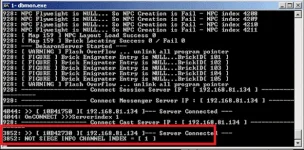
6. Account registration: 192.168.81.134/register.php
7. Run dekaron.exe in Client / bin
8. To make your account GM, use Query Analyzer. In VM, click Start > Programs > Microsoft SQL Server > SQL Analyzer
In SQL Query Analyzer in Virtual Machine and then paste into the Query above (username - sa password - 1234)
Use character;
Go
Update [user_character] Set character_name= '[GM]NAME' Where character_name= 'NAME'
(with [GM] NAME and NAME is the name of your character. For example, [GM] Tuan565 and Tuan565)


You do not have permission to view the full content of this post. Log in or register now.
Tutorial:
Dekaron Action9 (Without Aloken)
1. Set IP Subnet for VMnet1 card is 192.168.81.0
2. Run VM, when asked, select “I Moved It”
Account Administrator is Tuan565 (no password)
3. Run 1-dbmon.exe
4. Run 2-DekaronStartUp.exe
5. Wait for the following (about 5-10 minutes)
6. Account registration: 192.168.81.134/register.php
7. Run dekaron.exe in Client / bin
8. To make your account GM, use Query Analyzer. In VM, click Start > Programs > Microsoft SQL Server > SQL Analyzer
In SQL Query Analyzer in Virtual Machine and then paste into the Query above (username - sa password - 1234)
Use character;
Go
Update [user_character] Set character_name= '[GM]NAME' Where character_name= 'NAME'
(with [GM] NAME and NAME is the name of your character. For example, [GM] Tuan565 and Tuan565)