 PH
PHPHC_Incognito
Forum Veteran
Prerequisites:
1.LINK: You do not have permission to view the full content of this post. Log in or register now.
2. Virtual Network Adapter
SoftEther VPN Client communicates over a VPN by creating a Virtual Network Adapter on the system. The Virtual Network Adapter is recognized by the Windows operating system and applications running on Windows as a network device in the same way as a physical network adapter. This enables the user to use the Virtual Network Adapter with TCP/IP protocols and other network protocols (such as NetBEUI).
3. Softether VPN Account.
Recommended ( Fastssh, SSHStores & VPN Jantit) dito mas mabilis ang connection) tried and tested.
Instruction:
1.Para mag work sa Sun TU or Sun Freevideo, need mo muna e convert to DNS ang server IP Address
example: (FastSSH)
se-sg1.serverip.co / 128.199.215.34 (may sariling host to IP converter tool naman halos lahat na SSH Sites)
2. DNS Creator= Si Fast SSH may sarili ding DNS creator (Good for 30days) but working lang sa kanilang mga sariling servers.
LINK: You do not have permission to view the full content of this post. Log in or register now.
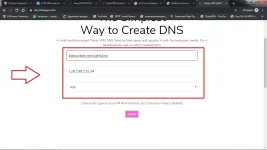
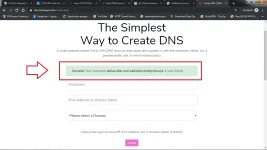
IF Gusto nyo Universal, pwede kayo dito gumawa,
LINK:TRINITYDNS
credit: trinityvpndns
3. Payload /format (using SUN TU) kayo na bahala if nka SUN Freevideo kayo, palitan nyo na lang payload
#
#
#
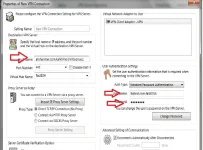
Then Press Okay, Tapos Connect
note: Pwede nyo rin Hotspot/tethering using adroid phone nyo.. basta nka on lang ang data ( gamit ko now)
credit nyo na lang si Trinity sa DNS .. thank you
1.LINK: You do not have permission to view the full content of this post. Log in or register now.
2. Virtual Network Adapter
SoftEther VPN Client communicates over a VPN by creating a Virtual Network Adapter on the system. The Virtual Network Adapter is recognized by the Windows operating system and applications running on Windows as a network device in the same way as a physical network adapter. This enables the user to use the Virtual Network Adapter with TCP/IP protocols and other network protocols (such as NetBEUI).
3. Softether VPN Account.
Recommended ( Fastssh, SSHStores & VPN Jantit) dito mas mabilis ang connection) tried and tested.
Instruction:
1.Para mag work sa Sun TU or Sun Freevideo, need mo muna e convert to DNS ang server IP Address
example: (FastSSH)
se-sg1.serverip.co / 128.199.215.34 (may sariling host to IP converter tool naman halos lahat na SSH Sites)
2. DNS Creator= Si Fast SSH may sarili ding DNS creator (Good for 30days) but working lang sa kanilang mga sariling servers.
LINK: You do not have permission to view the full content of this post. Log in or register now.
IF Gusto nyo Universal, pwede kayo dito gumawa,
LINK:TRINITYDNS
credit: trinityvpndns
3. Payload /format (using SUN TU) kayo na bahala if nka SUN Freevideo kayo, palitan nyo na lang payload
#
#
#
Then Press Okay, Tapos Connect
note: Pwede nyo rin Hotspot/tethering using adroid phone nyo.. basta nka on lang ang data ( gamit ko now)
credit nyo na lang si Trinity sa DNS .. thank you

