 PH
PHPHC_Taong-BATO
꧁ ⭐⭐🏆⭐⭐ ꧂ 🅰🅽🅶 🅰🅻🅰🅼🅰🆃 🅽🅶 🆂🅰🅶🅸🅽🅶
Big Credits to the ff.
hehetri/lucasmf2507
Kei
DarkStronge/iLek
Divine/Divin3
UPDATE: 9/16/2019 - 12:53PM ( Please Credit PHC & Ragezone) thank you.
Link:
server > You do not have permission to view the full content of this post. Log in or register now.
client > You do not have permission to view the full content of this post. Log in or register now.
database > You do not have permission to view the full content of this post. Log in or register now.
HxdSetup > You do not have permission to view the full content of this post. Log in or register now.
Redirector > You do not have permission to view the full content of this post. Log in or register now.
Hashcalc > You do not have permission to view the full content of this post. Log in or register now.
Use SQL Server 2005 or 2008. I use 2017.
Extract all server files and change all ip into your local ip
Configuring the database:
Install SQL Server and the Management Studio*.
*should be included
to find crc32, execute hashcalc
Important query used.
USE [gc]
INSERT INTO [dbo].[ClientChecksum] (ProtocolVer, Checksum, RegDate)
SELECT 321,0xCRC32HERE,CURRENT_TIMESTAMP
...and then execute it.
----------------------
Now replace everything with:
SELECT cast(checksum AS bigint) as rtxt FROM dbo.ClientChecksum
..and then copy the result. (the last one)
Put the result in between the parentheses of anything that says "Checksum" in config_server.lua. Only once, though. There should be 2 checksum parts.
Creating a user:
Open up the dbo.users table. (Right click + Edit)
Choose "text string" in You do not have permission to view the full content of this post. Log in or register now. and then type in your password in the text box where it says data. Now select MD5 and click calculat
Type in your username in the column that says ID.
Use that MD5 thing as your password.
Change your GP in gamepoint.
Type something random into email.
You're done.
ConnectStatusDB:
Right click + edit.
Delete everything else except the first one.
Edit your server name, and change your server IP to your local IP. (Hint: cmd+ipconfig)
You're done.
-------------------------
msg database:
Open MsgRouterList.
Change your IP.
Open MsgServerList.
Input these:
UserNum 0, IP (your local IP), Port 9300, ProtocolVersion 215
You're done.
-------------------------
ODBC:
Now go into your folders and edit the odbc dsn files with notepad/wordpad.
Edit it. It's self explanitory. Change the "PW" part to your password. Change the "Server" part to your "instance" name. (example: .\SQLEXPRESS or WAFFLE-PC\SQLEXPRESS)
-------------------------
GameServer:
Open config_server.lua.
Change the IPs to your local IP.
-------------------------
Running the server:
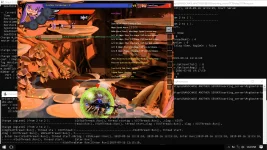
Open them up.
Client:
Use a hex editor like HxD and then find LoginServerIP. Change the IP after that.
Creating a nickname for your user:
Go into NickNames. It's a table.
Put your info in.
-------------------------
Running the client:
Create a bat file with:
main.exe __kogstudios_original_service__
...and then run it.
-//taong-bato
hehetri/lucasmf2507
Kei
DarkStronge/iLek
Divine/Divin3
UPDATE: 9/16/2019 - 12:53PM ( Please Credit PHC & Ragezone) thank you.
Link:
server > You do not have permission to view the full content of this post. Log in or register now.
client > You do not have permission to view the full content of this post. Log in or register now.
database > You do not have permission to view the full content of this post. Log in or register now.
HxdSetup > You do not have permission to view the full content of this post. Log in or register now.
Redirector > You do not have permission to view the full content of this post. Log in or register now.
Hashcalc > You do not have permission to view the full content of this post. Log in or register now.
Use SQL Server 2005 or 2008. I use 2017.
Extract all server files and change all ip into your local ip
Configuring the database:
Install SQL Server and the Management Studio*.
*should be included
to find crc32, execute hashcalc
Important query used.
USE [gc]
INSERT INTO [dbo].[ClientChecksum] (ProtocolVer, Checksum, RegDate)
SELECT 321,0xCRC32HERE,CURRENT_TIMESTAMP
...and then execute it.
----------------------
Now replace everything with:
SELECT cast(checksum AS bigint) as rtxt FROM dbo.ClientChecksum
..and then copy the result. (the last one)
Put the result in between the parentheses of anything that says "Checksum" in config_server.lua. Only once, though. There should be 2 checksum parts.
Creating a user:
Open up the dbo.users table. (Right click + Edit)
Choose "text string" in You do not have permission to view the full content of this post. Log in or register now. and then type in your password in the text box where it says data. Now select MD5 and click calculat
Type in your username in the column that says ID.
Use that MD5 thing as your password.
Change your GP in gamepoint.
Type something random into email.
You're done.
ConnectStatusDB:
Right click + edit.
Delete everything else except the first one.
Edit your server name, and change your server IP to your local IP. (Hint: cmd+ipconfig)
You're done.
-------------------------
msg database:
Open MsgRouterList.
Change your IP.
Open MsgServerList.
Input these:
UserNum 0, IP (your local IP), Port 9300, ProtocolVersion 215
You're done.
-------------------------
ODBC:
Now go into your folders and edit the odbc dsn files with notepad/wordpad.
Edit it. It's self explanitory. Change the "PW" part to your password. Change the "Server" part to your "instance" name. (example: .\SQLEXPRESS or WAFFLE-PC\SQLEXPRESS)
-------------------------
GameServer:
Open config_server.lua.
Change the IPs to your local IP.
-------------------------
Running the server:
Open them up.
Client:
Use a hex editor like HxD and then find LoginServerIP. Change the IP after that.
Creating a nickname for your user:
Go into NickNames. It's a table.
Put your info in.
-------------------------
Running the client:
Create a bat file with:
main.exe __kogstudios_original_service__
...and then run it.
-//taong-bato


