PH
PHBago basahin at gayahin ang steps dito, mangyaring pumunta muna dto sa link na to https://phcorner.org/threads/759904/ dahil ito ay konektado sa tutorial na to or kung naka set-up kana ng CryptoTab Browser then wag muna puntahan yang link na binigay ko.
So ituturo ko pagset-up ng IDM(Internet Download Manager) for PC.
Step1:
First off nyu muna anti-virus protection nyu ang akin kasi eset so eto sya
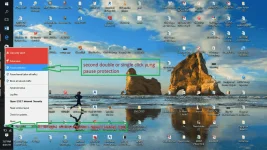
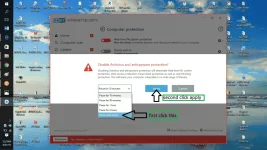
then may magpa-pop-up sa screen nyu na yes at no click nyu yes
Step2:
Exit nyu yung CryptoTab Browser nyu then open again just do it, kase dto magrerecommend ng new extension for IDM ang CryptoTab Browser nyu. Download nyu muna to latest IDM(correct if i am wrong) version 6.35 You do not have permission to view the full content of this post. Log in or register now. then lagay nyu sa new folder na ginawa nyu then extract nyu katulad nito..
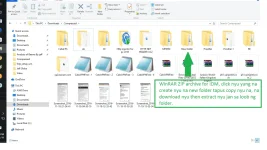
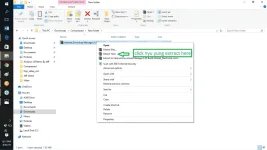
Step3:
open new folder na pinaglagyan nyu then...
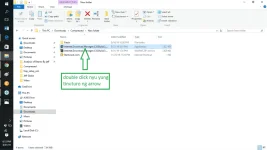
tapus may yes at no na lalabas sa screen click yes then tingnan natin ung pic sa baba
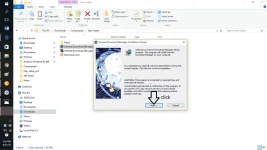
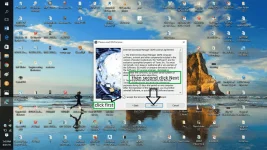
then click next ng 3 times, tapus after magload ng installer click finish kagaya neto..
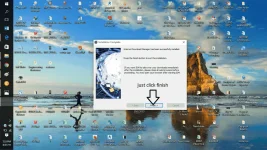
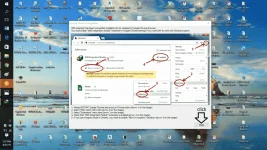
tapus punta agad sa CryptoTab Browser nyu pag may nag pop na you need to put your license key close nyu lang, so balik tayu sa CryptoTab Browser
open natin so tingnan sa picture na lang po sa baba.
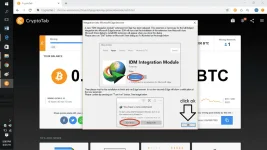
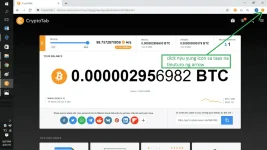
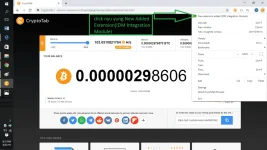
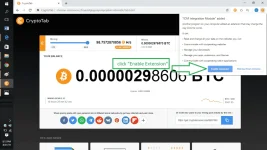
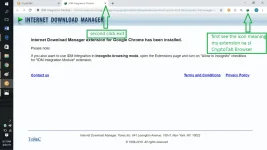
tapus hanapin ang icon ng IDM at click exit parang ganto
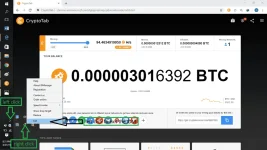
then hanapin sa desktop mo si IDM icon at e-right click then left click properties at click open file location parang ganto..
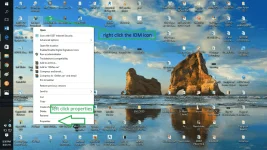
then go to the new folder na pinag-paste or cut mo ng na download mo na WinRAR ZIP ng IDM
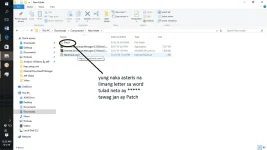
click yung folder na may name na ρá†ch then right click mo ung nag-iisa na file sa ρá†ch folder, kase iisa lang naman yun na laman ng ρá†ch folder
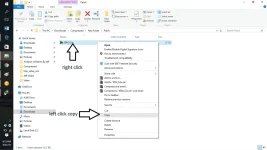
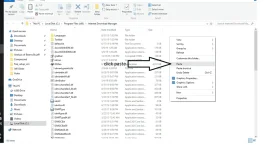
then punta sa local Disc C kung saan na save ung IDM hanapin ang folder na Internet download manager at e-open ito at doon e-paste ang file na na-copy sa loob ng ρá†ch folder katulad nito
then after ma paste may magpapakita sa screen mo eto sya..
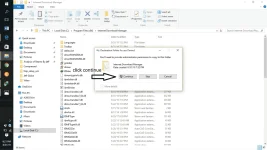
last is restart your pc or lop top enjoy guys tapus na! start na magbrowse parang google chrome with incentives(rewards) of bitcoin.
try nyu mag youtube kung maga-appear yung download logo ng idm sa mga video na e ple-play nyu but still sure ako dyan na maga-appear ang download logo. Pa-like at simpleng thank lang ok na ko.
"To GOD be the glory"
So ituturo ko pagset-up ng IDM(Internet Download Manager) for PC.
Step1:
First off nyu muna anti-virus protection nyu ang akin kasi eset so eto sya
then may magpa-pop-up sa screen nyu na yes at no click nyu yes
Step2:
Exit nyu yung CryptoTab Browser nyu then open again just do it, kase dto magrerecommend ng new extension for IDM ang CryptoTab Browser nyu. Download nyu muna to latest IDM(correct if i am wrong) version 6.35 You do not have permission to view the full content of this post. Log in or register now. then lagay nyu sa new folder na ginawa nyu then extract nyu katulad nito..
Step3:
open new folder na pinaglagyan nyu then...
tapus may yes at no na lalabas sa screen click yes then tingnan natin ung pic sa baba
then click next ng 3 times, tapus after magload ng installer click finish kagaya neto..
tapus punta agad sa CryptoTab Browser nyu pag may nag pop na you need to put your license key close nyu lang, so balik tayu sa CryptoTab Browser
open natin so tingnan sa picture na lang po sa baba.
tapus hanapin ang icon ng IDM at click exit parang ganto
then hanapin sa desktop mo si IDM icon at e-right click then left click properties at click open file location parang ganto..
then go to the new folder na pinag-paste or cut mo ng na download mo na WinRAR ZIP ng IDM
click yung folder na may name na ρá†ch then right click mo ung nag-iisa na file sa ρá†ch folder, kase iisa lang naman yun na laman ng ρá†ch folder
then punta sa local Disc C kung saan na save ung IDM hanapin ang folder na Internet download manager at e-open ito at doon e-paste ang file na na-copy sa loob ng ρá†ch folder katulad nito
then after ma paste may magpapakita sa screen mo eto sya..
last is restart your pc or lop top enjoy guys tapus na! start na magbrowse parang google chrome with incentives(rewards) of bitcoin.
try nyu mag youtube kung maga-appear yung download logo ng idm sa mga video na e ple-play nyu but still sure ako dyan na maga-appear ang download logo. Pa-like at simpleng thank lang ok na ko.
"To GOD be the glory"