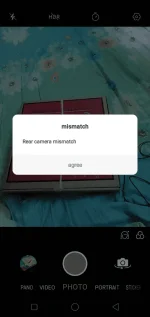
🔒 Closed Patulong naman po about Oppo Camera.

Status
Not open for further replies.
Ganito po nangyari mga paps. Baka po may alam kayo dito? Thanks
 

Attachments

  • Screenshot_2019-08-12-16-41-34-77.webp
    Screenshot_2019-08-12-16-41-34-77.webp
    81.3 KB · Views: 33
Na try mo na to paps
Clear camera's data and cache
For ColorOS 5.0: Go to [Settings]> [App Management]> [Show System Processes] > [Camera] > [Storage use] then click [Clear data] & [Clear cache]

For ColorOS 3.1 and 3.2: Go to [Settings]> [App Management> [All] > [Camera] >then click [Clear data] & [Clear cache]

For ColorOS 3.0 and below: Go to [Settings]> [Additional setting]> [Application Management]> [All] > [Camera] > then click [Clear data] & [Clearcache]

Source: You do not have permission to view the full content of this post. Log in or register now.
 
Na try mo na to paps
Clear camera's data and cache
For ColorOS 5.0: Go to [Settings]> [App Management]> [Show System Processes] > [Camera] > [Storage use] then click [Clear data] & [Clear cache]

For ColorOS 3.1 and 3.2: Go to [Settings]> [App Management> [All] > [Camera] >then click [Clear data] & [Clear cache]

For ColorOS 3.0 and below: Go to [Settings]> [Additional setting]> [Application Management]> [All] > [Camera] > then click [Clear data] & [Clearcache]

Source: You do not have permission to view the full content of this post. Log in or register now.
Nagawa ko na po paps pero la nangyare ganyan parin po
 
Status
Not open for further replies.

Similar threads

About this Thread

  • 5
    Replies
  • 627
    Views
  • 3
    Participants
Last reply from:
Unknown user

Online now

Members online
732
Guests online
7,608
Total visitors
8,340

Forum statistics

Threads
2,345,583
Posts
29,344,370
Members
1,102,943
Latest member
Dullah478
Back
Top