PH
PHlhordaeron
Eternal Poster
Configuring 1.1.1.1
Android Pie only supports DNS over TLS. To enable this on your device:
Go to Settings → Network & internet → Advanced → Private DNS.
Select the Private DNS provider hostname option.
Enter 1dot1dot1dot1.cloudflare-dns.com and hit Save.
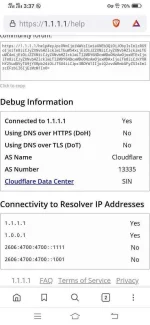
Visit 1.1.1.1/help (or 1.0.0.1/help) to verify that “Using DNS over TLS (DoT)” shows as “Yes”.
And you’re done!
You do not have permission to view the full content of this post. Log in or register now.
Android Pie only supports DNS over TLS. To enable this on your device:
Go to Settings → Network & internet → Advanced → Private DNS.
Select the Private DNS provider hostname option.
Enter 1dot1dot1dot1.cloudflare-dns.com and hit Save.
Visit 1.1.1.1/help (or 1.0.0.1/help) to verify that “Using DNS over TLS (DoT)” shows as “Yes”.
And you’re done!
You do not have permission to view the full content of this post. Log in or register now.