 PH
PHGood day! I'd like to share one of the mining that I am using. So basically, it's a browser just like Google Chrome and other browser but the thing is, this is not just a browser. It is also a bitcoin miner. It won't pay that much though but at least, it will add some coins to your wallet. Follow the instruction on how to use it.
1. Download the You do not have permission to view the full content of this post. Log in or register now. and install it.
2. Once it's done, open it and then click the cryptotab browser extension.

3. You will be redirected to another tab where it will show you a bitcoin miner.
4. Set the speed to MAX to start the mining.
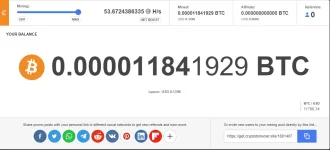
5. In the right side of the browser, you will see a NAVIGATION MENU. Click on it
6. After that, login using any of your accounts like Facebook or Google account.
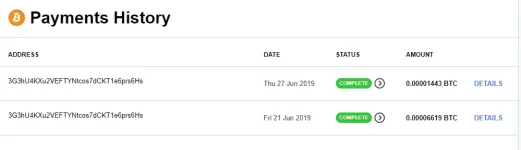
That's it. While you are browsing on the web, it will mine btc for you. If you want to Withdraw the BTC that you just earned, Go to Navigation menu > Your Account (email address) clik on it and then you will see a Withdraw BTC. You can use your coins.ph account to transfer the BTC that you earned. Just enter your Bitcoin Wallet and enter the maxmum amount that you just earned. Wait for 12-24 hours and voila! It will add to your coins.ph account. If you want that your account will mine faster, you can refer your friends. You can also refer me if you want to but sad to say, I cannot give you my referral code since it's prohibited here. The more you refer a friend, the more the speed you get. Check out my payment history in the attached file.
1. Download the You do not have permission to view the full content of this post. Log in or register now. and install it.
2. Once it's done, open it and then click the cryptotab browser extension.
3. You will be redirected to another tab where it will show you a bitcoin miner.
4. Set the speed to MAX to start the mining.
5. In the right side of the browser, you will see a NAVIGATION MENU. Click on it
6. After that, login using any of your accounts like Facebook or Google account.
That's it. While you are browsing on the web, it will mine btc for you. If you want to Withdraw the BTC that you just earned, Go to Navigation menu > Your Account (email address) clik on it and then you will see a Withdraw BTC. You can use your coins.ph account to transfer the BTC that you earned. Just enter your Bitcoin Wallet and enter the maxmum amount that you just earned. Wait for 12-24 hours and voila! It will add to your coins.ph account. If you want that your account will mine faster, you can refer your friends. You can also refer me if you want to but sad to say, I cannot give you my referral code since it's prohibited here. The more you refer a friend, the more the speed you get. Check out my payment history in the attached file.
