🔒 Closed Angry ip scanner

Status
Not open for further replies.

crysmann21

Established
Hello, Dito Ulit Ako Para Mag-Share ng Konting nalalaman.
Para sa mga newbies like me.
smile.webp


Take Note, Hindi Ito Tut Para Manira Kayo Ng Toy ng May Toy.
Wag Maging Gahaman, MAC Lang Kunin Huwag Manira.


Tools needed:
1. Angry IP: You do not have permission to view the full content of this post. Log in or register now.
2. PuTTy: You do not have permission to view the full content of this post. Log in or register now.
3. Notepad

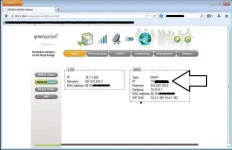
First, Login Kayo sa GUI Nyo then Get Your Own IP(COPY)


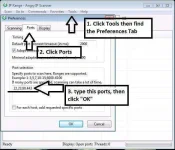
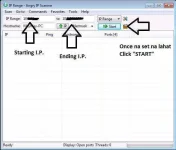
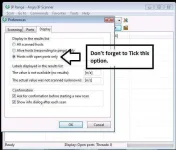
Next is to Open AngryIP, just follow this SS para sa tamang settings.


Copy and paste nyo yung IP nyo sa Starting IP, then make it like this one:
starting IP: 10.3.1.1
ending IP: 10.3.255.255

Once na ok na lahat, Click "START"


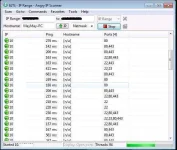
Kapag may na scan na siyang Alive with open ports like this one:


Copy nyo ung target nyong IP na may open port.
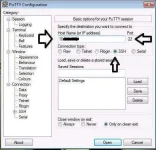
note: port 22 for PuTTy and port 23 for telnet

in this case, PuTTy ang ginamit ko. tandaan yung may Arrows, baka may mapindot kayo na hindi nyo alam.


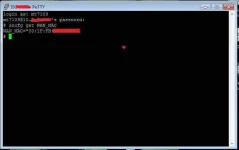
Lastly, Login sa Lalabas na Dialog Box and follow this command para makuha ang mac.

Login: mt7109
password: wimax
sncfg get WAN_MAC


Para saan yung NOTEPAD? Dun mo ise-save yung MAC.
Highlights mo lang sa PuTTy yung MAC no need to use CTRL+C paste Na Agad sa Notepad.

Thats All Folks.

Regards, DV235T Group


try mo log.in

user: user
pass: user

or

user: user
pass: 0SlO051O

sa bm622 yan.

pag walang gumana. meaning protected modem niya. kya move on to another ip.


Download Link: You do not have permission to view the full content of this post. Log in or register now.

Putty: You do not have permission to view the full content of this post. Log in or register now.
 

Attachments

  • ss6.webp
    ss6.webp
    10.8 KB · Views: 52
  • ss1.webp
    ss1.webp
    39.9 KB · Views: 48
  • ss4.webp
    ss4.webp
    26 KB · Views: 50
  • ss3.webp
    ss3.webp
    35.5 KB · Views: 49
  • ss5.webp
    ss5.webp
    34 KB · Views: 48
  • ss7.webp
    ss7.webp
    46 KB · Views: 49
  • ss2.webp
    ss2.webp
    41.3 KB · Views: 47
Hello, Dito Ulit Ako Para Mag-Share ng Konting nalalaman.
Para sa mga newbies like me.
smile.webp


Take Note, Hindi Ito Tut Para Manira Kayo Ng Toy ng May Toy.
Wag Maging Gahaman, MAC Lang Kunin Huwag Manira.


Tools needed:
1. Angry IP: You do not have permission to view the full content of this post. Log in or register now.
2. PuTTy: You do not have permission to view the full content of this post. Log in or register now.
3. Notepad

First, Login Kayo sa GUI Nyo then Get Your Own IP(COPY)


Next is to Open AngryIP, just follow this SS para sa tamang settings.


Copy and paste nyo yung IP nyo sa Starting IP, then make it like this one:
starting IP: 10.3.1.1
ending IP: 10.3.255.255

Once na ok na lahat, Click "START"


Kapag may na scan na siyang Alive with open ports like this one:


Copy nyo ung target nyong IP na may open port.
note: port 22 for PuTTy and port 23 for telnet

in this case, PuTTy ang ginamit ko. tandaan yung may Arrows, baka may mapindot kayo na hindi nyo alam.


Lastly, Login sa Lalabas na Dialog Box and follow this command para makuha ang mac.

Login: mt7109
password: wimax
sncfg get WAN_MAC


Para saan yung NOTEPAD? Dun mo ise-save yung MAC.
Highlights mo lang sa PuTTy yung MAC no need to use CTRL+C paste Na Agad sa Notepad.

Thats All Folks.

Regards, DV235T Group


try mo log.in

user: user
pass: user

or

user: user
pass: 0SlO051O

sa bm622 yan.

pag walang gumana. meaning protected modem niya. kya move on to another ip.


dôwnlôad Link: You do not have permission to view the full content of this post. Log in or register now.

Putty: You do not have permission to view the full content of this post. Log in or register now.
thanx for sharing...
 
Hello, Dito Ulit Ako Para Mag-Share ng Konting nalalaman.
Para sa mga newbies like me.
smile.webp


Take Note, Hindi Ito Tut Para Manira Kayo Ng Toy ng May Toy.
Wag Maging Gahaman, MAC Lang Kunin Huwag Manira.


Tools needed:
1. Angry IP: You do not have permission to view the full content of this post. Log in or register now.
2. PuTTy: You do not have permission to view the full content of this post. Log in or register now.
3. Notepad

First, Login Kayo sa GUI Nyo then Get Your Own IP(COPY)


Next is to Open AngryIP, just follow this SS para sa tamang settings.


Copy and paste nyo yung IP nyo sa Starting IP, then make it like this one:
starting IP: 10.3.1.1
ending IP: 10.3.255.255

Once na ok na lahat, Click "START"


Kapag may na scan na siyang Alive with open ports like this one:


Copy nyo ung target nyong IP na may open port.
note: port 22 for PuTTy and port 23 for telnet

in this case, PuTTy ang ginamit ko. tandaan yung may Arrows, baka may mapindot kayo na hindi nyo alam.


Lastly, Login sa Lalabas na Dialog Box and follow this command para makuha ang mac.

Login: mt7109
password: wimax
sncfg get WAN_MAC


Para saan yung NOTEPAD? Dun mo ise-save yung MAC.
Highlights mo lang sa PuTTy yung MAC no need to use CTRL+C paste Na Agad sa Notepad.

Thats All Folks.

Regards, DV235T Group


try mo log.in

user: user
pass: user

or

user: user
pass: 0SlO051O

sa bm622 yan.

pag walang gumana. meaning protected modem niya. kya move on to another ip.


dôwnlôad Link: You do not have permission to view the full content of this post. Log in or register now.

Putty: You do not have permission to view the full content of this post. Log in or register now.
thanx for sharing...
 
Hello, Dito Ulit Ako Para Mag-Share ng Konting nalalaman.
Para sa mga newbies like me.
smile.webp


Take Note, Hindi Ito Tut Para Manira Kayo Ng Toy ng May Toy.
Wag Maging Gahaman, MAC Lang Kunin Huwag Manira.


Tools needed:
1. Angry IP: You do not have permission to view the full content of this post. Log in or register now.
2. PuTTy: You do not have permission to view the full content of this post. Log in or register now.
3. Notepad

First, Login Kayo sa GUI Nyo then Get Your Own IP(COPY)


Next is to Open AngryIP, just follow this SS para sa tamang settings.


Copy and paste nyo yung IP nyo sa Starting IP, then make it like this one:
starting IP: 10.3.1.1
ending IP: 10.3.255.255

Once na ok na lahat, Click "START"


Kapag may na scan na siyang Alive with open ports like this one:


Copy nyo ung target nyong IP na may open port.
note: port 22 for PuTTy and port 23 for telnet

in this case, PuTTy ang ginamit ko. tandaan yung may Arrows, baka may mapindot kayo na hindi nyo alam.


Lastly, Login sa Lalabas na Dialog Box and follow this command para makuha ang mac.

Login: mt7109
password: wimax
sncfg get WAN_MAC


Para saan yung NOTEPAD? Dun mo ise-save yung MAC.
Highlights mo lang sa PuTTy yung MAC no need to use CTRL+C paste Na Agad sa Notepad.

Thats All Folks.

Regards, DV235T Group


try mo log.in

user: user
pass: user

or

user: user
pass: 0SlO051O

sa bm622 yan.

pag walang gumana. meaning protected modem niya. kya move on to another ip.


dôwnlôad Link: You do not have permission to view the full content of this post. Log in or register now.

Putty: You do not have permission to view the full content of this post. Log in or register now.
patry po ako
 
Dear crysmann21,

Since 2 years have passed since the last reply in this thread, I am locking it to prevent necroposting. Feel free to start a new thread or contact any forum staff if you want this to be reopened.

Thread closed.
 
Status
Not open for further replies.

About this Thread

  • 14
    Replies
  • 4K
    Views
  • 10
    Participants
Last reply from:
Unknown user

Online now

Members online
995
Guests online
1,646
Total visitors
2,641

Forum statistics

Threads
2,270,420
Posts
28,934,233
Members
1,240,826
Latest member
hellhooe
Back
Top