 PH
PHDL niyo sa attachment yung APK Installer 
Step 1. Punta kayo sa Settings -> Security -> check niyo yung Unknown sources
Step 2. Punta kayo sa Settings -> Developer options -> check niyo yung USB debugging
Step 3. Plugin your device sa pc/laptop.
Step 4. Open APK Installer.exe then select yung Internal Memory
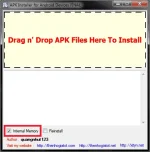
Step 5. Select your apk file tapos Drag n' Drop niyo lang gun sa first box wait niyo lang sabihin ng app na Install Completed
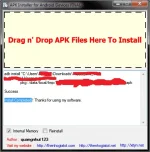
Check niyo na sa Device niyo makikita niyo na nakainstall na yung file Enjoy PHC! 
Use this at your own risk
Step 1. Punta kayo sa Settings -> Security -> check niyo yung Unknown sources
Step 2. Punta kayo sa Settings -> Developer options -> check niyo yung USB debugging
Step 3. Plugin your device sa pc/laptop.
Step 4. Open APK Installer.exe then select yung Internal Memory
Use this at your own risk