PH
PH- first download DC Unlocker You do not have permission to view the full content of this post.
Log in or register now.
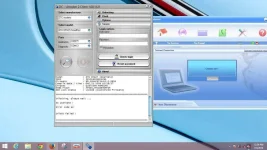
- after downloading . install the program .
- connect your broadband with sim that is not supported .
- Then Select Manufacturer

- sa model gawin natin ay auto detect


- kapag na detect na broadband nyo . click nyo unlocking tab . then click unlock (unlock na itong modem ko kaya unlock na lumabas at hindi na pwedeng pindutin si unlock)

- Viola ! unlock na modem nyo . congrats .
madaming models ang supported ni DC Unlocker . sa sobrang dami hindi ko na imemention . tingnan nyo na lang kung supported yong modem nyo .