PH
PHColorizing different folders in Windows


- Step 1: D0wnl0ad Folder Colorizer which is a third party tool used to assign colors to Folders in Windows
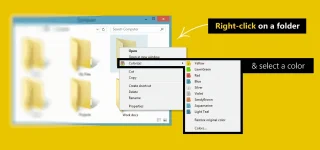
- Step 2: Install it and navigate to any folder that you wish to assign Color. Right Click on that folder and you will see Folder colorizer Integrated in the Context Menu.
- Step 3: Hover your Mouse on Colorize and Choose your Favourite color
- Step 4: After Choosing your favourite Color you will see that color has been assigned to the selected folder. repeat same steps for other Folders too.