 PH
PHComputer Technicians Quick Reference Guide
Useful DOS Commands:
Networking
ipconfig - Windows IP Configuration
ipconfig will tell you the IP settings for the current computer such as what your current IP is and what subnet/gateway
you are on. It is great for troubleshooting. Here are the two most useful commands for ipconfig and usage:
ipconfig /all – Views detailed information about the installed network devices.
ipconfig /release - This will release any IP information that the computer was given and make your IP address 0.0.0.0
ipconfig /renew - This will ask any DHCP servers (usually your modem/router) for a new IP address.
ping - Check a connection or computer
Ping is used to check the health of a connection. The ping command will tell you whether a network device is responding
and how fast it is running. The ping tool can also be used to convert a web address into an IP (eg. You do not have permission to view the full content of this post. Log in or register now. =74.125.19.99). Usage:
ping You do not have permission to view the full content of this post. Log in or register now. - Pings a webserver to see if it can be reached or is responding. I personally use this to see if the
computer I am on can reach the internet.
ping 192.168.0.1 - Pings a local address, often a modem, router or another computer.
netstat - Displays current TCP/IP connections
netstat - Will display what connections are currently active on the system. Useful for spotting programs calling back to
base such as spyware.
File Management
type - Open text files
Similar to Unix’s cat command, this command will display the contents of a text file in DOS as read-only. Usage:
type c:\sometextfile.txt
attrib - Make hidden files visible
Attrib can change the attributes of a file, such as whether its a system file or its hidden. This is especially useful to
technicians because critical files such as the boot.ini is a hidden system file:
attrib -H c:\boot.ini - To unhide the boot.ini
attrib -S c:\boot.ini - To make remove its system file attribute
For more options with this command, type attrib /?
find - Advanced file search
The find command is a very powerful one with many options such as the ability to search for something, but exclude
certain files. The following command will find all files with .pdf in their name on C:\
dir c:\ /s /b | find ".pdf"
For more information in this command and its usage, type find /?
move - Move files
Normal usage of the move command would be:
move file.txt c:\TextFiles\
However, you can also use it to move only certain files. For example, if I wanted to get all the PDF’s out of a folder and
move them to another location, but leave all other file types alone, I would do:
move *.pdf c:\WorkPDFs\
tree - View the tree structure
Type tree to see the folder and file structure of the folder you are currently in. You can also use this command to make
prints of the directory structure by sending the information to a text file with the following command tree > textfile.txt
System
systeminfo - Displays information about the system
systeminfo - Will display information about the system such as the name, version, uptime, specifications and patches
installed (XP Pro only by default).
tasklist / taskkill - Shows what programs are running on the computer and can kill them
tasklist - Will display all the processes running and their memory usage.
taskkill - Will kill a process (XP Pro only by default). Usage would be: taskkill firefox.exe
sfc - Launches Windows’ system file checker utility
sfc /scannow - This command will start scanning your computer for any damaged or missing windows system files.
Useful to run after a virus, adware or spyware attack has damaged core files. Have an XP CD handy for this one.
chkdsk - Can check a disk and attempt to recover data in bad sectors.
chkdsk /f /r - This will check a disk for errors and try and fixes information from bad sectors
chkdsk /x - Forces the volume to dismount first.
For further information/usage on any of these commands, you can bring up the help for each one of them by typing:
command /?
STOP Messages:
Stop 0x0000000A: IRQL_NOT_LESS_OR_EQUAL - This Windows stop error indicates that a kernal mode process or driver
tried to access a memory location that it did not have permission to access, or at a IRQL that was too high (a kernal
mode process can only access a IRQL that is lower than or equal to its own IRQL).
This stop message usually means that there is incompatible or faulty hardware. In personal experience its usually bad
ram.
Stop 0x000000D1: DRIVER_IRQL_NOT_LESS_OR_EQUAL - Note the "Driver" part at the start off the message, this isnt
the same as the error message above - This Windows stop error indicates that the computer tried to access memory
using a kernal process which had a IRQL that was too high (as kernal processes can only access IRQLs that it is either
equal to or IRQLs that less than it). This is usually caused by incorrect or incompatible drivers.
Stop 0x00000024: NTFS_FILE_SYSTEM - This Windows stop error typically indicates that a problem occured with the file
NTFS.sys such is the driver that allows the operating system to read and write to NTFS formatted harddrives. This can
often be caused by harddrive problems.
Stop 0x000000ED: UNMOUNTABLE_BOOT_VOLUME - This Windows stop error is caused by a Input/Output sub-system
tried to use the boot volume but failed. This error can occur during an upgrade to Windows XP Professional on
computers that use faster ATA harddrives or have controllers with the wrong cabling. This can sometimes be caused by a
failing hard drive.
Stop 0x00000050: PAGE_FAULT_IN_NONPAGED_AREA - This Windows stop error indicates that information that the
operating system was looking for was not found in memory (ram). This occurs when the system looks for information in
the ram that doesn’t exist. This is usually caused by defective RAM (including Ram on your motherboard, L2 cache and
video card ram).
Stop 0x0000002E: DATA_BUS_ERROR - This Windows stop error indicates an error in the system memory. It is caused
when the system tries to access a memory address that doesn’t exist. This usually is caused by defective or failed RAM
(including those on your motherboard, Level 2 case or the memory on your video card). This can also indicate hard drive
damage caused by viruses or other computer problems.
Stop 0x0000007B: INACCESSIBLE_BOOT_DEVICE - This Windows stop error indicates that Windows XP Professional is
unable to access the boot volume or system partition of your harddrive during startup.
Installing incorrect drivers for your harddrives or updating the storage adapter hardware usually causes this error. It is
also possible that the boot volume or system partition was damaged either by hardware failure or a virus infection.
Stop 0x000000EA: THREAD_STUCK_IN_DEVICE_DRIVER - This Windows stop error indicates that there is a problem with
a device driver (such as the video card driver) that is causing the system to pause indefinitely. This problem is usually
causes when the video card driver is waiting for the video card hardware to become idle but never does. This usually
indicates that there is a hardware problem with the video device or the video card driver is faulty.
Stop 0x0000008e: PAGE_FAULT_IN_NON_PAGED_AREA - This is typically caused by faulty RAM or the RAM
configuration you are running is incompatible with Windows XP.
Stop 0x00000044: MULTIPLE_IRP_COMPLETE_REQUESTS - This problem is primarily limited to Windows 2000 as is
caused by a bad driver called "falstaff.sys". This can be stopped by updating this driver from the vendor at
You do not have permission to view the full content of this post. Log in or register now.
Common Router/Modem Login Details:
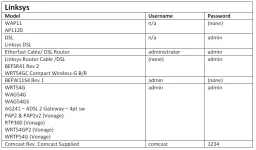
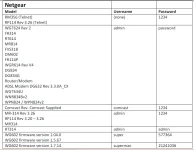

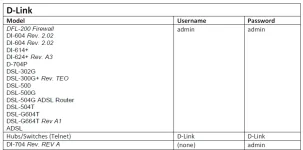
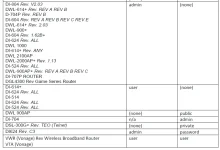
OpenDNS.com DNS Servers:
OpenDNS is a alternative DNS service to your ISP’s DNS servers. The advantages of OpenDNS is a safer, faster and more
reliable interet experience. OpenDNS allows you to put in parental controls, phishing protection, typo correction,
shortcuts and customization. For more information check out You do not have permission to view the full content of this post. Log in or register now.
To use open DNS, set your DNS servers to:
Primary Server: 208.67.222.222
Secondary Server: 208.67.220.220
Useful IP Addresses:
You can ping these addresses if you suspect that the current ISP is having DNS issues. These sites currently respond to
ping but it would be wise to test a few of them as they can change their IPs at any time or choose not to respond to ping.
The standard command for pinging a website in command prompt is: ping xxx.xxx.xxx.xxx
Google: 150.101.98.220 / 150.101.98.216
Wikipedia: 208.80.152.2
Yahoo: 209.131.36.158
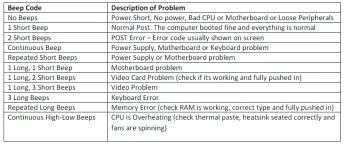
BIOS Beep Codes:
There are any different beep codes for different motherboards that could go on for pages and pages. However, most
motherboards now days adhere to the IBM standard beep codes with the exception of a few OEMs. Below are the IBM
beep codes:
Useful Links:
HijackThis Log Analyzer - You do not have permission to view the full content of this post. Log in or register now.
HijackThis.de is a “Hijack This!” Log Analyzer where you paste your Hijack This! logs into the website and it will tell you
what is potentially malicious and what is safe.
Test Single File for Virus – You do not have permission to view the full content of this post. Log in or register now.
Virustotal allows you to upload a single file to their website and it will be tested using a variety of anti-virus products
databases.
Test Internet Speed - You do not have permission to view the full content of this post. Log in or register now.
Speedtest allows you to test the speed of your internet connection, choose multiple mirrors to test from and compare
your results to other people in the area.
Find You Public IP Address - You do not have permission to view the full content of this post. Log in or register now.
Displays your public IP address, nothing more. Simple but useful.
Online Virus Scanner - You do not have permission to view the full content of this post. Log in or register now.
A online virus scanner to scan your computer for viruses.
Find Hardware Drivers - You do not have permission to view the full content of this post. Log in or register now.
A site with a huge collection of drivers for all sorts of hardware.
Router Passwords - You do not have permission to view the full content of this post. Log in or register now.
Contains a list of the default passwords for various router models.
Replace Missing or Damaged DLLs - You do not have permission to view the full content of this post. Log in or register now.
Contains many different DLL’s which are available for download. Handy when an application is missing a certain DLL that
is preventing it from running.
Check Windows Processes - You do not have permission to view the full content of this post. Log in or register now.
A searchable list of Windows processes. Just enter the name of the process (for example, svchost.exe) and it will let you
know whether it is malicious, safe or unneeded.
Computer Manuals - You do not have permission to view the full content of this post. Log in or register now.
This place has 5260+ manuals for various computer manufacturers, parts and peripherals. They have manuals for
Printers, Laptops, Networking Equipment, Uninterruptible Power Supplies, Scanners, Motherboards, Audio adapters and
more.
Computer Manufacturer Links - You do not have permission to view the full content of this post. Log in or register now.
If you know the name of a computer manufacturer, this list has their web address. A handy site when you are trying to
find drivers for a rare part.
Shields Up! Firewall Leak Test - You do not have permission to view the full content of this post. Log in or register now.
This website/server probes your computer looking for any open ports and vulnerabilities then creates a report.
Kellys XP Tweaks - You do not have permission to view the full content of this post. Log in or register now.
If there is a little nagging bug in Windows that you cant figure out or just want to disable something that annoys you,
chances are there is a registry tweak for it here.
Doug Knox XP Tweaks and Fixes - You do not have permission to view the full content of this post. Log in or register now.
Similar to Kellys XP Tweaks.
List of Open Source Software - You do not have permission to view the full content of this post. Log in or register now.
A nicely ordered list for open source (free) software packages.
Freeware Alternatives:
Virus Protection
AVG Free - You do not have permission to view the full content of this post. Log in or register now.
AVG Free is one of my personal favorites and remains a favorite amonst most of the techicians on the Technibble
forums. It has a very extensive virus database and will detect anything that a major antivirus brand such as Norton can
detect. In fact, there have been a few times while I was on the field that AVG found viruses that Norton/McAfee didnt
detect at all.
Avira Antivir - You do not have permission to view the full content of this post. Log in or register now.
Avira Antivir is an antivirus I have seen only a couple of times on clients machines in the field. I have to say, its resident
virus shield is awsome. One time when I was onsite, I plugged in my USB drive with all my computer technician tools on
it. As soon as it was in, Avira detected a virus on my USB drive and asked me what I wanted to do with it. I hadnt run
anything on the drive, I hadnt even looked at the drive in My Computer yet. Just plugged it in. It turns out it discovered
the the Eicar virus which is a test file that computer technicians can use to test the capabilities of antivirus software.
Avira is a little “heavier” on system resources than AVG, but not by much.
avast! - You do not have permission to view the full content of this post. Log in or register now.
Another good antivirus. I’ve seen it many times onsite and it does its job well.
Child Filtering Software
K9 Web Protection - You do not have permission to view the full content of this post. Log in or register now.
A great parental filter with many features such as the ability to set the protection based on the child’s age.
Backup Utility
Cobain Backup - You do not have permission to view the full content of this post. Log in or register now.
I really like Cobain Backup and use this piece of software myself. It’s simple enough for home users to setup, yet is
powerful and feature packed for the computer technicians. Cobain Backup can run as a service and backup to FTPs.
Office Suite (Word Processing, Spreadsheets etc..)
Open Office - You do not have permission to view the full content of this post. Log in or register now.
Open Office looks and feels like the Microsoft Office package. It can do pretty much anything MSOffice can do without
the nasty price tag.
Firewall
Zonealarm Firewall - You do not have permission to view the full content of this post. Log in or register now.
For the more knowledgeable clients, I recommend Zonealarm, provided they know a little bit about processes and
security. Otherwise they don’t know what the security popups mean and just allow anything. For the nonknowledgeable
clients, I just use the built in Windows firewall.
Media Player
VLC Media Player - You do not have permission to view the full content of this post. Log in or register now.
I love VLC. There have been many times where a client cannot play the video they want in Windows Media Player
because its lacking the correct codec. I just install VLC and it fixes most of their problems. VLC is lighter, faster and less
prone to breaking than Windows Media Player.
PDF Creation
PDF Creator - You do not have permission to view the full content of this post. Log in or register now.
PDF Creator installs itself as a printer so that it can export to PDF in almost any program that you can print in. Just select
PDF Creator as your printer and it will save that document as a PDF.
Resizing Images
Image Resizer Powertoy - You do not have permission to view the full content of this post. Log in or register now.
ImageResizerPowertoySetup.exe
Many of my clients want to send digital photos via email to relatives or post some pictures on eBay. However, most
digital cameras take poster sized photos which can often be 1mb or more. The Image Resizer Powertoy allows you to
right click on any photograph, select “Resize Picture” and choose what size you want the picture to be.
Photo Editing
Paint.net - You do not have permission to view the full content of this post. Log in or register now.
I used to work as a web developer, so I know my way around graphics software like Photoshop. Ive used Paint.net a few
times and I must say that it has great features and comparable to Adobe Photoshop, except about $1000 cheaper.
Picasa - You do not have permission to view the full content of this post. Log in or register now.
Organise, edit and share your photos
PDF Reader
FoxIt Reader - You do not have permission to view the full content of this post. Log in or register now.
FoxIt Reader is a lightweight alternative to Adobe Acrobat Reader for reading PDFs. The install file for Adobe Acrobat is
22mb, FoxIt Reader does it in 2mb and has almost all of the same features.
Web Browser
Firefox – You do not have permission to view the full content of this post. Log in or register now.
Opera Web Browser - You do not have permission to view the full content of this post. Log in or register now.
Chrome Browser - You do not have permission to view the full content of this post. Log in or register now.
Faster, more secure and a better alternative to Internet Explorer.
Email Client
Thunderbird - You do not have permission to view the full content of this post. Log in or register now.
Faster, more secure and better alternative to Outlook E×ρréšš.
Music Player
Winamp – You do not have permission to view the full content of this post. Log in or register now.
A lightweight and very well featured Music Player. Runs much quicker than Windows Media Player
Archive Extractor (zip, rar, tar etc..)
7-Zip - You do not have permission to view the full content of this post. Log in or register now.
7-Zip can create and extract many different archive types such as Zip, Rar, Tar, Arj, .Gz, preventing you from needing
multiple archive extractors such as Winzip, Winrar, Winace etc.
Anti-Spam
Spamfighter Free - You do not have permission to view the full content of this post. Log in or register now.
I have used this on many clients computers and it works very well. It comes pre trained to deflect most spam and has
the ability to learn even more based on your preferences.
Useful DOS Commands:
Networking
ipconfig - Windows IP Configuration
ipconfig will tell you the IP settings for the current computer such as what your current IP is and what subnet/gateway
you are on. It is great for troubleshooting. Here are the two most useful commands for ipconfig and usage:
ipconfig /all – Views detailed information about the installed network devices.
ipconfig /release - This will release any IP information that the computer was given and make your IP address 0.0.0.0
ipconfig /renew - This will ask any DHCP servers (usually your modem/router) for a new IP address.
ping - Check a connection or computer
Ping is used to check the health of a connection. The ping command will tell you whether a network device is responding
and how fast it is running. The ping tool can also be used to convert a web address into an IP (eg. You do not have permission to view the full content of this post. Log in or register now. =74.125.19.99). Usage:
ping You do not have permission to view the full content of this post. Log in or register now. - Pings a webserver to see if it can be reached or is responding. I personally use this to see if the
computer I am on can reach the internet.
ping 192.168.0.1 - Pings a local address, often a modem, router or another computer.
netstat - Displays current TCP/IP connections
netstat - Will display what connections are currently active on the system. Useful for spotting programs calling back to
base such as spyware.
File Management
type - Open text files
Similar to Unix’s cat command, this command will display the contents of a text file in DOS as read-only. Usage:
type c:\sometextfile.txt
attrib - Make hidden files visible
Attrib can change the attributes of a file, such as whether its a system file or its hidden. This is especially useful to
technicians because critical files such as the boot.ini is a hidden system file:
attrib -H c:\boot.ini - To unhide the boot.ini
attrib -S c:\boot.ini - To make remove its system file attribute
For more options with this command, type attrib /?
find - Advanced file search
The find command is a very powerful one with many options such as the ability to search for something, but exclude
certain files. The following command will find all files with .pdf in their name on C:\
dir c:\ /s /b | find ".pdf"
For more information in this command and its usage, type find /?
move - Move files
Normal usage of the move command would be:
move file.txt c:\TextFiles\
However, you can also use it to move only certain files. For example, if I wanted to get all the PDF’s out of a folder and
move them to another location, but leave all other file types alone, I would do:
move *.pdf c:\WorkPDFs\
tree - View the tree structure
Type tree to see the folder and file structure of the folder you are currently in. You can also use this command to make
prints of the directory structure by sending the information to a text file with the following command tree > textfile.txt
System
systeminfo - Displays information about the system
systeminfo - Will display information about the system such as the name, version, uptime, specifications and patches
installed (XP Pro only by default).
tasklist / taskkill - Shows what programs are running on the computer and can kill them
tasklist - Will display all the processes running and their memory usage.
taskkill - Will kill a process (XP Pro only by default). Usage would be: taskkill firefox.exe
sfc - Launches Windows’ system file checker utility
sfc /scannow - This command will start scanning your computer for any damaged or missing windows system files.
Useful to run after a virus, adware or spyware attack has damaged core files. Have an XP CD handy for this one.
chkdsk - Can check a disk and attempt to recover data in bad sectors.
chkdsk /f /r - This will check a disk for errors and try and fixes information from bad sectors
chkdsk /x - Forces the volume to dismount first.
For further information/usage on any of these commands, you can bring up the help for each one of them by typing:
command /?
STOP Messages:
Stop 0x0000000A: IRQL_NOT_LESS_OR_EQUAL - This Windows stop error indicates that a kernal mode process or driver
tried to access a memory location that it did not have permission to access, or at a IRQL that was too high (a kernal
mode process can only access a IRQL that is lower than or equal to its own IRQL).
This stop message usually means that there is incompatible or faulty hardware. In personal experience its usually bad
ram.
Stop 0x000000D1: DRIVER_IRQL_NOT_LESS_OR_EQUAL - Note the "Driver" part at the start off the message, this isnt
the same as the error message above - This Windows stop error indicates that the computer tried to access memory
using a kernal process which had a IRQL that was too high (as kernal processes can only access IRQLs that it is either
equal to or IRQLs that less than it). This is usually caused by incorrect or incompatible drivers.
Stop 0x00000024: NTFS_FILE_SYSTEM - This Windows stop error typically indicates that a problem occured with the file
NTFS.sys such is the driver that allows the operating system to read and write to NTFS formatted harddrives. This can
often be caused by harddrive problems.
Stop 0x000000ED: UNMOUNTABLE_BOOT_VOLUME - This Windows stop error is caused by a Input/Output sub-system
tried to use the boot volume but failed. This error can occur during an upgrade to Windows XP Professional on
computers that use faster ATA harddrives or have controllers with the wrong cabling. This can sometimes be caused by a
failing hard drive.
Stop 0x00000050: PAGE_FAULT_IN_NONPAGED_AREA - This Windows stop error indicates that information that the
operating system was looking for was not found in memory (ram). This occurs when the system looks for information in
the ram that doesn’t exist. This is usually caused by defective RAM (including Ram on your motherboard, L2 cache and
video card ram).
Stop 0x0000002E: DATA_BUS_ERROR - This Windows stop error indicates an error in the system memory. It is caused
when the system tries to access a memory address that doesn’t exist. This usually is caused by defective or failed RAM
(including those on your motherboard, Level 2 case or the memory on your video card). This can also indicate hard drive
damage caused by viruses or other computer problems.
Stop 0x0000007B: INACCESSIBLE_BOOT_DEVICE - This Windows stop error indicates that Windows XP Professional is
unable to access the boot volume or system partition of your harddrive during startup.
Installing incorrect drivers for your harddrives or updating the storage adapter hardware usually causes this error. It is
also possible that the boot volume or system partition was damaged either by hardware failure or a virus infection.
Stop 0x000000EA: THREAD_STUCK_IN_DEVICE_DRIVER - This Windows stop error indicates that there is a problem with
a device driver (such as the video card driver) that is causing the system to pause indefinitely. This problem is usually
causes when the video card driver is waiting for the video card hardware to become idle but never does. This usually
indicates that there is a hardware problem with the video device or the video card driver is faulty.
Stop 0x0000008e: PAGE_FAULT_IN_NON_PAGED_AREA - This is typically caused by faulty RAM or the RAM
configuration you are running is incompatible with Windows XP.
Stop 0x00000044: MULTIPLE_IRP_COMPLETE_REQUESTS - This problem is primarily limited to Windows 2000 as is
caused by a bad driver called "falstaff.sys". This can be stopped by updating this driver from the vendor at
You do not have permission to view the full content of this post. Log in or register now.
Common Router/Modem Login Details:
OpenDNS.com DNS Servers:
OpenDNS is a alternative DNS service to your ISP’s DNS servers. The advantages of OpenDNS is a safer, faster and more
reliable interet experience. OpenDNS allows you to put in parental controls, phishing protection, typo correction,
shortcuts and customization. For more information check out You do not have permission to view the full content of this post. Log in or register now.
To use open DNS, set your DNS servers to:
Primary Server: 208.67.222.222
Secondary Server: 208.67.220.220
Useful IP Addresses:
You can ping these addresses if you suspect that the current ISP is having DNS issues. These sites currently respond to
ping but it would be wise to test a few of them as they can change their IPs at any time or choose not to respond to ping.
The standard command for pinging a website in command prompt is: ping xxx.xxx.xxx.xxx
Google: 150.101.98.220 / 150.101.98.216
Wikipedia: 208.80.152.2
Yahoo: 209.131.36.158
BIOS Beep Codes:
There are any different beep codes for different motherboards that could go on for pages and pages. However, most
motherboards now days adhere to the IBM standard beep codes with the exception of a few OEMs. Below are the IBM
beep codes:
Useful Links:
HijackThis Log Analyzer - You do not have permission to view the full content of this post. Log in or register now.
HijackThis.de is a “Hijack This!” Log Analyzer where you paste your Hijack This! logs into the website and it will tell you
what is potentially malicious and what is safe.
Test Single File for Virus – You do not have permission to view the full content of this post. Log in or register now.
Virustotal allows you to upload a single file to their website and it will be tested using a variety of anti-virus products
databases.
Test Internet Speed - You do not have permission to view the full content of this post. Log in or register now.
Speedtest allows you to test the speed of your internet connection, choose multiple mirrors to test from and compare
your results to other people in the area.
Find You Public IP Address - You do not have permission to view the full content of this post. Log in or register now.
Displays your public IP address, nothing more. Simple but useful.
Online Virus Scanner - You do not have permission to view the full content of this post. Log in or register now.
A online virus scanner to scan your computer for viruses.
Find Hardware Drivers - You do not have permission to view the full content of this post. Log in or register now.
A site with a huge collection of drivers for all sorts of hardware.
Router Passwords - You do not have permission to view the full content of this post. Log in or register now.
Contains a list of the default passwords for various router models.
Replace Missing or Damaged DLLs - You do not have permission to view the full content of this post. Log in or register now.
Contains many different DLL’s which are available for download. Handy when an application is missing a certain DLL that
is preventing it from running.
Check Windows Processes - You do not have permission to view the full content of this post. Log in or register now.
A searchable list of Windows processes. Just enter the name of the process (for example, svchost.exe) and it will let you
know whether it is malicious, safe or unneeded.
Computer Manuals - You do not have permission to view the full content of this post. Log in or register now.
This place has 5260+ manuals for various computer manufacturers, parts and peripherals. They have manuals for
Printers, Laptops, Networking Equipment, Uninterruptible Power Supplies, Scanners, Motherboards, Audio adapters and
more.
Computer Manufacturer Links - You do not have permission to view the full content of this post. Log in or register now.
If you know the name of a computer manufacturer, this list has their web address. A handy site when you are trying to
find drivers for a rare part.
Shields Up! Firewall Leak Test - You do not have permission to view the full content of this post. Log in or register now.
This website/server probes your computer looking for any open ports and vulnerabilities then creates a report.
Kellys XP Tweaks - You do not have permission to view the full content of this post. Log in or register now.
If there is a little nagging bug in Windows that you cant figure out or just want to disable something that annoys you,
chances are there is a registry tweak for it here.
Doug Knox XP Tweaks and Fixes - You do not have permission to view the full content of this post. Log in or register now.
Similar to Kellys XP Tweaks.
List of Open Source Software - You do not have permission to view the full content of this post. Log in or register now.
A nicely ordered list for open source (free) software packages.
Freeware Alternatives:
Virus Protection
AVG Free - You do not have permission to view the full content of this post. Log in or register now.
AVG Free is one of my personal favorites and remains a favorite amonst most of the techicians on the Technibble
forums. It has a very extensive virus database and will detect anything that a major antivirus brand such as Norton can
detect. In fact, there have been a few times while I was on the field that AVG found viruses that Norton/McAfee didnt
detect at all.
Avira Antivir - You do not have permission to view the full content of this post. Log in or register now.
Avira Antivir is an antivirus I have seen only a couple of times on clients machines in the field. I have to say, its resident
virus shield is awsome. One time when I was onsite, I plugged in my USB drive with all my computer technician tools on
it. As soon as it was in, Avira detected a virus on my USB drive and asked me what I wanted to do with it. I hadnt run
anything on the drive, I hadnt even looked at the drive in My Computer yet. Just plugged it in. It turns out it discovered
the the Eicar virus which is a test file that computer technicians can use to test the capabilities of antivirus software.
Avira is a little “heavier” on system resources than AVG, but not by much.
avast! - You do not have permission to view the full content of this post. Log in or register now.
Another good antivirus. I’ve seen it many times onsite and it does its job well.
Child Filtering Software
K9 Web Protection - You do not have permission to view the full content of this post. Log in or register now.
A great parental filter with many features such as the ability to set the protection based on the child’s age.
Backup Utility
Cobain Backup - You do not have permission to view the full content of this post. Log in or register now.
I really like Cobain Backup and use this piece of software myself. It’s simple enough for home users to setup, yet is
powerful and feature packed for the computer technicians. Cobain Backup can run as a service and backup to FTPs.
Office Suite (Word Processing, Spreadsheets etc..)
Open Office - You do not have permission to view the full content of this post. Log in or register now.
Open Office looks and feels like the Microsoft Office package. It can do pretty much anything MSOffice can do without
the nasty price tag.
Firewall
Zonealarm Firewall - You do not have permission to view the full content of this post. Log in or register now.
For the more knowledgeable clients, I recommend Zonealarm, provided they know a little bit about processes and
security. Otherwise they don’t know what the security popups mean and just allow anything. For the nonknowledgeable
clients, I just use the built in Windows firewall.
Media Player
VLC Media Player - You do not have permission to view the full content of this post. Log in or register now.
I love VLC. There have been many times where a client cannot play the video they want in Windows Media Player
because its lacking the correct codec. I just install VLC and it fixes most of their problems. VLC is lighter, faster and less
prone to breaking than Windows Media Player.
PDF Creation
PDF Creator - You do not have permission to view the full content of this post. Log in or register now.
PDF Creator installs itself as a printer so that it can export to PDF in almost any program that you can print in. Just select
PDF Creator as your printer and it will save that document as a PDF.
Resizing Images
Image Resizer Powertoy - You do not have permission to view the full content of this post. Log in or register now.
ImageResizerPowertoySetup.exe
Many of my clients want to send digital photos via email to relatives or post some pictures on eBay. However, most
digital cameras take poster sized photos which can often be 1mb or more. The Image Resizer Powertoy allows you to
right click on any photograph, select “Resize Picture” and choose what size you want the picture to be.
Photo Editing
Paint.net - You do not have permission to view the full content of this post. Log in or register now.
I used to work as a web developer, so I know my way around graphics software like Photoshop. Ive used Paint.net a few
times and I must say that it has great features and comparable to Adobe Photoshop, except about $1000 cheaper.
Picasa - You do not have permission to view the full content of this post. Log in or register now.
Organise, edit and share your photos
PDF Reader
FoxIt Reader - You do not have permission to view the full content of this post. Log in or register now.
FoxIt Reader is a lightweight alternative to Adobe Acrobat Reader for reading PDFs. The install file for Adobe Acrobat is
22mb, FoxIt Reader does it in 2mb and has almost all of the same features.
Web Browser
Firefox – You do not have permission to view the full content of this post. Log in or register now.
Opera Web Browser - You do not have permission to view the full content of this post. Log in or register now.
Chrome Browser - You do not have permission to view the full content of this post. Log in or register now.
Faster, more secure and a better alternative to Internet Explorer.
Email Client
Thunderbird - You do not have permission to view the full content of this post. Log in or register now.
Faster, more secure and better alternative to Outlook E×ρréšš.
Music Player
Winamp – You do not have permission to view the full content of this post. Log in or register now.
A lightweight and very well featured Music Player. Runs much quicker than Windows Media Player
Archive Extractor (zip, rar, tar etc..)
7-Zip - You do not have permission to view the full content of this post. Log in or register now.
7-Zip can create and extract many different archive types such as Zip, Rar, Tar, Arj, .Gz, preventing you from needing
multiple archive extractors such as Winzip, Winrar, Winace etc.
Anti-Spam
Spamfighter Free - You do not have permission to view the full content of this post. Log in or register now.
I have used this on many clients computers and it works very well. It comes pre trained to deflect most spam and has
the ability to learn even more based on your preferences.

 Malaking tulong ito sa akin
