 PH
PH100% Free!
I just want to Share itong matagal ko ng gamit ng pang Linis ng Adware na
Hindi kaya ng mga Anti-Virus
Direct download:
You do not have permission to view the full content of this post. Log in or register now.You do not have permission to view the full content of this post. Log in or register now.You do not have permission to view the full content of this post. Log in or register now.
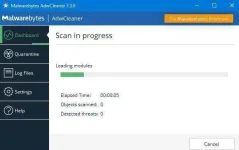
How to Install & use:
1. Right click the Adwcleaner 7.3 & Run as administrator
2. Accept the Agreement, just click "Agree"
3. Click Scan to start scanning any adware on your PC

4. If object or treat found click on clean.
5. Click Clean & Restart, make sure you closed any open apps on your PC
Notes:
If new update is detected just click on "Cancel" not to download the new latest Adwcleaner.
This is to proceed with scanning your PC.

Tip:
I just want to Share itong matagal ko ng gamit ng pang Linis ng Adware na
Hindi kaya ng mga Anti-Virus
Direct download:
You do not have permission to view the full content of this post. Log in or register now.You do not have permission to view the full content of this post. Log in or register now.You do not have permission to view the full content of this post. Log in or register now.
- Adware (ads software)
- PUP/LPI (Potentially Undesirable Program)
- Toolbars
- Hijacker (Hijack of the browser's homepage)
- Compatible with Windows 7, 8, 8.1, 10 in 32 & 64 bits.
- Compatible with other anti-virus (No conflict in installing)
How to Install & use:
1. Right click the Adwcleaner 7.3 & Run as administrator
2. Accept the Agreement, just click "Agree"
3. Click Scan to start scanning any adware on your PC
4. If object or treat found click on clean.
5. Click Clean & Restart, make sure you closed any open apps on your PC
Notes:
If new update is detected just click on "Cancel" not to download the new latest Adwcleaner.
This is to proceed with scanning your PC.
Tip:
- Create shortcut link on your Desktop for easy access on running the Adwcleaner:
- After shortcut created, On the icon of Adwcleaner just "Right-click" & click Property
- Click "Advanced"
- Tick/click "Run as Administrator
- Click Apply & a pop-up window appear just click "Continue" to complete operation.
- Click "Ok" button to exit

