🔒 Closed Huawei B593s-22 Globe LTE Modem Unlock

Status
Not open for further replies.

erwinzkie005

Journeyman
622566

procedure

  1. Go to your web gui, on browser 192.168.254.254 and login using user user/ passl03e1t3
  2. Copy your device imei (ex. 86009102399XXXX) - on product information tab.
  3. Generate the unlock code by going to You do not have permission to view the full content of this post. Log in or register now.
  4. Use your Google account and hit +1 be sure to encode every details.
  5. Put your IMEI and copy the red generated NEW ALGO (usually 8 digits)
  6. Insert any SIM except Globe (SMART recommended)
  7. Log-in again to 192.168.254.254 just ignore the message invalid SIM
  8. Use the user account again user/l03e1t3
Procedure: Phase 2
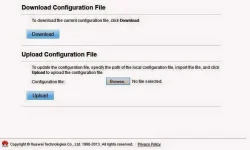
  1. Download the config file You do not have permission to view the full content of this post. Log in or register now.
  2. Upload the config file by going to system - scroll down till you see "Upload Configuration File", click browse choose file then upload.
Huawei-b593s-22-unlock-tut.webp

  1. The LTE modem will reboot
Procedure: Phase 3
  1. This time go to 192.168.1.1 on your browser
  2. Log-in as admin user admin/ pass password123
  3. Navigate to INTERNET tab and paste the NEW ALGO code.
  4. Your Huawei B593s-22 is now openline.
Using SMART LTE SIM: APN and Settings
  • To create an APN go to internet, next apn management, and add profile. For profile name you can use any name doesn't matter, APN is internet leave everything else blank.
  • Go to network mode and select the available network in your area WCDMA or LTE only. Don't forget to switch profile when changing SIM's.
  • Explore and tweak your modem's WIFI and password as you desire.
 
View attachment 622566
procedure

  1. Go to your web gui, on browser 192.168.254.254 and login using user user/ passl03e1t3
  2. Copy your device imei (ex. 86009102399XXXX) - on product information tab.
  3. Generate the unlock code by going to You do not have permission to view the full content of this post. Log in or register now.
  4. Use your Google account and hit +1 be sure to encode every details.
  5. Put your IMEI and copy the red generated NEW ALGO (usually 8 digits)
  6. Insert any SIM except Globe (SMART recommended)
  7. Log-in again to 192.168.254.254 just ignore the message invalid SIM
  8. Use the user account again user/l03e1t3
Procedure: Phase 2
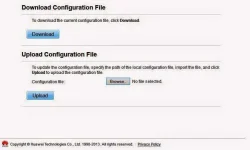
  1. Download the config file You do not have permission to view the full content of this post. Log in or register now.
  2. Upload the config file by going to system - scroll down till you see "Upload Configuration File", click browse choose file then upload.
Huawei-b593s-22-unlock-tut.webp
d nmn mka kuha ng credits s calculator o credits dw
  1. The LTE modem will reboot
Procedure: Phase 3
  1. This time go to 192.168.1.1 on your browser
  2. Log-in as admin user admin/ pass password123
  3. Navigate to INTERNET tab and paste the NEW ALGO code.
  4. Your Huawei B593s-22 is now openline.
Using SMART LTE SIM: APN and Settings
  • To create an APN go to internet, next apn management, and add profile. For profile name you can use any name doesn't matter, APN is internet leave everything else blank.
  • Go to network mode and select the available network in your area WCDMA or LTE only. Don't forget to switch profile when changing SIM's.
  • Explore and tweak your modem's WIFI and password as you desire.
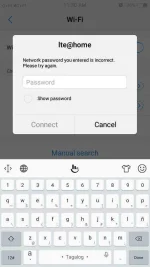
 
boss bat kya yung s22 ko my error pag nag aupload nko CANT MODIFIED ROUTER PLS TRY AGAIN AFTER THE CALL o kahit anung set ang gawin ko yan ang nalabas..i dedebrand at i aunlock ko sana eh..
SP30 AUGUST FIRMWARE
Vr.B..SALAMAT SA MAKAKA TULONG...
 
Sir after ko po ngreboot my password sa wifi..ano po password nito?
 

Attachments

  • Screenshot_20190727_113001.webp
    Screenshot_20190727_113001.webp
    32.1 KB · Views: 55
Status
Not open for further replies.

About this Thread

  • 43
    Replies
  • 13K
    Views
  • 24
    Participants
Last reply from:
bongsul

Online now

Members online
1,038
Guests online
1,388
Total visitors
2,426

Forum statistics

Threads
2,278,556
Posts
28,984,230
Members
1,227,457
Latest member
XerxesFaust
Back
Top