 PH
PHrecycled na tong post na to, hehe.
[a] Open computer management
Under Storage, Choose Disk Management

[c] Right click the partition then choose delete.
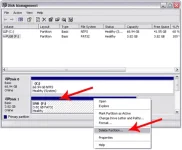
[d] Ang lalabas ay parang itim so ito ay unallocated, so what you need to do is piliin ang pinagkuhanan ng partition or drive na ginawan mo ng partition, right click mo yun then choose Extend volume.
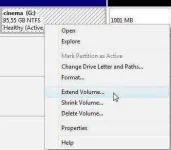
[e] Wala na yung ginawa mong partition at bumalik na sa dati ang drive C mo
=====================================
AT DOON AKO NATUTO SA PAGGAWA NG PARTITION
[a] Open computer management
Under Storage, Choose Disk Management
[c] Right click the partition then choose delete.
[d] Ang lalabas ay parang itim so ito ay unallocated, so what you need to do is piliin ang pinagkuhanan ng partition or drive na ginawan mo ng partition, right click mo yun then choose Extend volume.
[e] Wala na yung ginawa mong partition at bumalik na sa dati ang drive C mo
=====================================
AT DOON AKO NATUTO SA PAGGAWA NG PARTITION
