PH
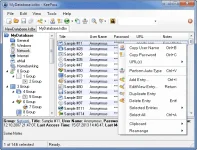
PHKeePass is a free open source password manager,
which helps you to manage your passwords in a secure way..

You can put all your passwords in one database,
which is locked with one master key or a key file..
So you only have to remember one single master password
or select the key file to unlock the whole database..
The databases are encrypted using the best
and most secure encryption algorithms..
KeePass supports the Advanced Encryption Standard (AES, Rijndael)
and the Twofish algorithm to encrypt its password databases..
Both of these ciphers are regarded as being very secure.
AES e.g. became effective as a U.S. Federal government standard
and is approved by the National Security Agency (NSA) for top secret information..
A password database consists of only one file that can be transferred from one computer to another easily.
KeePass All Features:
Supported Operating Systems: Windows 2000, XP, Vista, Windows 7, Windows 8 (32-bit & 64-bit).
Changes in KeePass 1.27:
New Features:
– Password text boxes now use a monospace font.
– The ‘Find in this Group’ function now also searches in subgroups of the selected group.
– {OPERA} placeholder: updated detection code to also support the latest versions of Opera.
– Enhanced Internet Explorer detection.
– Added high resolution version of the KeePass application icon.
Improvements:
– Improved realization of the {CLEARFIELD} command (now using Bksp instead of Del, in order to avoid Ctrl+Alt+Del issues on newer Windows systems).
– When the option ‘Enable auto-type features’ is deactivated, the global auto-type hot key is not registered anymore.
– Improved quoted app paths parsing.
– Font handling improvements.
– Various files (e.g. ‘History.txt’) are now encoded using UTF-8.
– Improved build system.
– Upgraded to Boost libraries version 1.55.0.
– Various UI text improvements.
– Various code optimizations.
– Minor other improvements.
Homepage – You do not have permission to view the full content of this post. Log in or register now.
Size: 2.41 MB
Download KeePass 2.25 Professional Edition Part 1 (Installer EXE for Windows)
Download KeePass 2.25 Professional Edition Part 2 (Installer EXE for Windows)
which helps you to manage your passwords in a secure way..
You can put all your passwords in one database,
which is locked with one master key or a key file..
So you only have to remember one single master password
or select the key file to unlock the whole database..
The databases are encrypted using the best
and most secure encryption algorithms..
KeePass supports the Advanced Encryption Standard (AES, Rijndael)
and the Twofish algorithm to encrypt its password databases..
Both of these ciphers are regarded as being very secure.
AES e.g. became effective as a U.S. Federal government standard
and is approved by the National Security Agency (NSA) for top secret information..
A password database consists of only one file that can be transferred from one computer to another easily.
KeePass All Features:
Supported Operating Systems: Windows 2000, XP, Vista, Windows 7, Windows 8 (32-bit & 64-bit).
Changes in KeePass 1.27:
New Features:
– Password text boxes now use a monospace font.
– The ‘Find in this Group’ function now also searches in subgroups of the selected group.
– {OPERA} placeholder: updated detection code to also support the latest versions of Opera.
– Enhanced Internet Explorer detection.
– Added high resolution version of the KeePass application icon.
Improvements:
– Improved realization of the {CLEARFIELD} command (now using Bksp instead of Del, in order to avoid Ctrl+Alt+Del issues on newer Windows systems).
– When the option ‘Enable auto-type features’ is deactivated, the global auto-type hot key is not registered anymore.
– Improved quoted app paths parsing.
– Font handling improvements.
– Various files (e.g. ‘History.txt’) are now encoded using UTF-8.
– Improved build system.
– Upgraded to Boost libraries version 1.55.0.
– Various UI text improvements.
– Various code optimizations.
– Minor other improvements.
Homepage – You do not have permission to view the full content of this post. Log in or register now.
Size: 2.41 MB
Download KeePass 2.25 Professional Edition Part 1 (Installer EXE for Windows)
Download KeePass 2.25 Professional Edition Part 2 (Installer EXE for Windows)