🔒 Closed ★ ★ ★ globe wimax complete tutorial ( h@ck1ng, tweaking etc etc... ) [updated]★ ★ ★

Status
Not open for further replies.
sir java bt ung tools nyo color blue ung po sken color red parehas din po b un? san po nkaka dØwnlØad nyan? 

change mac nb sir khit ndi ko pa ma open ung GUI ng modem ko..???
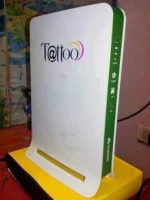
teka ano ba ang BM mo sir anong model

kung 622i po yan user/user or admin/admin lang po ang password sa gui then copy mo yung mac dun sa gui paki PM sakin ako mg gegenerate ng password sa admin
 
teka ano ba ang BM mo sir anong model

kung 622i po yan user/user or admin/admin lang po ang password sa gui then copy mo yung mac dun sa gui paki PM sakin ako mg gegenerate ng password sa admin
sir BM622m po modem ko.. ndi ko po tlga ma access GUI ko pinalitan kc dati to.. tnx po
 
sir newbie pa lng po ako d2 di ko po alam pano mag pm eh kaya d2 nlng po ako manghihingi ng mac address ..okay lng po ba ? thanks po in advance
 
kung pinalitan reset mo nalang po my maliit n botton yan 15sec po click mo yun
sir ok n po ung gui ng bm622 ko na access ko n po.. ang problema ko lang po ang dami n po akong na try na mac add pra ma reconnect ung modem ko pero wla po me mkuhang working mac,,, bka sir meron kau jan,,, TIA
 
hi sir java, i've tried the tutorial on my BM622 2011 and successfully häçked my unit. Thanks for this very useful tutorial. But I encountered a problem after changing MAC, when I am about to use telnet again using username: firefly and password: 0SlO051O feedback is log in error, I've tried it several times. what seems to be the problem here? appreciate immediate feedback as I am not able to change MAC again?

Thanks so much... 
tapos sir, NAI, user ID at user password ano po ba mga value iinput dun sa part ng WiMax Security? kasi po medyo naconfuse lang ako dun sa screen shot sa tutorial kung ano talaga mga iinput na value dun? hope you can enlighten me?

Thanks so much...
 
hi sir java, i've tried the tutorial on my BM622 2011 and successfully h@ckëd my unit. Thanks for this very useful tutorial. But I encountered a problem after changing MAC, when I am about to use telnet again using username: firefly and password: 0SlO051O feedback is log in error, I've tried it several times. what seems to be the problem here? appreciate immediate feedback as I am not able to change MAC again?

Thanks so much... 
tapos sir, NAI, user ID at user password ano po ba mga value iinput dun sa part ng WiMax Security? kasi po medyo naconfuse lang ako dun sa screen shot sa tutorial kung ano talaga mga iinput na value dun? hope you can enlighten me?

Thanks so much...


TELNET ACCESS
USER: Firefly
PASS: $P4mb1h1r4N4m4nT0!!


GUI ACCESS
USER: user
PASS: 0SlO051O

SAMPLE"
NAI : C405287118F8
USERID: mLFNdD2mzylPjopf@globelines.com.ph
PASSWORD: mLFNdD2mzylPjopf

SAME LANG PO SILA NG USERID SA PASSWORD
 
Bm622m 2013 v19 easy change mac video + tools (FOR NEWBIE)


REQUIREMENTS:

1.GOOGLE CHROME

2.GENPASS WALA PONG AVAILBLE LINK NITO PAKI WAIT NALANG

3. SHYBOI MAC CHANGER D0WNL0AD here
rar password : free
4.BRAIN TO THINK

5. EYES TO SEE

STEPS ON VIDEO

1. SHORTCUT USE ON GOOGLE CHROME

CRTL+SHIFT + i

CRTL+F

CREDIT TO SHYBOI FOR THE TOOLS

CREDIT TO SQUASFS AND M4RLENE FOR THE PASSWORD GENERATOR AND HELP
.
 
TELNET ACCESS
USER: Firefly
PASS: $P4mb1h1r4N4m4nT0!!


GUI ACCESS
USER: user
PASS: 0SlO051O

SAMPLE"
NAI : C405287118F8
USERID: mLFNdD2mzylPjopf@globelines.com.ph
PASSWORD: mLFNdD2mzylPjopf

SAME LANG PO SILA NG USERID SA PASSWORD

TELNET ACCESS
USER: Firefly
PASS: $P4mb1h1r4N4m4nT0!!


GUI ACCESS
USER: user
PASS: 0SlO051O

SAMPLE"
NAI : C405287118F8
USERID: mLFNdD2mzylPjopf@globelines.com.ph
PASSWORD: mLFNdD2mzylPjopf

SAME LANG PO SILA NG USERID SA PASSWORD
thank you sir for immediate reply. sorry po napagmix ko pala yung password na natype ko. eto nga po talaga iniinput ko sa telnet:
USER: Firefly
PASS: $P4mb1h1r4N4m4nT0!!

pero ayaw na pong tanggapin etong username at password na ito? pahelp po for the solution? iniisip ko pong ibalik sa default config? ok lang po bang gawin ko yun sir? bblik din po ba default telnet username & passwrord?
 
thank you sir for immediate reply. sorry po napagmix ko pala yung password na natype ko. eto nga po talaga iniinput ko sa telnet:
USER: Firefly
PASS: $P4mb1h1r4N4m4nT0!!

pero ayaw na pong tanggapin etong username at password na ito? pahelp po for the solution? iniisip ko pong ibalik sa default config? ok lang po bang gawin ko yun sir? bblik din po ba default telnet username & passwrord?

Thanks so much... 
sir java, ok na po telnet, may mali pala ako sa username (f) ang natatype ko not (F). Pahingi na lang po ako ng working MAC para magamit ko na uli tabo ko? hehehe...

Thanks so much sir...
 
thank you sir for immediate reply. sorry po napagmix ko pala yung password na natype ko. eto nga po talaga iniinput ko sa telnet:
USER: Firefly
PASS: $P4mb1h1r4N4m4nT0!!

pero ayaw na pong tanggapin etong username at password na ito? pahelp po for the solution? iniisip ko pong ibalik sa default config? ok lang po bang gawin ko yun sir? bblik din po ba default telnet username & passwrord?

Thanks so much... 
sir java, ok na po telnet, may mali pala ako sa username (f) ang natatype ko not (F). Pahingi na lang po ako ng working MAC para magamit ko na uli tabo ko? hehehe...

Thanks so much sir...
SORRY WALA AKONG MAC NGAUN
 
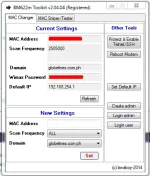
WiMAX BM622m [2012-13] Toolkit v.2.04.04

url.webp

BM622m Toolkit v. 2.04.04 TUTORIALS
The Fastest MAC Hunter,Changer for bm622m 2012-2013
INGREDIENTS:

1. BM622m Toolkit by LAVABOY v.2.04.04

Toolkit+face.webp

2. Supported WIMAX models BM622m 2012 / 2013
(For BM622m models - 2012 FW preferred, kindly downgrade at YOUR OWN RISK!) Search the Threads on how to do this

INTRODUCTION:
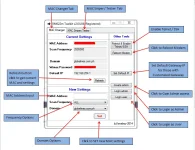
THE MAC CHANGER TAB

Toolkit+anatomy.webp

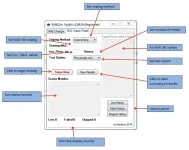
THE SOS (SNIPER ON STEROIDS) MAC SNIPER TESTER TAB
SOS+Anatomy.webp

HOW TO USE:

[CHANGE MAC]

1. Plugin your Wimax Unit

2. Wait for the tool to Read current settings
-------->(You should be able to see your current settings in the display panel, IF NOT, check LAN connection!)

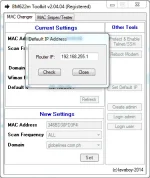
3. Set Default Gateway IP
-------->(for those with customized default gateway IP) IF your IP is default, you may skip steps 3 and 4.

Default+gateway+IP.webp

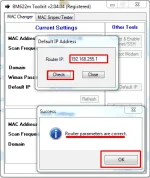
4. Click Check (You should be able to see a prompt) > Click ok then > Refresh - Your current settings are now on Display
Default+gateway+IP+2.webp

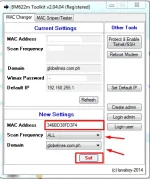
5. Set MAC Address > Set Frequency (Please choose the best freq. in your location) > Set domain > Click SET! Wait for the Tool to finish. New MAC address is now on the Display Panel
MAC+CHANGE.webp

NOTE: - For the MAC address Kahit walang colon, OK LANG PO, the tool will automatically adjust this for you.
The WIMAX GUI will NOT reflect the changes until after reboot of the modem (Pero sa loob nyan changed na ang settings, VERIFY mo sa wimax account settings. No need to reboot, connected na yan using your chosen LIVE MAC!)

[MAC SNIPING] / SOS!

SUPPORTED SERIES (OLD AND NEW, ALL)!!!

NOTE:For Shareware versions, MAC sniping will automatically STOP once 3 LIVE MACs are found. Kindly reload / input a new MAC Range after the tool stops.

INCREMENT / DECREMENT METHOD

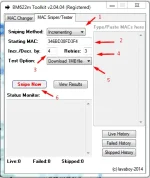
1. Choose INCREMENT OR DECREMENT

2. Input MAC RANGE
-------->(IMPT!: FOR NEW SERIES (34, E8, C8 ETC.) LAST HEXADECIMAL VALUE SHOULD BE 0, 4, 8, C PILI NA LANG KAYO)

3. Input Inc. /Decr. Value
-------->( FOR NEW SERIES ADVISABLE TO SET AT 4)

4. Set Number of Retries (select option acording to your preference)
------- >Higher value: increased reliaibility of LIVE MAC sniped, pero increased din ang sniping time
-------->Lower value : decreased reliability of LIVE MAC sniped, pero decreased ang total sniping time (mabilis!)

5. Select Test option (select option acording to your preference)
--------> Ping : High speed detection of live MACS, pero low reliability of MACs sniped
--------> d0wnl0ad 1MB file: increased reliability of LIVE MACs sniped, increased total MAC sniping time
--------> Basically mas malaki ang DL test file mas matagal pero mas siguradong LIVE MAC ang na SNIPE

6. Click Snipe Now!

Snipe+instruction.webp

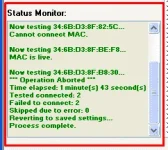
You should be able to see something like this
Status+monitor.webp

NOTE:PRESS THE ESC BUTTON IF YOU WANT TO TERMINATE THE SNIPING SESSION. CLICK VIEW HISTORY OR ANY HISTORY BUTTON OF YOUR PREFERRENCE TO VIEW THE RESULTS
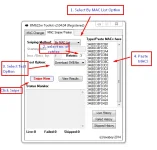
SNIPING VIA MAC LIST

FOLLOW THE INSTRUCTIONS BELOW:

NOTE:For Shareware versions, MAC sniping will automatically STOP once 3 LIVE MACs are found. Kindly reload a different MAC Range on the MAC list panel

By+MAC+LIST.webp

Download/s:You do not have permission to view the full content of this post. Log in or register now.
 
sir java napaka hopeless ko na, diko talga matutunan, bm622m 2013 modem ko, may nagsasabi idown grade pa daw, may nag sasabi naman live mac na lng kailangan... patulong naman sir, meron din po ako bm622 2011 diko naman maenable telnet kase diko alam yung password ng admin, diko naman makita yung cnasabi mong password decoder ni heartily... patulong naman sir... salamat po
 
Status
Not open for further replies.

About this Thread

  • 644
    Replies
  • 201K
    Views
  • 317
    Participants
Last reply from:
H4wk3y3

Online now

Members online
360
Guests online
1,796
Total visitors
2,156

Forum statistics

Threads
2,269,415
Posts
28,928,555
Members
1,242,390
Latest member
noza
Back
Top