PH
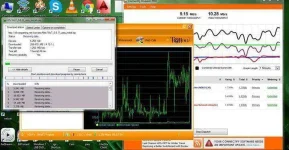
PH1. kunin nyu yung Ip ng Wifi nyu para malaman yung ip ng wifi niyo, una Open connectify then start
pag nkastart na Go to -control panel->network and internet->then sa network connection
on my case local area connection *12 ("hotspot name na nilagay ko" wi-fi XX) madali nyo lng makita dun then right click ->properties
then go to Internet Protocol VErsion 4 (tcp/IPv4)-> properties (u can see now your IP address (ex. 192.168.205.1)
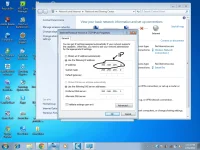
2 yung makukuha mung IP ilagay mu sa Cproxy,
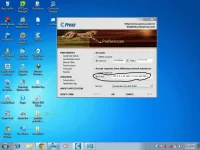
3. then sa CP use auto proxy then lagay ung IP ng wifi nyo and port 3128 connect to wifi then connect autoproxy then browse.
SORRY NEWBIE LANG PO SA PAGAWA NG THREAD KAYA MEDYO MAGULO )
)
FEEDBACK NA LANG PO!!
pag nkastart na Go to -control panel->network and internet->then sa network connection
on my case local area connection *12 ("hotspot name na nilagay ko" wi-fi XX) madali nyo lng makita dun then right click ->properties
then go to Internet Protocol VErsion 4 (tcp/IPv4)-> properties (u can see now your IP address (ex. 192.168.205.1)
2 yung makukuha mung IP ilagay mu sa Cproxy,
3. then sa CP use auto proxy then lagay ung IP ng wifi nyo and port 3128 connect to wifi then connect autoproxy then browse.
SORRY NEWBIE LANG PO SA PAGAWA NG THREAD KAYA MEDYO MAGULO
) FEEDBACK NA LANG PO!!

 sana working sa ating mga ka PHC to