 PH
PH-
Welcome to PHCorner Forums! Sign up for free to unlock full access and exclusive privileges, including:
- Asking questions about computer and mobile issues
- Discovering internet tips for your mobile network and computer
You are using an out of date browser. It may not display this or other websites correctly.
You should upgrade or use an alternative browser.
You should upgrade or use an alternative browser.
Working pa ba ang Cproxy+Proxifier pa Help naman sa Setup
- Thread starter DynamiTe
- Start date
- Status
- Not open for further replies.

Credits to sharehäçker.phc.onl/#forbidden#
1.) Download proxifier here,
Mirror 1 >>>You do not have permission to view the full content of this post. Log in or register now.
Mirror 2 >>>You do not have permission to view the full content of this post. Log in or register now.
Mirror 3 >>>You do not have permission to view the full content of this post. Log in or register now.
Install it
Image 1

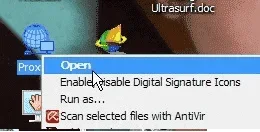
Run it
Image 2
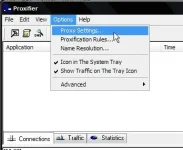
2.) Click Options > Proxy Settings...
Image 3
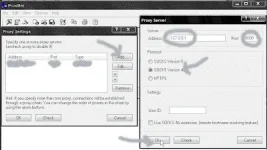
3.) Click Add... then follow the settings below, (127.0.0.1 port 9000, Socks Version 4, OK)
Image 4
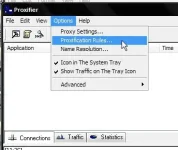
4.) Click again Options then Proxification rules.
Image 5
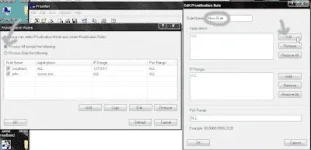
5.) Select Process All except the following > Add > Rulename:anyname (cproxy) then Add
Image 6
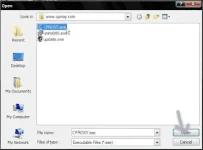
6.) Browse for cproxy.exe (C:\Program Files\You do not have permission to view the full content of this post. Log in or register now.) default location. Click Open
Image7
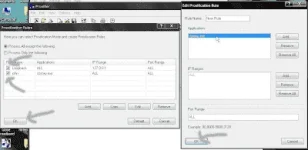
7.)The cproxy.exe will appear under applications. Click Ok, check all rule name then OK.
Image 8
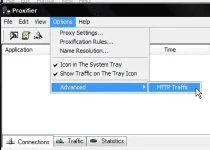
8.) Click again Options > Advanced > HTTP Traffic
Image 9
9.) Copy the settings below. Click Ok
Image 10
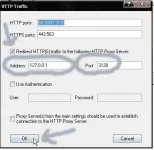
10.) No need to configure your browser, just use default settings No Proxy, instead of manual Proxy Configuration.
1.) Download proxifier here,
Mirror 1 >>>You do not have permission to view the full content of this post. Log in or register now.
Mirror 2 >>>You do not have permission to view the full content of this post. Log in or register now.
Mirror 3 >>>You do not have permission to view the full content of this post. Log in or register now.
Install it
Image 1
Run it
Image 2
2.) Click Options > Proxy Settings...
Image 3
3.) Click Add... then follow the settings below, (127.0.0.1 port 9000, Socks Version 4, OK)
Image 4
4.) Click again Options then Proxification rules.
Image 5
5.) Select Process All except the following > Add > Rulename:anyname (cproxy) then Add
Image 6
6.) Browse for cproxy.exe (C:\Program Files\You do not have permission to view the full content of this post. Log in or register now.) default location. Click Open
Image7
7.)The cproxy.exe will appear under applications. Click Ok, check all rule name then OK.
Image 8
8.) Click again Options > Advanced > HTTP Traffic
Image 9
9.) Copy the settings below. Click Ok
Image 10
10.) No need to configure your browser, just use default settings No Proxy, instead of manual Proxy Configuration.
jamesiswizard_1
Elite
Deads na tol.,sa area ko at base sa iba deads na rin .,
- Status
- Not open for further replies.
About this Thread
-
4Replies
-
2KViews
-
3Participants
Last reply from:
jamesiswizard_1
jamesiswizard_1
New Topics
-
Facebook face ver failed, IG Deactivate
- Started by mhiemabhels
- Replies: 0
- ❓ Internet Questions
-
Paturo mga boss
- Started by austin817
- Replies: 2
- ❓ Internet Questions
-
Pahelp mga boss pahingi po ng pisofi image 4.8.8v for rasberry pi
- Started by ayeman
- Replies: 0
- ❓ Internet Questions
-
Pahelp po SheerID ng gemini
- Started by ambitiousnoob
- Replies: 0
- ❓ Internet Questions
-
Ask abt Gfiber prepaid
- Started by LeBlanc
- Replies: 0
- ❓ Internet Questions
-
Cctv camera (same wifi)
- Started by oneal_31
- Replies: 2
- ❓ Internet Questions
-
New User Here, Help me
- Started by jaleeebean
- Replies: 0
- ❓ Internet Questions
-
Disable LOS Blinking HG8415X6-10
- Started by Shannun
- Replies: 0
- ❓ Internet Questions
-
Baka meron kayo solution tiktok paylater?
- Started by White chocolate
- Replies: 2
- ❓ Internet Questions
-
B535-932 firmware downgrade
- Started by Munchlax__
- Replies: 1
- ❓ Internet Questions
Trending Topics
Online now
- Members online
- 1,228
- Guests online
- 6,237
- Total visitors
- 7,465