PH
PHDisclaimer:
This method is for Visual Basic E×ρréšš 2010 there might be issues when using other products.
Steps
1. Punta sa You do not have permission to view the full content of this post. Log in or register now. at mag login gamit ang microsoft account at iclick ang downloads

2. sa downloads may searchbox dun mo i-type ang vbexpress 2010 (vb E×ρréšš ang goal ko dito pero kung gusto mong iba pwede din)

3. click download

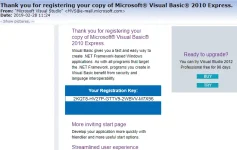
4. after mong mainstall, iopen ang vb tapos pumunta sa 'help' at iclick ang 'register product' tapos ilagay mo tong serial key
Kung gusto mong ikaw mismo kumuha ng serial key mo sundan mo to
requirements
- installed pero unregistered vb E×ρréšš 2010

This method is for Visual Basic E×ρréšš 2010 there might be issues when using other products.
Steps
1. Punta sa You do not have permission to view the full content of this post. Log in or register now. at mag login gamit ang microsoft account at iclick ang downloads
2. sa downloads may searchbox dun mo i-type ang vbexpress 2010 (vb E×ρréšš ang goal ko dito pero kung gusto mong iba pwede din)
3. click download
4. after mong mainstall, iopen ang vb tapos pumunta sa 'help' at iclick ang 'register product' tapos ilagay mo tong serial key
Code:
2KQT8-HV27P-GTTV9-2WBVV-M7X96Kung gusto mong ikaw mismo kumuha ng serial key mo sundan mo to
requirements
- installed pero unregistered vb E×ρréšš 2010
- irun ang vbexpress at pumunta sa help > register product
- pindutin mo yung register product(mag oopen ito ng browser)
- mag fillup sa form, siguraduhin may access ka sa ilalagay mong email kasi dun isesend ang serial
- after mag fillup click continue
- check mo yung email mo