 PH
PH-
Welcome to PHCorner Forums! Sign up for free to unlock full access and exclusive privileges, including:
- Asking questions about computer and mobile issues
- Discovering internet tips for your mobile network and computer
You are using an out of date browser. It may not display this or other websites correctly.
You should upgrade or use an alternative browser.
You should upgrade or use an alternative browser.
🔒 Closed jamesiswizard_1 IPv^6 Tutorial & Tricks Updates
- Thread starter jamesiswizard_1
- Start date
-
- Tags
- acer android android apps broadband bug captiva cd-r king cproxy custom rom facebook fb free ayosdito trick free internet free social freenet galaxy s3 mini globe globe boradband globe wimax internet ip ipv6 ipv^6 jamesiswizard_1 load lte mangyan pasikat setting smart smart and talk and text smart broadband sun sun broadband tm tnt trick tricks tutorial wifi xsilent
- Status
- Not open for further replies.
jamesiswizard_1
Elite
ayos na yan bro.,
BOss James Invalid URL Ung modded na FireFox ??"Haters Make Me Famous"
You do not have permission to view the full content of this post. Log in or register now.
(Click Me)
View attachment 12238
View attachment 12545
jamesiswizard_1 IPv^6 Tutorial and Tricks Updates + Ipv^6 Cproxy
(From Pinag Sama Samang Kalaalaman Ng PhCorner Member)
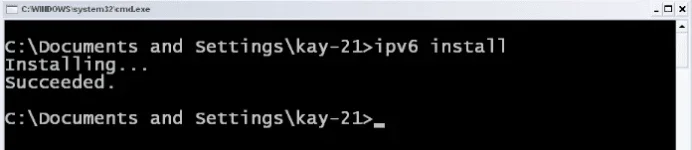
Enabled IPv^6 in CMD XP
(note: IPv^6 Is Already Enabled in Windows Vista, 7, 8 to 8.1)
Setting IPv^6 As Priority IP's in CMD Windows XP, Vista, 7, 8 to 8.1
Run Administrator in CMD then type "netsh interface ipv6 set teredo client " Without Quetation
Hi!
(TUTORIAL from Michael092)
Problem mo is
walang yung ipv6 address mo!
Ito po ang reason kung bakit wala (my own conclusion)

Una po make sure na lahat ng step ay nagawa mo ng tama
yung nasa 1st page po!
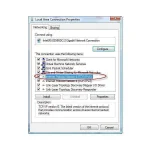
Then Nakacheck yung ipv6 sa status ng connection mo
Ito po ang reason (my own conclusion)
Kung mapapansin mo may teredo kana sa ipconfig
Lumalabas lang ang ipv6 address "KUNG"
Una
Naka legit connection, vpn at kahit anong FBT na pag ikaw ay nag type ng ping google.com -t sa cmd
ay nag rereply sa ip address, (hindi yung ip na 127.0.0.1)
Pansinin naten kung naka vpn ka pag nagping ang reply ay yung galing sa ip nagbibigay sayu ng internet connection
ganun din po sa legit connection
Ikalawa, kung naka cproxy ka kung mag type ka sa cmd ng ping google.com -t
ito po ang lalabas
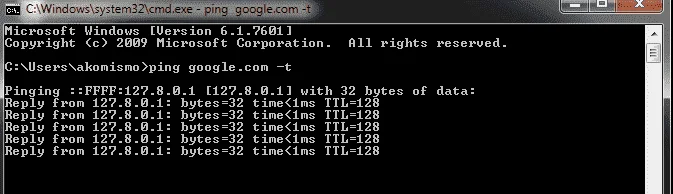
ito naman ang ipconfig/all ko when using cproxy
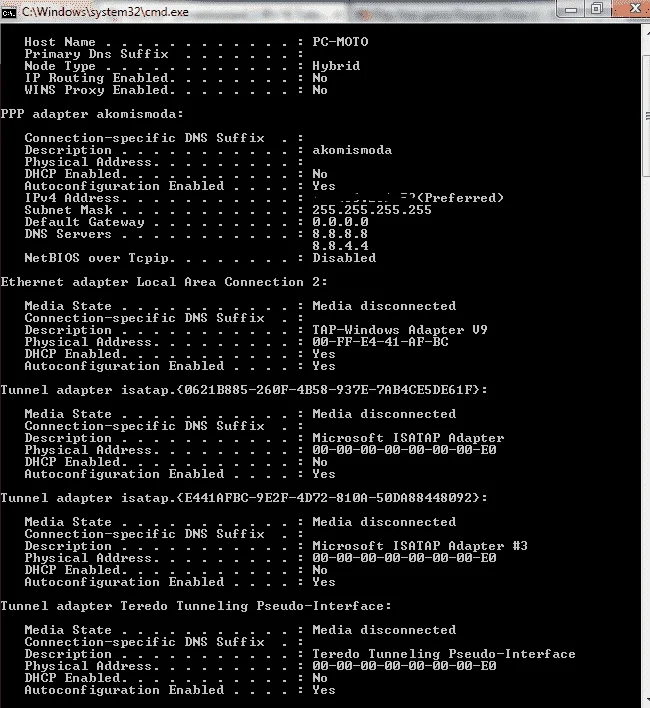
Pansin mo ?View attachment 12619
Wala rin yung ipv6 address
Kasi po lumalabas lang yung ipv6 address kung ang ping google.com -t sa cmd
ay yung galing sa ip address na hindi nag sisimula kay 127.0.0.1
Pero kahit po disconnected yan ok na po yan
kita mo naman yung ping google.com -t ko
start sa ganito
kasi po naka ipv6
REgedit
View attachment 12620
How To USe jamesiswizard_1 IPv^8 5G connector In Cproxy
(Tutorial FroM Fenrir)
gawa ka po connection sa dashbord mo
profile name: jamesiswizard_1 IPv6 Dial up
number: *99#
apn: internet
connect mo muna sa dashborad para ma create ung connection tapos disconnect mo ulit
then gamitin mu na po ung connector ni sir james..magaamit mo na po cproxy
View attachment 12576 View attachment 12577
napansin ko po na pag walang dns walang ping pag may dns may ping
(Mas Maganda Wag Nyo Lagyan ng DNS)
Feedback ko lang:
(From vinocz)
delete ko lahat ng broaband connection sa network and sharing center
now pumapalo na sa 900kbps browsing ko gamit connector ni sir jamesiswizard
cproxy portable-trial account-coolhousing.net server
Ayos!
Ipv^6 Browser Tricks
ENABLE NYO LANG YUNG IPv^6
Sa Mga New Browser or Updated na Browser Ka Default na Yung iPv^6 ka No need Na i Configure
SonicProxy
(Password: jamesiswizard_1)
Procedure:
Run this After IPv^6 Tricks and Cproxy Is Connected And Browsing
Purpose:
Exceed The Limit Of Internet Speed
You do not have permission to view the full content of this post. Log in or register now.
View attachment 12745
View attachment 12744
View attachment 12887
jamesiswizard_1 Fire Fox Browser
(Use This Instead Of Other Browser)

You do not have permission to view the full content of this post. Log in or register now.



jamesiswizard_1
Elite
palita mo ng o yung O sa "download"..,napansin mo diba malaki.,BOss James Invalid URL Ung modded na FireFox ??
palita mo ng o yung O sa "d0wnl0ad"..,napansin mo diba malaki.,
Attachments

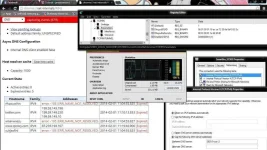
Nagawa ko na din ung Sa CMD anu pa di ko nagawa ? o ok na yan boss james ? -_- but after restart den connect ung Smart Bro nag Uunchecked ung Ipv6 sa network ? bakit kaya ?palita mo ng o yung O sa "d0wnl0ad"..,napansin mo diba malaki.,
Attachments
jamesiswizard_1
Elite
Nagawa ko na din ung Sa CMD anu pa di ko nagawa ? o ok na yan boss james ? -_- but after restart den connect ung Smart Bro nag Uunchecked ung Ipv6 sa network ? bakit kaya ?
ok na ayn.,basta check mo lang yung ipv^4 at ipv^6.,
kung gusto mo yung connector ko na lang
jamesiswizard_1
Elite
feed back na lang.,i hope it works ..........................................
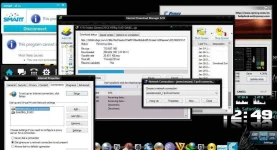
Gamit ko na sir james connector muh pero ganun pa din Speed san ako nagkamali ?Nagawa ko na din ung Sa CMD anu pa di ko nagawa ? o ok na yan boss james ? -_- but after restart den connect ung Smart Bro nag Uunchecked ung Ipv6 sa network ? bakit kaya ?

jamesiswizard_1
Elite
Gamit ko na sir james connector muh pero ganun pa din Speed san ako nagkamali ?
restart mo lang.,then gamtin mo lang till mag karoon yan ng Log file at Ma boost na.,alam naman natin na SAT nagun.,pic time pati.,dami naka online.,mabibigla ka na lang yan .,mag wowork yan .,kaya chill lang.,
iamdkvergara
Leecher
pano bababa ung latency ko sa dragon nest im using pd proxy pero may 1sec delay xa hindi playable sa pvp salamat idol
jamesiswizard_1
Elite
yung latecy kasi naka defende sa good connection.,yun dapat i improve.,pano bababa ung latency ko sa dragon nest im using pd proxy pero may 1sec delay xa hindi playable sa pvp salamat idol
jamesiswizard_1
Elite
ok naman.,palitan mo ng o yung O sa download.,boss deadlink na yung sonicproxy mo!!! napagana ko na yung ipv6 may smartbro na ako
ou namanelow sir james, pwede ba yung connector mu sa globe? na disconnect smart ko kagabi kaya load muna.hehe
ayus na sir,edit ko lang apn tas dial #.ok naman.,palitan mo ng o yung O sa d0wnl0ad.,
ou naman
fb ako later,observe muna
bagal kasi ni globe kahit naka powersurf.
jamesiswizard_1
Elite
ayus na sir,edit ko lang apn tas dial #.
fb ako later,observe muna
bagal kasi ni globe kahit naka powersurf.
yun salamatok naman.,palitan mo ng o yung O sa d0wnl0ad.,
ou naman
jamesiswizard_1
Elite
welcomeyun salamat
- Status
- Not open for further replies.
About this Thread
-
1KReplies
-
116KViews
-
106Participants
Last reply from:
khiano
khiano
New Topics
-
LOOKING FOR WIREGUARD SETUP IN MIKROTIK (WILLING TO PAY )
- Started by moreinformation
- Replies: 1
- 🚀 Freenet & Tunneling
-
MGa BOSS FREE VPN NA MAY PH SERVER PARA DITO SA AFRICA?
- Started by Junbiel 26
- Replies: 0
- 🚀 Freenet & Tunneling
-
PISOWIFI NO HULOG | (26-09-30) | NPV TUNNEL
- Started by Calcifeer
- Replies: 8
- 🚀 Freenet & Tunneling
-
[NOW WORKING] Youtube No Ads & Other Sites! via DNS
- Started by Lerps
- Replies: 29
- 🚀 Freenet & Tunneling
-
Free vpn can bypass captive portal
- Started by Darz2468
- Replies: 6
- 🚀 Freenet & Tunneling
-
Ano po gagawin pag ganto po?
- Started by jokejoke
- Replies: 3
- 🚀 Freenet & Tunneling
-
C pasabit pls need lang po sa edting
- Started by racetrack21
- Replies: 0
- 🚀 Freenet & Tunneling
Trending Topics
-
-
-
WIFI häçk using NodeMCU V3 ESP8266 Deauther + Evil Twin Attack (low badget 200 pesos)
- PHC H3XGAMING
Replies: 574 -
-
Multi-hop VLESS + Cloudflare WARP config (XHTTP + REALITY + TLS), privacy-focused
- Noahclanman
Replies: 4 -
-
Online now
- Members online
- 798
- Guests online
- 4,332
- Total visitors
- 5,130